Turn support ticket chaos into a clear product roadmap using AI
Your queue is full of clues. Each support ticket carries product feedback, friction points, and unmet customer needs. Using AI, you can transform that overwhelming stream of tickets into a reliable source of structured insights for your product roadmap. AI highlights key themes, ranks opportunities, and provides evidence for product tradeoffs, all with a repeatable and auditable system.
Start with a clear objective: connect every customer pain point to a potential improvement for your product. Each improvement, your “bet”, should have a core theme, a defined scope, and a measurable impact. Allow AI to assist with handling large volumes of data, categorizing or clustering the information, and assigning meaningful scores or value assessments. With this approach, AI manages the complex data processing, and you retain control over the final decisions.
- Shift from anecdotal evidence to structured insights.
- Connect support ticket themes directly to revenue impact, customer churn risk, and specific audience segments.
- Communicate back to your customers when their feedback leads to changes.
Support tickets can be thought of as a repository of customer issues that need to be addressed in your product development roadmap. AI simply helps analyze and categorize these tickets in a standardized manner to identify recurring themes or patterns.
Define an AI‑ready support ticket taxonomy for product roadmap decisions
For AI to be effective, it requires consistent structure. Create a minimal taxonomy that captures essential product areas and the corresponding business impact. Maintain this structure consistently across email, chat, and voice transcripts.
- Theme: the core product topic at issue, instead of just the literal question.
- Component: the specific feature or area within your product.
- Intent: is it a bug, a missing feature, a point of user confusion, or a workflow gap?
- Severity: how severe is the customer impact, on a 1 to 5 scale?
- Frequency: how many times does this issue arise per period or per 1,000 tickets?
- Persona and segment: include role, plan tier, industry, and region.
- ARR influenced: the revenue associated with affected customer accounts.
- Environment: details such as browser, operating system, software version, and relevant integrations.
Align these fields with your CRM and issue tracking systems, using consistent terminology across all platforms. If your organization uses specialized vocabulary, incorporate these into your artificial intelligence models. For step-by-step guidance, see how to train AI on your internal product language.
Extract product signals from support tickets with AI prompts and structured fields
Start with data extraction. Task AI to read raw ticket text and populate your taxonomy fields. Use clear, specific prompts and insist on outputs that are machine-readable. Here is a straightforward, adaptable approach:
system : You are a product analyst. task : Extract fields from the ticket. schema : \{ theme , component , intent : \[ bug | gap | confusion | workflow \] , severity : 1-5 , persona , segment , environment , reproduction_steps \} output : JSON only.
After extraction, normalize the data. Map synonyms to your standard product
terms, storing both the original phrase and its normalized version for clarity
and explainability. If a field is unknown, return null instead of guessing.
For tickets spanning multiple messages, use a second pass: have AI summarize the conversation into one clear problem statement and one proposed solution, referencing message IDs to preserve traceability.
Cluster support tickets with AI to reveal product themes worth building
Clustering helps reduce thousands of tickets to a few actionable product themes. While advanced methods like embeddings are available, you can start by grouping tickets by normalized theme and intent, then further sub-clustering by component and environment.
- Remove near-duplicate tickets using fuzzy matching techniques.
- Group by theme and intent to form main clusters.
- Segment further by customer tier and persona to identify unique gaps.
- Attach ticket counts, median severity, and ARR influenced for each group.
Language drift can reduce cluster quality over time. Prevent this by maintaining an up-to-date glossary and continuously updating your normalization process. This becomes far easier if you regularly train AI on your product’s terminology.
Score and prioritize product roadmap items from support tickets using AI and business data
Transform clusters into actionable options for your roadmap. Assign each a score representing both impact and implementation effort. Use simple, transparent calculations:
- Volume: number of tickets per quarter in the cluster.
- ARR influenced: total revenue from affected accounts.
- Severity: median severity rating of the cluster.
- Churn risk: higher if related to accounts up for renewal soon.
- Adoption friction: issues preventing new users from realizing value quickly.
- Effort: engineering estimate or effort “t-shirt size.”
Normalize each variable to a 0..1 scale, and invert the effort score so lower effort ranks higher. Then calculate a weighted total, make your weighting scheme transparent to the team:
score = 0.30 * volume_norm + 0.25 * arr_norm + 0.20 * severity_norm + 0.15 * churn_norm + 0.05 * adoption_norm + 0.05 * effort_inverse
Have the AI produce a concise, one-page summary for each top cluster. Detail the full score breakdown, include sample tickets, state the core problem clearly, and supply a draft specification and test plan. This process ensures your backlog remains actionable and ready for triage.
Validate AI‑derived roadmap insights with human review and auditing workflows
While AI speeds up processing, final decisions remain yours. Set up a weekly review with product and support staff. Examine cluster samples, read linked tickets, and adjust scores as needed. Document all decisions to maintain traceability.
Quality depends on careful evaluation. Build verification steps to check extraction accuracy and monitor for label drift. Measure precision for critical fields such as intent and component. For hands-on strengthening, learn how to audit AI support conversations and use these routines to improve ticket labeling over time.
Continue the feedback loop with support agents. When a cluster advances to a roadmap item, tag it. Once a fix is released, prompt agents to close the loop with customers involved. Doing so transforms raw data into earned trust.
Choose AI tools for turning support tickets into a product roadmap without overhauling your stack
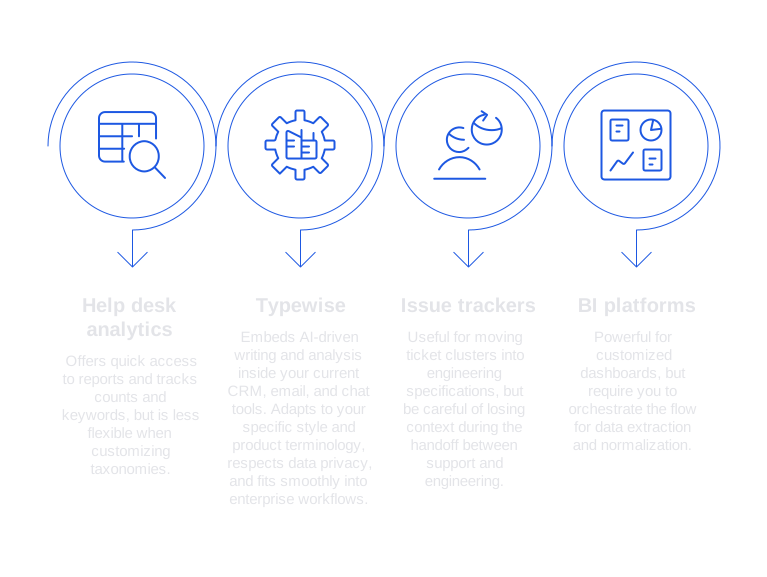
No need to transition to a new help desk system, many teams integrate this AI workflow into their current suite of tools. Here’s a breakdown to help guide your selection:
- Help desk analytics suites: offer quick access to reports, and good for tracking counts and keywords, but less flexible when customizing taxonomies.
- Typewise: Embeds AI-driven writing and analysis inside your current CRM, email, and chat tools. Adapts to your specific style and product terminology, respects data privacy, and fits smoothly into enterprise workflows.
- Issue trackers with AI features: Useful for moving ticket clusters into engineering specifications, but be careful of losing context during the handoff between support and engineering.
- BI platforms with LLM connectors: Powerful for customized dashboards, but require you to orchestrate the flow for data extraction and normalization.
If your support environment involves complex B2B scenarios with long ticket threads and multiple stakeholders, seek tools that can manage these dimensions efficiently. See this guide on choosing AI tools for complex B2B support tickets to help with trade-off decisions.
When considering options, evaluate privacy, taxonomy flexibility, and how well the AI system can produce communication in your brand voice. If your team constantly rewrites AI-generated responses, you lose the benefits of automation.
Implement a practical workflow to turn support tickets into a product roadmap with AI
Step 1: Ingest and normalize
Aggregate tickets from your help desk, CRM, and call transcripts. Run AI-driven extraction and normalization, storing both raw and normalized fields to allow for later audits.
Step 2: Cluster and summarize
Generate ticket clusters weekly. Write concise summaries for each, including direct links to source tickets and key customer quotes as examples.
Step 3: Score and review
Assign scores based on real-time ARR and renewal data. Collaboratively review the top 10 items with product, support, and design teams. Adjust the scoring weights if your company strategy evolves.
Step 4: Spec and handoff
Draft a specification using the cluster summary. Keep it concise, actionable, and testable. Here is an example of an effective AI prompt:
role : Product manager. input : cluster_summary , sample_tickets , acceptance_criteria . task : Produce a one‑page PRD with problem , scope , non‑goals , risks , analytics events , and a rollout plan. format : Markdown. length : 300-500 words.
Step 5: Ship and close the loop
Tag solutions as shipped within their clusters. Automatically suggest follow-up replies for customers affected by the improvement. For faster replies, refer to these ways AI accelerates support response time and adapt the techniques to your team.
Avoid common pitfalls when using AI to convert support tickets into a product roadmap
- Over-prioritizing loud customer segments: Weigh opportunities by revenue and fit with your strategy, not by ticket volume alone.
- Taxonomy sprawl: Keep your categorization fields limited and consistent. Make name changes only with care.
- Label drift: Retrain your systems after major launches or when terminology changes.
- Neglecting implementation effort: Balance wins that quickly reduce user friction.
- One-way processes: Always communicate back to customers and support agents when feedback leads to change.
- Non-transparent AI prompts: Document all prompts, training examples, and versions, and map them to the outcomes you measure.
Where Typewise fits when you turn support tickets into a product roadmap with AI
Typewise seamlessly integrates with your existing tools. It empowers agents to compose clear replies, maintains consistent product terminology, structures incoming tickets, clusters recurring themes, and prepares actionable briefs for your product team. You won’t need to switch from your familiar CRM, inbox, or chat environment, Typewise works within them.
For stronger governance, combine Typewise with a defined review and audit process. Learn how to audit AI-driven customer support conversations to keep your ticket labeling accurate as your volume grows.
Ready to transform your support tickets into a living product roadmap, without ripping out core systems? Start a pilot phase with your product and support leads. See how Typewise adapts to your workflow and privacy policies. Contact Typewise for a practical demonstration that delivers actionable insights within weeks.
FAQ
How can AI convert support tickets into a product roadmap?
AI analyzes and categorizes support tickets to uncover key themes and recurring issues, providing structured insights for product enhancements. It sifts through vast amounts of data, ensuring that identified trends are directly linked to potential improvements in your product offerings.
What is an AI-ready support ticket taxonomy?
An AI-ready taxonomy provides a consistent structure for categorizing support tickets, enabling AI to efficiently extract relevant insights. It should cover fields like theme, component, severity, and business impact to ensure meaningful analysis and prioritization.
Why is it important to score and prioritize product roadmap items from support tickets?
Scoring helps prioritize support tickets based on factors like customer impact, revenue implications, and implementation effort, ensuring that high-value opportunities are addressed first. This systematic approach prevents hasty decisions driven by loud customers or anecdotal evidence.
What role does Typewise play in this process?
Typewise integrates with existing systems to enhance ticket analysis, ensuring structured responses and consistent product terminology. It streamlines the processing of recurring themes, aligning ticket insights with actionable product development briefs.
How can AI-derived insights be validated?
Human review and auditing workflows are essential to ensure AI-generated insights accurately reflect real customer needs and are actionable. Regular audits help identify errors in AI analysis, providing accountability and maintaining trust in the AI's outputs.
What challenges might arise with AI clustering of support tickets?
Language drift and taxonomy sprawl can degrade cluster quality over time, causing inconsistencies in identified themes. Regular updates to glossaries and normalization processes are essential to maintain the accuracy and reliability of AI cluster analysis.
What are common pitfalls when using AI for product roadmaps?
Over-prioritizing based on ticket volume rather than strategic fit or revenue potential can lead to misguided decisions. It's crucial to maintain transparency in AI prompts and communication with customers to ensure feedback-driven progress.
How does AI help in handling complex B2B support scenarios?
AI efficiently manages intricate B2B support issues by aggregating data from multiple stakeholders, ensuring accurate and multi-faceted insights. This facilitates a holistic understanding, essential for informed product strategy in complex environments.
Why is feedback communication important in this process?
Communicating feedback-driven changes to customers fosters trust and demonstrates a commitment to continuous improvement. It closes the loop, ensuring customers realize their input is valued and impactful.