
200+

Deep integrations.

10M+

Tickets solved.

Any

Language in/out.
Trusted by modern customer teams.
System Orchestration

Make AI work across your entire stack.

A new software layer that sits above your systems, connecting channels, policies, and actions.

AI supervisor with domain specialists. Handles Support, Sales, and Commerce workflows, including returns, billing, quotes, and renewals.

Takes action across your entire stack. Reads and writes across CRM, ERP, billing, ITSM, commerce, and knowledge systems.

Governed by design. Follows defined automation levels, approvals, simulations, and audit trails.

Layered system architecture diagram showing AI Layer orchestration connecting omni channel and AI agents to CRM, ERP, ITSM, MCP systems, LLM providers, and 200+ native integrations.

Omnichannel, plus AI-native.

Customers can start anywhere, switch channels freely, and keep context end-to-end.

Chat
Email
WhatsApp
Social
Voice
ChatGPT
Claude

End-to-end resolution without losing control.

Boost customer satisfaction and reduce costs with next-gen AI you can trust.
Dark UI card titled “Booking Specialist” showing instructions to check valid bookings using “Get booking details,” with conditional steps for updating booking dates and pricing adjustments.
Natural-language Instructions

Define and run workflows in plain language. No coding required.

With Natural Language Instructions, existing docs become live automations. Business teams update behavior directly, no tickets, no bottlenecks, no waiting on IT.

Hybrid Intelligence

Automate boldly.
Stay in control.

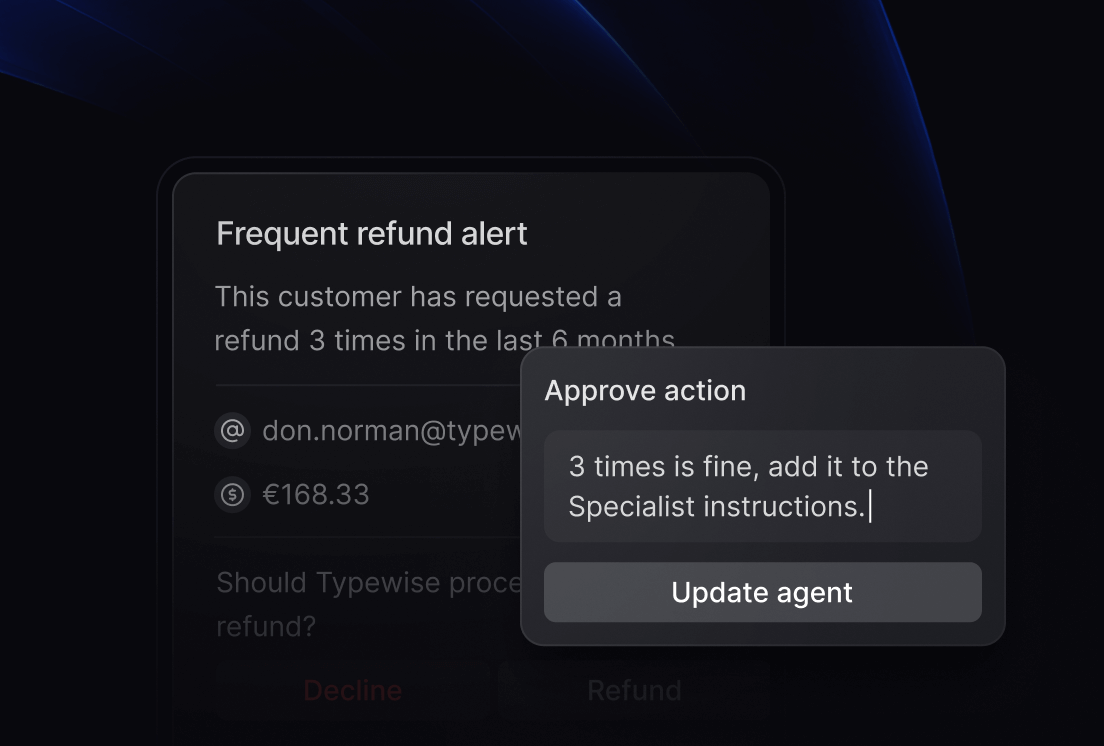
Hybrid Intelligence & Approvals let you decide how far automation goes. When things get complex, the AI brings in a human for approval, partial handoff, or full takeover.

Dark interface showing a “Frequent refund alert” for a customer with three refund requests in six months, alongside an approval modal to update specialist instructions.
Dashboard section titled “Automated Evaluations” displaying a table of workflows with specialist type, success rate percentages, and last run times.
Automated Evaluations

Ship safely. Scale confidently.

Built-in Policies, Simulation, and Evaluation validate every change before it goes live, and keep agents aligned as your system evolves.

Launch in 15 minutes. Scale in weeks.

Build in natural language, validate with simulation & evaluations, and roll out step-by-step. No flowcharts or coding required.

Typical time to first live agents
15 minutes
CRM & Contact Center suites
Weeks to Months
In-house builds
Months to Quarters
Comparison bar chart showing typical time to first live agents: Typewise 15 minutes, CRM & Contact Center suites weeks to months, In-house builds months to quarters.
Day 1
First agent live

Create your first specialist agent, connect it to your knowledge, and validate it safely.

Week 1
Human-in-the-loop launch

Go live on your first channel with human review and approval where it matters most.

Week 2-3
Expand agents and channels

Add more channels and specialist agents, while extending integrations and available actions.

Week 4+
Scale across teams

Roll out across company, and automate increasingly complex end-to-end workflows.

Knowledge & Actions Hub

Knowledge + actions across your stack.

Ground on your sources and take actions in the tools you already run: CRM, billing, logistics, commerce, and more.

Unified data access

Read from docs, help center, ERP fields, order data.

Production-ready deployment

Execute actions with built-in controls.

Deep native connectors

Works with 200+ deep out-of-the-box integrations.

MCP-native architecture

MCP-native architecture

Insights Hub

Measure outcomes,
not just conversations.

Outcome Performance

Track resolution rates and see where conversations escalate to human support.

Intent & Demand Insights

Understand top user intents and what’s actually driving conversations.

Quality & Compliance

Monitor response quality and ensure policy adherence across every interaction.

Customer Satisfaction (CSAT)

Collect and analyze feedback to measure real customer satisfaction.

Line graph showing AI Agents' resolution rate increasing from 75% to above 90%.Abstract dark background with glowing blue curved lines resembling light trails or energy waves.

Enterprise-grade security & governance.

Designed for real-world risk: approvals, auditability, and dataresidency options.

Review before execution
Audit logs & access controls
Policy-based permissions
Circle of twelve stars surrounding the text EU AI ACT on a dark background.
ISO 27001 certification emblem with a globe outline on a dark circular background.Circle of twelve white stars surrounding the text GDPR on a dark background, symbolizing European Union data protection regulation.

Success-based pricing.

Pay for outcomes. Start small and scale confidently.

Starting from
$1
per resolution.

Proven in production.

Frequently Asked Questions

Get quick answers about Typewise’s features, ROI, integrations, and supported channels to help you get started faster.

How much time can Typewise save my support team?

Enterprises typically see 50%+ agent time savings after deploying Typewise’s AI. Savings come from automatic ticket triage, suggested replies grounded in your knowledge base, and faster wrap-up (summaries, tagging, and dispositioning).

What ROI can we expect from Typewise?

Most enterprise companies report 5–10× ROI in year one through automated resolution and higher CSAT/NPS. Using the AI Assistant alone, companies typically see 3–4× ROI driven by reduced Average Handling Time (AHT) and more consistent first-time resolution.

How quickly can we go live?

Most teams go live in 1–2 days. Connect your inbox/CRM, ingest core knowledge sources, define hand-off criteria, and start with a small pilot queue before ramping.

How do integrations work?

We provide pre-built API integrations for major CRMs/ERPs and support webhooks and REST for everything else. We also leverage the Machine Context Protocol (MCP) where appropriate to keep integrations fast and future-proof.

What is a partial resolution?

A partial resolution is when the AI intentionally hands off a conversation to a human based on your criteria (e.g., low confidence, risk, or policy exceptions). The agent completes that step, then the AI resumes. Partial resolutions are tracked separately so you can see where humans add the most value.

Can we automate customer experience if we have legacy systems?

Yes. Use manual actions for steps that can’t be automated (e.g., a legacy mainframe screen). The AI hands off just that step and takes the ticket back afterward. We log how often these actions occur and how long they take so you can build a business case for future upgrades.

Which channels are supported?

Typewise is omni-channel: email, web chat, WhatsApp, SMS, and major social messaging channels. (Voice workflows are on the roadmap.)

How much time can Typewise save my support team?

Enterprises typically see 50%+ agent time savings after deploying Typewise’s AI. Savings come from automatic ticket triage, suggested replies grounded in your knowledge base, and faster wrap-up (summaries, tagging, and dispositioning).

What ROI can we expect from Typewise?

Most enterprise companies report 5–10× ROI in year one through automated resolution and higher CSAT/NPS. Using the AI Assistant alone, companies typically see 3–4× ROI driven by reduced Average Handling Time (AHT) and more consistent first-time resolution.

How quickly can we go live?

Most teams go live in 1–2 days. Connect your inbox/CRM, ingest core knowledge sources, define hand-off criteria, and start with a small pilot queue before ramping.

How do integrations work?

We provide pre-built API integrations for major CRMs/ERPs and support webhooks and REST for everything else. We also leverage the Machine Context Protocol (MCP) where appropriate to keep integrations fast and future-proof.

What is a partial resolution?

A partial resolution is when the AI intentionally hands off a conversation to a human based on your criteria (e.g., low confidence, risk, or policy exceptions). The agent completes that step, then the AI resumes. Partial resolutions are tracked separately so you can see where humans add the most value.

Can we automate customer experience if we have legacy systems?

Yes. Use manual actions for steps that can’t be automated (e.g., a legacy mainframe screen). The AI hands off just that step and takes the ticket back afterward. We log how often these actions occur and how long they take so you can build a business case for future upgrades.

Which channels are supported?

Typewise is omni-channel: email, web chat, WhatsApp, SMS, and major social messaging channels. (Voice workflows are on the roadmap.)