How Forbidden Words in AI Customer Support Quietly Create Risk
Small words can trigger big problems. In support chats, a single phrase can set in motion legal, financial, or trust risks. Your AI must be aware of which words to avoid and what to use in their place.
Consider different categories of problematic words: absolutes like always or guarantee, inappropriate requests such as asking for passwords, or casual slang that may come off as dismissive. Each type can harm your credibility, and at scale, the impact multiplies.
Language is a control surface. Guard it, or risk triggering incidents.
This practical list shows what language to block and what to use instead, and it explains how to implement these rules without slowing down response speed or disrupting tone.
The Practical Risk List of Forbidden Words and Safer Alternatives in AI Customer Support
1) Guarantees and Absolutes That Overpromise
- Avoid: guarantee, always, never, permanent, lifetime.
- Instead say: designed to, in most cases, typically, based on your plan.
- Example: Replace “We guarantee a fix” with “We will apply the documented fix.”
2) Legal and Compliance Statements That Mislead
- Avoid: HIPAA certified, GDPR compliant in all cases, legal advice.
- Instead say: we follow documented security practices, please consult legal counsel.
- Note: Link customers to policy documents instead of paraphrasing laws in chat.
3) Blameful or Shaming Tone Toward Customers
- Avoid: user error, you failed, your fault.
- Instead say: let’s review the steps together, here is a guided path.
- Goal: Maintain customer dignity while solving the issue.
4) Sensitive Data Requests That Create Security Exposure
- Avoid: send your password, full card number, full SSN.
- Instead say: please do not share passwords, use the secure form.
- Automate: Mask or delete any pasted secrets automatically.
5) Speculation During Incidents That Fuels Panic
- Avoid: breach, outage, bug in production before confirmation.
- Instead say: we are investigating, next update by 14:00 UTC.
- Promise only what you can deliver.
6) Discounts, Pricing, and Promises That Bind the Company
- Avoid: free forever, I can guarantee a discount, we will price match.
- Instead say: current promotion applies here, pricing depends on contract terms.
- Route approvals to sales for exceptions when needed.
7) Medical and Financial Claims That Cross Regulatory Lines
- Avoid: cures, risk free, investment advice.
- Instead say: for guidance, please consult a professional.
- Stick to product facts, not outcomes.
8) Biased or Outdated Terminology That Harms Inclusion
- Avoid: whitelist, blacklist, crazy, insane.
- Instead say: allowlist, denylist, unexpected, unusual.
- Adopt inclusive language in all customer service templates.
9) Profanity, Sarcasm, and Slang That Reduce Trust
- Avoid: profanity, sarcasm, culture-specific jokes, text-speak abbreviations.
- Instead say: clear, neutral, and respectful language.
- Write for a global audience in plain words.
10) Security Superlatives That Overstate Protection
- Avoid: unhackable, military grade, bank level.
- Instead say: we use industry standard encryption, we undergo regular reviews.
- Provide a link to your security page for further details.
11) Vague Time Commitments That Escalate Frustration
- Avoid: ASAP, soon, shortly, in minutes without certainty.
- Instead say: update within 2 business hours, next step by Friday.
- Always use exact times with time zones where possible.
12) Data Retention and Deletion Claims That Overcommit
- Avoid: we delete everything instantly, we keep nothing.
- Instead say: we follow the documented retention policy.
- Share the data retention policy link when asked.
How to Operationalize Forbidden Words in AI Customer Support Without Slowing Responses
The guidelines on forbidden words only work when your AI and agents can apply them. Build these rules into prompts, automated suggestions, and quality assurance checks, keeping processes simple so updates can be deployed rapidly.
Start by aligning the forbidden word list with your approved product language. This cuts down on false positives and reduces ambiguity. For more information on consistent product language, see this guide on training AI on internal terminology for team-wide consistency.
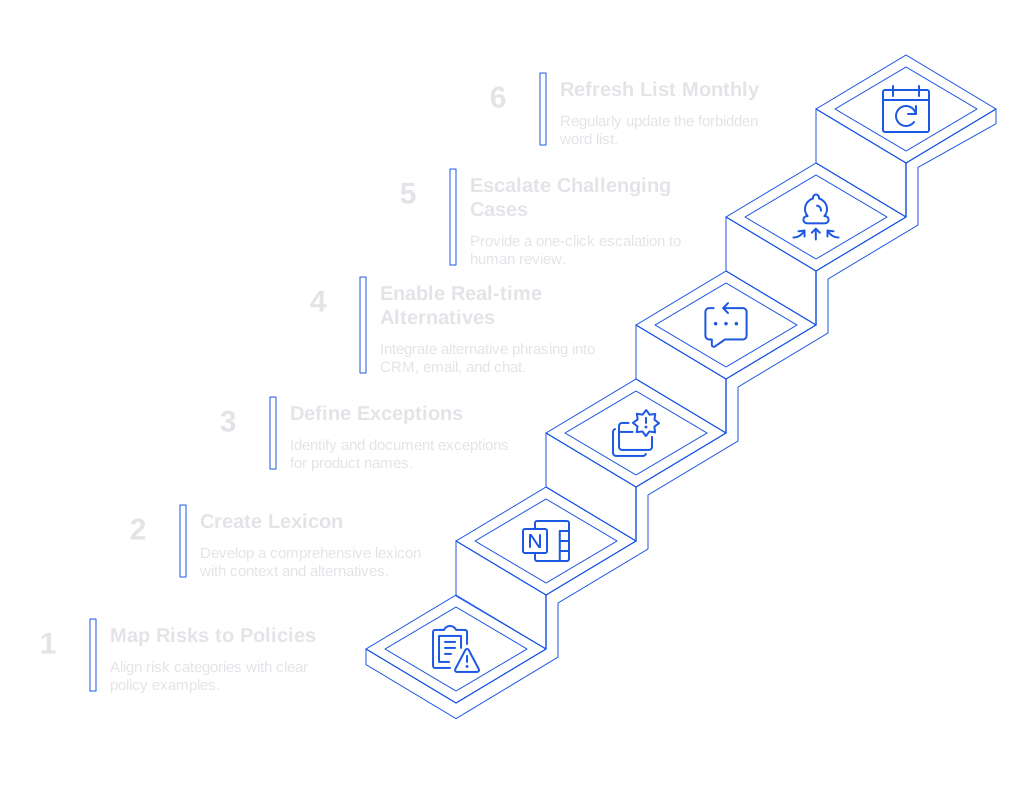
- Map each risk category directly to your policies, with clear examples.
- Create a lexicon complete with context notes and safe alternatives.
- Define exceptions for product names or terms that might otherwise seem risky.
- Enable real-time alternative phrasing within your CRM, email, and chat workflows.
- Escalate challenging cases to human review with a single click.
- Refresh your list every month and immediately after incidents occur.
Typewise integrates effortlessly into this workflow, offering functionality that fits each step. It connects with your CRM, email, and chat tools, helping teams generate accurate, brand-consistent replies while reducing response times. Typewise takes a privacy-first approach that enterprise teams can rely on.
Set up regular audits to check both language use and real-world outcomes. To learn more about effective audits, see how to audit your AI customer support conversations and quickly feed insights back into your training data.
How to Handle Crisis Language in AI Customer Support When Things Go Wrong
Incidents put your language under stress. Pressure increases the temptation for speculation and absolutes. Your crisis playbook should include safe phrases and clear timing expectations.
- State only established facts. Avoid speculation.
- Provide the time of the next update, and ensure it’s realistic.
- Acknowledge impacts without assigning blame.
- Offer one specific next step for the customer.
For guidance on tone and template selection, refer to this crisis response tone guide. Make sure these templates are easily accessible by your AI and your support team.
Comparing Tools for Managing Forbidden Words in AI Customer Support
You have multiple paths when choosing tooling. Consider using built-in features of your support platforms or dedicated add-on solutions. Look for tools that provide context awareness, smart suggestions, audit trails, and strong privacy features.
- Zendesk Advanced AI: Ideal for teams already using Zendesk, with customizable rules and macros.
- Typewise: An AI customer service platform that integrates with CRM, email, and chat. It delivers precise language suggestions and ensures brand-consistent tone. Great for organizations prioritizing data privacy and brand control.
- Intercom automation: Works well with Messenger workflows and commonly used customer intents.
- Ada and Forethought: Strong options for workflow automation and efficient case deflection.
When evaluating any tool, ask yourself: Does it respect your forbidden list in its context? Does it learn your product language accurately? Does it provide clear editing suggestions for agents?
Metrics That Track the Impact of Forbidden Words Governance in AI Customer Support
- Policy violations per 1,000 replies: Track by team and support channel.
- Reopen rate due to miscommunication: Compare before and after rollout.
- Refunds tied to promises: Connect specific language to resulting outcomes.
- Escalations to legal or security: Measure these weekly, especially during incidents.
- CSAT comments on tone: Classify for signs of shaming or absolute terms.
- Suggestion acceptance rate: Monitor how often agents follow suggested edits.
Set quarterly targets and share both wins and areas for improvement with concrete examples. Identify the most successful edits and create response templates based on them.
Implementation Checklist for a Forbidden Words Program in AI Customer Support
- Draft your forbidden words list by category, with examples and safe alternatives.
- Align the list with your brand, legal, and security stakeholders.
- Train your AI model using approved product terminology.
- Enable real-time suggestions for agents in all communication tools.
- Automatically mask sensitive data across every channel.
- Run weekly audits and update the list after each review.
- Coach agents with side-by-side examples during onboarding.
- Publish a clear escalation path for addressing edge cases.
For a practical starting point, pilot the approach with your lexicon, two templates, and one audit loop. Test the guidance on real tickets and adjust based on feedback. If you need assistance translating this list into daily workflows, the team at Typewise is ready to help, making sure your guidance translates efficiently into everyday writing across your support stack.
FAQ
What are the risks of using absolutes in AI customer support?
Using absolutes like 'guarantee' or 'always' can lead to legal liabilities and erode customer trust when those promises aren't met. These terms put a company in a vulnerable position, especially when customer expectations are not aligned with actual service capabilities.
Why is it important to avoid inappropriate data requests in customer support chats?
Requesting sensitive information such as passwords can create significant security risks and lead to data breaches. Using Typewise helps automate redaction and secure communication channels, mitigating potential exposure.
How can speculation during incidents increase operational risks?
Speculating about the nature of incidents before confirmation can fuel panic and damage brand reputation. It’s crucial to communicate only verified information and manage customer expectations carefully.
What are the consequences of using biased language in AI customer support?
Biased or outdated terminology can alienate customers and harm a brand’s inclusivity efforts. Terms like 'whitelist' or 'blacklist' should be replaced with neutral alternatives to maintain customer trust and corporate responsibility.
Why is it crucial to manage the language used in security claims?
Overstating security measures by using terms like 'unhackable' can lead to a false sense of safety and potentially legal repercussions. It's more effective to communicate industry-standard practices transparently to maintain trust without overcommitting.
How does Typewise assist in managing language use in customer support?
Typewise offers precise language suggestions and integrates seamlessly with support tools to ensure consistent communication. It emphasizes data privacy and enables teams to adapt quickly without compromising response quality.
What’s the importance of setting real-time response expectations?
Vague timelines like 'soon' can frustrate customers, leading to escalated issues and dissatisfaction. Providing specific response times enhances trust and operational efficiency, aligning customer expectations with achievable service levels.
How does monitoring forbidden word usage optimize customer service?
Tracking policy violations and other metrics helps identify communication weak points that could lead to misunderstandings or legal issues. Regular audits and updates ensure processes remain aligned with best practices and emerging risks.