


When large language model context windows silently drain quality and budget
Context windows may appear generous in accepting large amounts of information, tempting users to dump all and expect the model to figure it out. The true cost emerges later: larger prompts increase latency, drive up per-token costs, and may dilute accuracy by scattering focus.
Not every token carries equal weight for language models. Overly lengthy set-ups can bury key facts, while excessive repetition may push the model toward unhelpful response patterns. The results: answers that are wordier, more hedged, or that miss critical steps. Shorter, more precise prompts consistently enable clearer outputs and faster replies.
Short context is a feature, not a limitation.
Right-sizing is not about depriving the model of crucial information. It means providing only what’s essential for the task at hand. By trimming away unnecessary details and focusing on relevant data, you not only control costs but also maintain, often even improve, accuracy.
Right-sizing prompts to fit the actual task without losing accuracy
Approach prompt design by starting with the task, not a transcript. Clearly express the intended goal and expected output. Pass along only those facts required to properly ground an answer. Avoid pleasantries, lengthy motivational asides, and verbose roleplay scenarios. A well-constructed, targeted system prompt paired with essential facts will almost always outperform a bloated alternative.
Bloated pattern to avoid
System: You are a friendly assistant. Consider all past chats. Cite every policy. Explain your reasoning.
Right-sized alternative
System: You are a support agent. Follow the style guide. Use only provided facts. Return final answer only.
Leverage retrieval to supply supporting details, rather than pasting lengthy documents into the prompt. Insert only the most relevant excerpts for each user’s question. Giving the model a clear objective and tight constraints prevents digressions and helps keep token counts under control.
A few focused examples are all you need. Two well-chosen samples are far more useful than ten generic ones. Never repeat the same instruction across multiple sections, as redundancy needlessly consumes tokens and introduces ambiguity.
Deciding what belongs in the context window versus what belongs in retrieval
Hard context for rules, soft context for facts
Place fixed rules and procedures directly in the system prompt. Use retrieval mechanisms for mutable facts like product names, pricing tiers, or country-specific policies. These details tend to evolve and are best pulled on demand. If consistency in brand voice matters, train the model specifically, see how to train AI on your internal product language, to keep tone and terminology in sync, avoiding unnecessary token usage.
RAG that prefers snippets over dumps
Divide information into small, labeled sections to keep context windows concise. If possible, retrieve three to five high-relevance snippets instead of entire pages to conserve context window size. Precede each snippet with a source tag for easy citation and prioritization.
Sources: \[ kb://refunds#plan_a , kb://sla#priority2 \] Task: Answer the customer. Use only sources above.
Maintain control over the size of the context window and its content. If a question requires just one data row, send only that row. For definition requests, include only the necessary definition, not the complete glossary.
Techniques that keep responses accurate while shrinking prompts
- Structured outputs. Request a schema; this encourages precise, to-the-point answers with less filler.
- Verifier steps. Integrate a lightweight verification to spot gaps and hallucinations before a response is finalized. See how to add verifiers and improve support answer quality without making main prompts longer.
- Tool hints. Let the model know which tools are available and when to use them, but avoid embedding entire manuals in the prompt.
- Output gating. Disallow responses missing essential citations or fields; prompt the model to revise only deficient sections.
- Few-shot minimalism. Keep example data brief and directly relevant to the task. Rotate examples as domains shift.
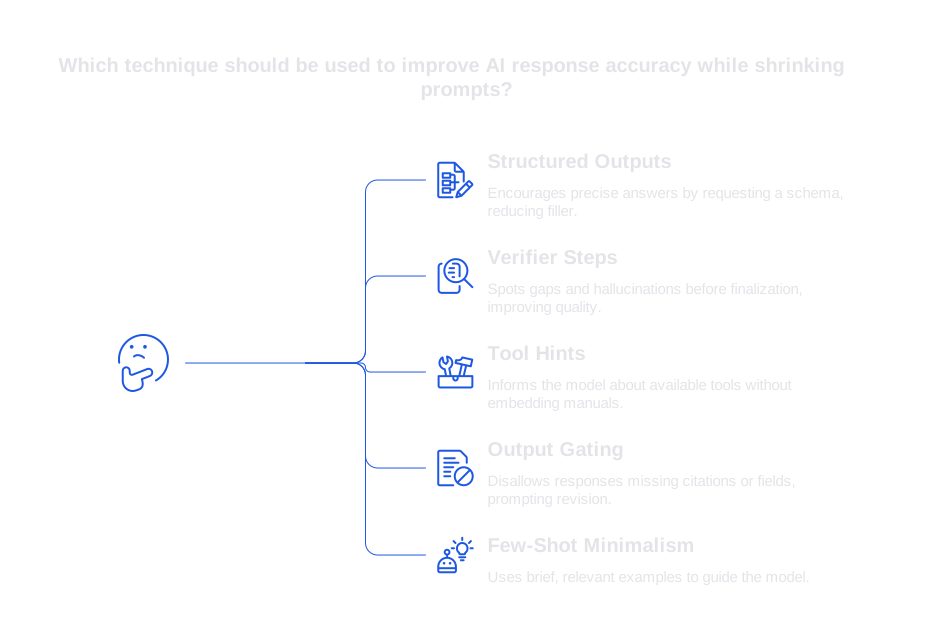
These strategies not only reduce token consumption, but also enhance clarity. They lead to less hedging, fewer tangents, and make mistakes easier to diagnose and resolve.
Operational practices for support teams that manage context budgets
- Template the system prompt. Store a single, central version within your platform and manage updates globally.
- Set token budgets by channel. Adapt token allowances: email can accommodate longer prompts than chat, while voice demands brevity.
- Log prompt diffs. Audit prompt expansion over time and eliminate lines that do not impact outcomes.
- Separate examples from rules. Swap out examples for specific locales or products, but keep baseline rules constant.
- Audit outcomes weekly. Regularly review and tag session samples for errors or breakdowns. Learn how to audit AI customer support conversations using repeatable checklists.
Remember that effective prompts are continually refined. Each time you make a change, log a note. If you ever feel compelled to justify a new line in the prompt, it likely belongs in supplementary documentation, not in the context window itself.
How leading customer support tools approach context window management
- Salesforce Service Cloud with Einstein aligns prompts closely with CRM fields and workflows, maximizing effectiveness through strict schema adherence.
- Typewise seamlessly integrates with your CRM, email, and chat. It mirrors your brand’s tone and trims response time with strong privacy standards. Its workflow emphasizes retrieval, concise prompts, and verification, reducing context window spend without harming accuracy.
- Intercom offers AI-generated replies in the messenger app. Short, strategy-driven prompts excel when paired with relevant articles.
- Zendesk AI utilizes macros and knowledge links, where concise prompts and focused article snippets yield the best results.
All these platforms succeed with well-sized inputs. What sets teams apart is discipline: those that routinely trim, retrieve, and verify see steadier quality and significant cost savings.
Metrics to track when shrinking prompts without losing accuracy
- Tokens per reply. Track median and 95th percentile usage. Be vigilant against gradual token creep.
- Latency per turn. Reducing prompt size can cut slow response times.
- Factuality rate. Sample and verify accuracy on a regular basis.
- Citation coverage. Ensure required responses always include at least one relevant source.
- Escalation rate. Monitor automated handoffs, watching for recurring causes.
- First response time. Efficient prompt sizing can lead to faster and more accurate responses, keeping users engaged.
- Editing time by agents. A declining need for edits is often a good sign of well-constructed prompts.
Use dashboards to assess trends, not just static snapshots. Connect abrupt changes in metrics to prompt change logs, and roll back lines that cause performance drops.
A practical checklist to right-size prompts today without harming accuracy
- Craft a single-line task statement for every workflow.
- Move variable details to retrieval, while embedding stable rules in the system prompt.
- Eliminate duplicate instructions and unnecessarily long role descriptions.
- Replace lengthy paragraphs with a schema and two brief examples.
- Implement a verifier to check for correct intent and adequate citations.
- Document token budgets and enforce them within templates.
- A/B test adjustments for latency, factual accuracy, and agent edit time.
As you refine prompts, also invest in improving your knowledge base. Well-structured articles lessen the urge for lengthy context. If your product has unique jargon, consider training your model on internal language to further minimize the need for repetitive prompt content.
How Typewise fits a right-sized prompt strategy without heavy lift
Typewise integrates with your existing workflow tools, generating succinct, on-brand responses. Retrieval strategies minimize prompt size, while verifiers intercept unsound answers before they reach users. Auditing features help visualize token usage and optimize decisions.
If you’re working to perfect your prompts, begin with three key steps: trim system prompts to the essentials, route facts via retrieval, and add a concise verifier. Typewise delivers support for all three directly, while meeting privacy requirements for enterprise customers.
Take the next step with focused prompts and measurable accuracy
You don’t need bigger context windows for reliable results, just the right context, delivered at the right moment. If you want a pragmatic approach that balances cost and quality, connect with us. Start the conversation at typewise.app. We’re ready to review your prompts and suggest a streamlined, effective path forward.
FAQ
How can ChatGPT Enterprise help in handling ad hoc exploration tasks?
ChatGPT Enterprise is ideal for exploring ideas and comparing documents through its flexible platform. By using a two-step compress-then-answer approach, it minimizes the risk of overly lengthy prompts, thereby reducing the cost and complexity of interactions.
How can Typewise support context window management?
Typewise excels by integrating retrieval strategies, emphasizing concise prompts, and using verifiers to ensure sound responses. It offers tools to monitor token usage and help maintain accuracy without bloating prompts.
What metrics should be tracked when minimizing prompt size?
Lead with tokens per reply, latency, and factual accuracy as key metrics to track. Monitoring these will reveal inefficiencies and guide better prompt design and tweaks.
Can using retrieval systems help improve prompt efficiency?
Yes, retrieval systems can inject highly relevant snippets into prompts, cutting down unnecessary context and maintaining focus. This results in both reduced costs and increased answer precision.
What's a pragmatic first step to improve prompt design?
Start by trimming system prompts to retain only essential elements and re-routing extraneous details to retrieval systems. This simple adjustment promotes both efficiency and clarity in outputs.


