

Understanding Claude’s Limits When Building a Customer Support Agent
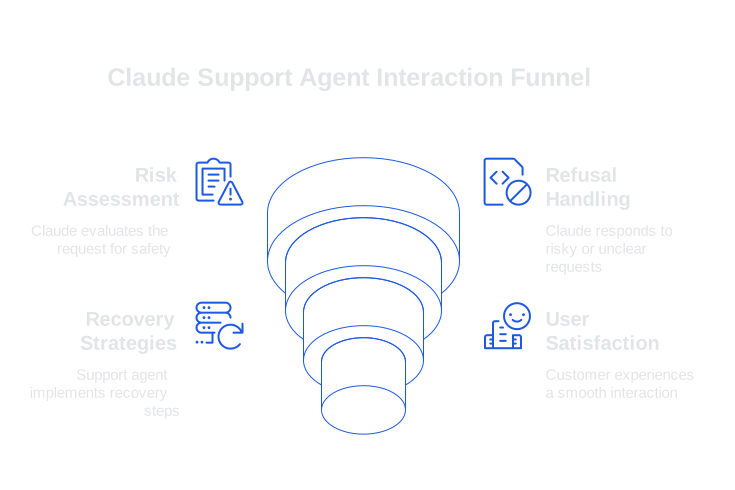
Claude’s architecture keeps customer safety at the forefront. This commitment shields users but can also inadvertently block useful responses if a request appears risky or is lacking clarity. Your agent must skillfully handle customer interactions during risky or unclear requests, ensuring a smooth, frustration-free experience.
Plan for system refusals when Claude encounters prompts that ask for private data, require medical or legal advice, or involve ambiguous troubleshooting steps. Expect the model to hedge or ask for clarification if instructions conflict or lack necessary context. Prepare your support flows to detect these states and recover efficiently.
Plan for smooth recovery. Offer clarifying questions, provide secure handoffs when needed, and log refusal reasons for later review. Maintain customer trust by keeping fallbacks short, transparent, and direct.
- Prompt for missing identifiers and validate them before proceeding.
- Provide a safe action path before escalating to a human agent.
- Capture and store user intent in structured fields for future use.
Treat every refusal as constructive feedback about the clarity of your prompt or the quality of data provided, rather than a sign of model reluctance.
Claude’s Knowledge and Context Limitations in Customer Support
Remember, Claude, as an automated system, is not inherently aware of your latest release notes or documentation changes. It also does not browse the web by default. Even with a spacious context window, excessively long or uncurated input dumps can reduce accuracy. For high precision, supply only essential, curated information.
Establish an efficient retrieval process that serves only the most relevant details , product snippets, policies, or step-by-step instructions. Organize content by tasks or features instead of entire pages, and use strict time filters to prevent outdated information. If your product or error codes use specialized language, train Claude on your internal product terminology to enhance recognition and accuracy.
Tool-Use and Function Calling Limits in Support Workflows
Successful tool integrations rely on straightforward and repeatable API schemas. Failures often occur if outputs are inconsistent, endpoints return incomplete data, or schemas allow unrestricted free text. Exercise strict constraints to minimize errors.
Assign one tool per specific intent, echo back user context, validate inputs pre-execution, and standardize outputs in compact JSON with clear status indicators. Limit retries to safe boundaries.
Prompt skeleton for deterministic tool calls:
system: You are a support agent. Use tools only when confidence is high. Return JSON that matches the schema exactly.
assistant: \{thought: Check order status, action: get_order_status, params: \{order_id: A12345\}\}
Always confirm tool results within your response. If a tool fails, summarize the reason and outline the next step , never speculate on a failed action’s outcome.
Claude’s Rate Limits, Latency, and Cost Constraints for Support Queues
Operational throughput is critical during live customer interactions. Provider-imposed rate limits may vary by subscription level or traffic spikes, and incident surges can expose weak queueing or retry mechanisms.
- Use streaming responses for faster perceived delivery on lengthy answers.
- Offload non-critical summarization tasks from primary workflows.
- Fallback to concise prompts when queue congestion increases.
- Cache stable answers for repeated, identical inputs using secure keys.
- Employ circuit breakers to manage recurring timeout errors.
Measure concurrency, average token usage, and abandonment rates across channels, not just per account. Both channel-level and account-level tracking are vital for capacity planning and cost control.
Managing Hallucination and Brand Style Drift in Support Interactions
Hallucinations arise when prompts lack grounded facts or require speculation. Brand style drift can show up if the system prioritizes politeness or creativity over consistency. Both undermine customer confidence.
Implement two safeguards: First, ensure every answer is substantiated with sourced facts from your document retrieval. Second, verify outputs before delivery. You can add automated verifiers to catch and block responses that invent policies, steps, or product details.
- Require citations from internal documentation for complex solutions.
- Score each reply’s tone against a style rubric relevant to your brand.
- Refuse to respond when citations are missing on high-risk requests.
Supporting Multiple Languages and Consistent Tone Across Locales
While Claude supports numerous languages, tone and specific terminology can shift across locales. Relying solely on automatic translation introduces risk. Glossaries and targeted testing are essential.
Define desired brand tone for each market. Lock down vital product nouns and error messages. Run bilingual diff checks to validate meaning rather than literal wording. Use brief, active sentences for easier localization. Request the AI system, Claude, to generate structured fields specific to numbers, dates, and product names.
Evaluating, Auditing, and Incident Handling for Claude-Based Support Agents
You cannot improve what you do not measure. Track accuracy, case deflection quality, safe refusals, and unnecessary escalations. Audit challenging tickets daily, and review both prompts and retrieved texts for every answer.
Create review checklists that humans can complete in under two minutes; automate the rest. For a step-by-step approach, see how to audit AI support conversations using structured workflows.
Prepare for disruptions. Define incident categories such as model outages, document retrieval failures, or incorrect pricing policies. Set up predefined escalation and backup routes. Log each decision for compliance and ongoing improvement.
Effective Prompting Patterns That Respect Claude’s Limits
Minor adjustments to prompt design lead to significant improvements in stability. Use succinct instructions followed by checklists. Prompt for explicit expressions of uncertainty and demand structured output formats.
Response template for clarity and citation tracking:
system: Follow the policy and style guide. If unsure, ask one question or escalate. Cite sources.
assistant_style: \{tone: calm, direct, format: steps, then summary, fields: \[sources, confidence\]\}
user: Issue: camera not syncing. Device: CamX v2.2. Goal: restore feed. Constraints: no reset.
assistant_output_schema: \{steps: \[\], summary: , sources: \[doc://...\], confidence: 0.0\}
Manage your prompts effectively: maintain versions for record-keeping, associate each version with relevant metrics and audit results, and consider retiring those that frequently cause ambiguity or refusals.
Data Privacy Limits and Enterprise Integration for Claude-Based Support
While customers inherently expect privacy, remember that it is not Claude but your platform that controls what data to log or retain. Mask personally identifiable information (PII) before sending prompts, store context securely, and keep raw transcripts separate from analytics data. Integrate review outcomes back into CRM, email, and chat tools so teams understand the reasoning behind each dispatched or escalated answer.
Where Typewise Fits in Claude-Based Support Solutions
Claude can be integrated directly, or used through orchestration platforms and specialized support tools. Typewise focuses on enterprise support automation, prioritizing privacy and consistency. It connects with your CRM, email, and chat platforms without requiring major process changes.
Typewise helps ground responses using your organization’s product vocabulary, verifies risky outputs, and enables auditing at scale. It complements your existing stack and is built to respect your established workflows. If you plan to implement in-depth training, explore how to teach Claude your internal product language for more powerful automation.
Practical Checklist
- Establish clear paths for handling model refusals, including well-defined follow-up questions.
- Curate and strictly version retrieval snippets for accuracy and maintainability.
- Constrain tool usage with tight schemas and rigorous input validation.
- Leverage streaming, caching, and smart queue management for predictable latency.
- Run verifiers and audits, especially for high-risk scenarios, to ensure output quality.
Final Thought. Claude is a capable tool that operates within well-defined limits. Success comes from designing around those limits to deliver consistent, reliable customer support.
If you are seeking a pragmatic solution to these challenges, consider partnering with Typewise, a team focused on creating customer service AI that fits your processes and respects your data. Start your journey at typewise.app.
FAQ
Why does Claude sometimes refuse to process requests?
Claude prioritizes user safety and data privacy, leading to refusals in situations it deems risky or unclear. Recognize these refusals as feedback on the quality of prompts or data, and adjust accordingly to restore process flow.
How can I ensure Claude accurately handles my product terminology?
To increase accuracy, integrate a training regimen for Claude encompassing your internal product language. Typewise can help by grounding responses with your enterprise's specific vocabulary and verifying complex outputs.
What steps can I take if Claude provides inaccurate information?
First, ensure that the inputs were curated and concise, as lengthy or uncurated data reduces accuracy. Utilize verifiers to ensure responses are factual and align with internal documentation; adjust prompts to improve future interactions.
Is Claude capable of handling multiple languages consistently?
While Claude supports various languages, automatic translation can lead to inconsistencies. Use glossaries, define brand tones per market, and rely on bilingual checks to ensure the accuracy and consistency of translations.
What role does Typewise play in enhancing Claude's customer support capabilities?
Typewise offers integration with your existing CRM and support systems, focusing on automation, privacy, and consistency in handling customer queries. It aids in structuring responses through enterprise terminology training and output verification.
How should I address tool integration failures when using Claude?
Ensure tool integrations have clear, repeatable API schemas to avoid failures due to inconsistent outputs or incomplete data. Use strict constraints, and always confirm tool results, summarizing issues and next steps without speculation.
What measures should be in place for auditing Claude-based support interactions?
Regular audits of challenging tickets are critical. Develop quick review checklists for human oversight and automate as much as possible. Pre-define escalation and backup routes for potential disruptions to maintain operational integrity.
What are the cost implications when deploying Claude in high-traffic support scenarios?
Operational throughput can be impacted by provider-imposed rate limits and traffic spikes. Implement streaming responses, smart queuing, and caching to mitigate costs and ensure efficiency, particularly during peak demand.
How can I minimize the issue of hallucinations in Claude’s responses?
Minimize hallucinations by sourcing responses from well-curated, factual documentation and requiring citations for complex solutions. Use automated verifiers to detect and block incorrect or speculative outputs.


