


What to do during the first 90 days after deploying AI agents in your customer service team to avoid losing your best agents
Your top customer service agents thrive on challenges and the opportunity to demonstrate their expertise. If you roll out AI in a way that disrupts this, you risk losing your best people within 90 days. Uncertainty around roles, recognition, and quality can push your most skilled employees to look elsewhere. Treat the first three months as a unique period to shape company culture, reinforcing trust and clarity, not simply as a new software implementation. From the start, position AI as a tool that enhances expert work, rather than replaces it.
Set clear rules for human and AI collaboration within the first 90 days
Establish explicit guidelines about responsibilities before your first ticket is processed by AI. Maintain a shared guide or resource that outlines the division of work, covering ticket complexity, data sensitivity, and authority over actions like refunds, so every agent understands their lane. Let AI handle routine Tier 1 questions, while reserving high-stakes, cross-product, and revenue-critical tickets for your experts. This avoids confusion and makes sure everyone is consistently informed.
- AI drafts replies for Tier 2; agents review and send, maintaining authorship credit.
- AI never independently resolves cases involving security, billing disputes, or VIP accounts.
- Escalation processes must be fast, visible to all, and reversible.
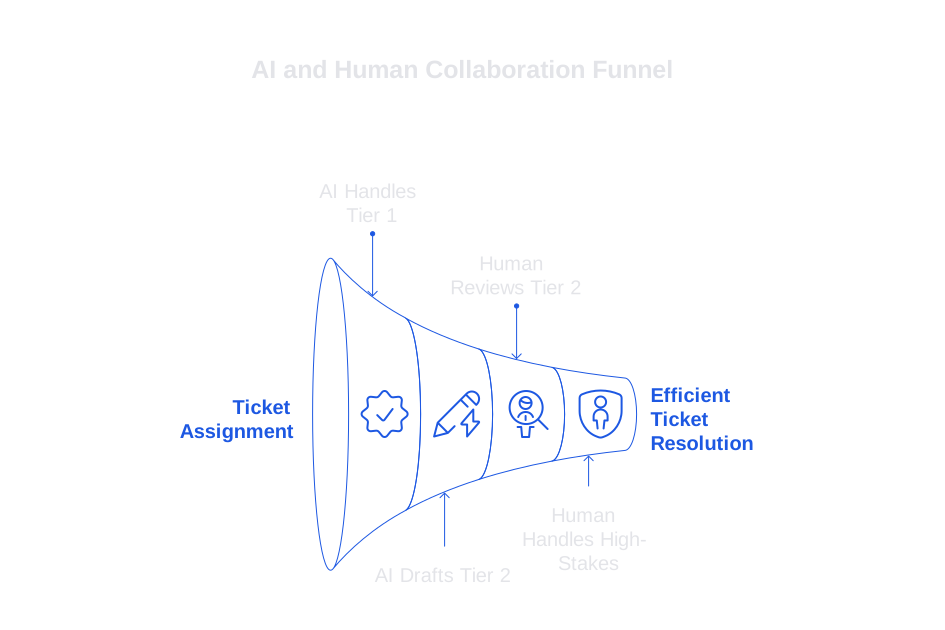
Empower agents with a visible “final say” button to reinforce their judgment in case handling, focusing on active decision-making rather than just efficiency. Sync these rules with a system prompt that encodes such boundaries for AI use:
system: You are a support copilot. If ticket risk = payment, security, VIP,
or legal, escalate to human. If uncertainty > 0.3, ask for clarification.
Always cite source snippet ids. Never guess.
Align incentives and performance metrics from day one
Agents will adapt to what you measure and reward. If your metrics focus purely on speed, you risk AI undermining expert engagement. If your dashboards reflect edits, judgment, and the value of human intervention, top agents remain involved and motivated. Make sure you clearly separate and report both model contributions and human authorship, and share results weekly with your team.
- Report how often agents use, accept, or override AI drafts by queue.
- Attribute customer satisfaction scores (CSAT) to the sending agent, not the AI model.
- Rotate complex cases among agents to sustain skill development and morale.
Set clear thresholds that you’re willing to revisit as you learn. For instance, aim for 70% AI drafting for Tier 1 tickets and 30% for Tier 2, but adjust depending on product line and time of year. Document every adjustment and the rationale in a changelog for transparency.
Teach your AI the nuances of your product language
Just as agents take pride in their precision with language, it’s equally important that this precision is reflected in AI responses. Build a dynamic glossary containing product names, feature flags, and official support phrases, along with deprecated or outdated terms. Ensure training uses authentic, permissioned ticket examples, not generic templates. For a step-by-step guide, see how to train AI with your internal product language and style.
developer: Style guide v3. Terms: Pro Plan, not Professional. Say credit is
applied, not discount. Forbidden: free forever. Tone: concise, friendly, no
emojis.
Distribute the glossary with each model update. Invite agents to propose edits by filling out a concise feedback form, ensuring their expertise informs ongoing improvements. Rapidly review and approve updates. Recognize contributors during your weekly standup meetings.
Build a rigorous conversation review loop to sustain quality
If not properly managed, the quality of service can decrease in those periods between dealing with tickets. Implement a daily sampling practice: regularly audit a set number of conversations from each queue and scenario. Score for reasoning, accuracy, policy compliance, and tone. Make the review rubric public before launch, so agents know how performance is assessed. If you need a starting point, learn practical steps to audit AI customer support conversations transparently.
user: Evaluate this draft. Criteria: policy fit, factual correctness,
empathy, actionability. Return JSON with reasons and a coaching tip.
I trust the AI when I know how we grade it. Use this perspective as a guiding principle for the first 90 days.
Reduce risky outputs before customers ever see them
Prevention is better than correction. Employ verification checks that block or flag potential errors before AI-generated replies go out. Use retrieval checks for information accuracy, policy compliance classifiers, and numeric consistency validations. Route tickets with uncertainty directly to humans, providing all necessary context to streamline escalation and save senior agents’ time and patience. Apply step-by-step patterns, as shown in setting up self-checking AI support workflows.
- Run a secondary model to confirm AI-generated facts against original sources.
- Block responses if required citations are absent or show contradictions.
- Trigger an incident note whenever a spike in similar errors is detected.
Invest in agent coaching and create new career pathways
Retain your top talent by expanding their responsibilities and learning opportunities. Introduce roles such as Prompt Curator, Quality Lead, and Incident Captain, rotating these responsibilities to foster shared knowledge and skill development. Conduct weekly coaching sessions using real tickets and AI logs, always spotlighting the importance of agent judgment and business impact.
Make learning visible and accessible
Publish brief internal summaries: include insights gained by both the AI and human team, as well as any key changes implemented. Publicly acknowledge agents who contributed to better prompt writing or identified policy gaps.
Choose the right customer service AI stack with your agents in mind
The choice of tech tools we use signals our company culture. Consider how candidate systems respect autonomy, data privacy, and brand voice.
- Salesforce Service Cloud Einstein best fits teams already operating heavily within Salesforce environments.
- Typewise is ideal for teams seeking writing assistance directly within CRM, email, and chat, providing robust tone control and prioritizing privacy.
- Other tools such as Intercom, Ada, and Forethought focus on routing and deflection strategies.
Run transparent evaluations using your actual tickets, glossaries, and most challenging scenarios. Include senior agents in the scoring process, not just technology managers. Rate each tool by edit effort, accuracy under ambiguity, and how well outcomes can be audited. Avoid demo environments that conceal real-world issues with data retrieval.
Create a robust but focused 90-day dashboard to support agent engagement
Keep the dashboard succinct and transparent, representing only key, genuine metrics that agents can easily interpret and respond to. Review it at a set time each week and invite agents to give their input on the results.
- Quality rates segmented by ticket tier and product line.
- How often agents edit AI drafts and their top reasons for doing so.
- Weekly count and types of AI errors, plus the time taken to fix them.
- How complex tickets are distributed among senior agents.
- Median resolution time for more complicated Tier 2 and Tier 3 tickets.
- Signals of agent engagement, such as requests for new internal roles or career moves.
When you see spikes, clearly annotate them with release notes. If a model change impacted results, state this directly. Your best agents will value transparent and straightforward information more than embellishments or misunderstood data.
Communicate your rollout plan openly during the first 90 days
Lack of communication feeds anxiety. Publish a single-page rollout plan listing the model’s scope, steps for audit and review, and exact escalation routes. Clarify what the AI will, and will not, handle at this stage. Offer agents a private, stigma-free way to voice concerns or requests for help.
- Host weekly “show and tell” sessions with real ticket walk-throughs to build comfort and visibility.
- Document changes, linking prompt alterations, data refinements, and outcome shifts in the changelog.
- Invite product and legal stakeholders to monthly reviews for cross-functional accountability.
End each session by introducing one new improvement for trial in the coming week, then follow up with results for accountability.
Your checklist to keep your best agents engaged after deploying AI
- Publish clear guidelines for human and AI responsibilities, with examples.
- Track and reward agent authorship, not just efficiency, in every queue.
- Maintain a living, agent-reviewed product glossary and style guide for the AI.
- Audit conversations daily using transparent rubrics and coaching feedback.
- Implement verification gates to prevent risky outputs reaching customers.
- Create rotational, growth-focused agent roles that value judgment.
- Select tools by involving agents with real cases, not just owners or managers.
- Monitor a simple, transparent dashboard; document impacts of all changes.
- Communicate openly, share progress, limits, and successes with clear evidence.
Ready to make your first 90 days with AI calmer and more productive? If you’re seeking writing support that fits your current workflows and preserves your brand’s unique voice, start a conversation with Typewise. We offer tailored playbooks, prompt strategies, and review frameworks for teams handling complex support. Get in touch with Typewise to see if our approach fits your roadmap.
FAQ
How can deploying AI in customer service impact agent morale?
If AI implementation is perceived as a replacement rather than a tool for enhancement, it can drive skilled agents to leave. AI should bolster your team’s capabilities, not diminish their sense of value.
What are the risks if clear guidelines for AI use aren't established?
Lack of clear guidelines can lead to role uncertainty, inefficiencies, and potential mishandling of complex cases. By defining responsibilities, you mitigate the risk of AI infringing on areas requiring human expertise.
Why is it important to tailor AI to your company's product language?
An AI that misunderstands your product terminology will weaken customer trust. Training AI with precise product language ensures consistency and credibility in every interaction, creating a seamless brand experience.
How does involving agents in tool selection benefit AI deployment?
If agents aren't involved, tools might not align with actual needs, leading to poor integration and decreased productivity. Engaging them ensures the tools enhance existing workflows and meet real-case scenarios effectively.
What are the potential downsides of focusing solely on speed in customer service metrics?
Prioritizing speed can discourage thoroughness and lead to superficial problem-solving, resulting in dissatisfied customers. Balancing speed with quality and human insight retains expert engagement and drives better outcomes.
How does regular conversation auditing sustain service quality?
Without regular audits, undetected errors can erode service quality over time. Implementing a review loop identifies gaps quickly, providing timely corrective actions and ongoing agent development.
What role does transparency play in AI implementation for customer service?
Lack of transparency breeds mistrust and misalignment between agents and AI systems. Open communication about scope, updates, and errors ensures everyone is informed, reducing resistance and fostering adaptation.


