The Hidden Math Behind Real Cost Per Ticket in Customer Service
Your cost per ticket is more than just a single figure, it's a reflection of your entire support operation. It accounts for how you staff, train, manage, power, and improve your customer service. This metric spans people, tools, processes, and rework. Measured correctly, it allows you to optimize for efficiency while still delivering excellent customer experiences.
This guide breaks down the formula in full detail. You’ll learn what costs to include, how to segment your calculations, and where AI can bring extra value. You may want to have a calculator handy. We’ll provide an example and walk through each specific calculation step by step.
What the Real Cost Per Ticket in Customer Service Includes
Many teams simply take total agent salaries and divide by the number of tickets, but this leaves out major cost drivers. A comprehensive cost per ticket captures every resource spent to resolve a customer issue, covering both direct outlay and time you are already paying for.
- People: base pay, benefits, overtime, contractors, incentives.
- Leadership: team leads, quality assurance, workforce planners, and managers.
- Tools: help desk systems, telephony, robotic process automation (RPA), AI assistants, and data storage.
- Operations: training, maintenance of knowledge bases, content reviews.
- Facilities: office space, equipment, security.
- Quality Fallout: refunds, credits, repeat contacts, and churn risks caused by errors.
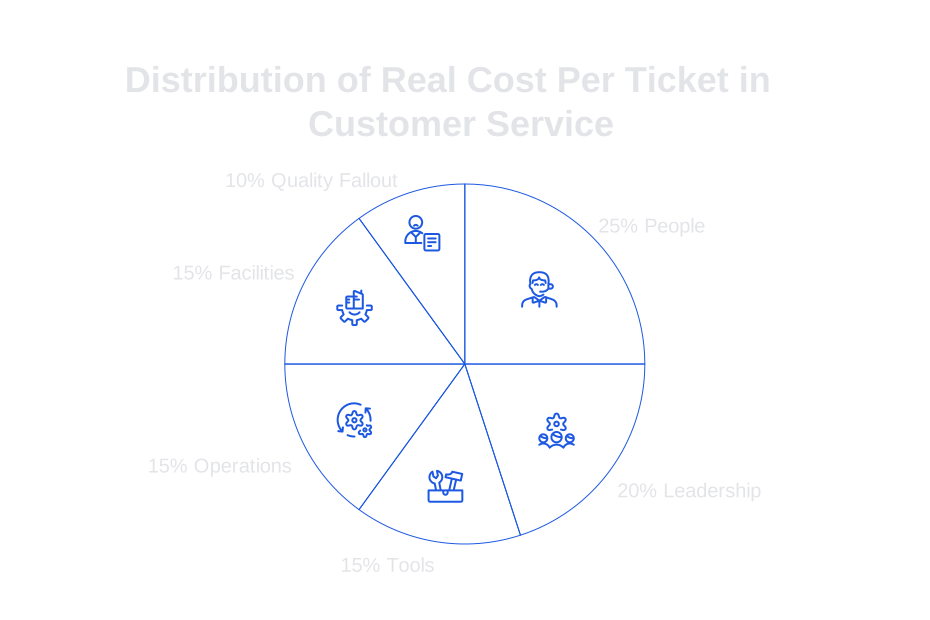
After calculating all these costs associated with resolving an issue, you should divide the total by the number of tickets actually handled, not just those received.
How to Calculate the Cost Per Ticket in Customer Service with a Clear Formula
This calculation has two essential components: total monthly support cost, and the number of tickets efficiently resolved. Do not include tickets that are not ultimately handled by an agent or that are duplicates. Focus only on fully resolved support conversations.
- Sum all direct and indirect support costs for the chosen month.
- Determine the number of tickets handled using productivity calculations, not by tallying incoming or unworked items.
- Divide the total cost by the number of handled tickets to find your cost per ticket.
Segment your figures by channel, level of support, and language. Blended metrics can hide important trends and problem areas.
How Productivity Shapes Cost Per Ticket in Customer Service
The number of tickets your team handles depends on available working hours, sustained focus, and average ticket duration. Four main factors drive this productivity:
- Average Handle Time (AHT): average time spent per ticket, including any work after the customer disconnects.
- Occupancy: percentage of available time spent actively working on tickets.
- Shrinkage: time lost to meetings, breaks, PTO, sick days, and training.
- Concurrency: ability to handle multiple chats or emails in parallel, provided quality is maintained.
A simple approach: available hours per month equals paid hours times one minus shrinkage rate. Handling hours equal available hours times occupancy. Total tickets handled is calculated as handling minutes divided by AHT. For chat and email, safe concurrency can increase your ticket volume, assuming quality remains high.
Direct Costs That Drive Cost Per Ticket in Customer Service
Allocate all monthly costs to the period you’re measuring. Monthly calculations are practical for most teams.
- Agent and contractor pay, including employer taxes and benefits.
- Overtime and holiday premiums.
- Licenses for customer relationship management (CRM), telephony, and any AI tools for drafting responses.
- Usage-based fees (per message or per minute) for communication channels and voice solutions.
Any shared tools or subscriptions should be allocated by usage or seat count. Consistency in allocation rules makes your analysis reliable.
Indirect and Quality Costs That Raise Cost Per Ticket in Customer Service
Often, these costs can outpace software and platform expenses, and done correctly, they prevent costly rework later.
- Team lead time for coaching and escalations.
- Quality assurance reviews and calibration sessions.
- Training hours for onboarding and product updates.
- Knowledge base authoring and periodic review.
- Compensation paid out for errors, such as refunds or credits, due to service mistakes or delays.
Reduce unnecessary rework by reviewing transcripts and outcomes for support quality. Effective analysis and correction of issues helps eliminate repeat contacts, keeping true costs down.
Step-by-Step Model to Compute Cost Per Ticket in Customer Service
1) Scope the Tickets
Select a specific channel, support tier, and language. Exclude spam and test cases from your calculations.
2) Gather Paid Hours and Shrinkage Data
Obtain the total paid hours for the agents in scope, and apply shrinkage rates sourced from your workforce management data.
3) Confirm Occupancy and AHT
Extract occupancy rates from your platform. Use an average handle time (AHT) that includes after-call work and any required notes/documentation.
4) Calculate Tickets Handled
Handling minutes per agent are calculated as paid hours times 60, times one minus shrinkage, times occupancy. Divide this by AHT and adjust for concurrency in chat or email if applicable.
5) Sum Costs
Add up all direct and indirect costs for the same agent group and period you are assessing.
6) Divide and Validate
Divide the total cost by the number of tickets handled. Sample 50 random tickets to confirm the mix matches your defined scope.
7) Refresh Monthly
Update these calculations every month. Track changes and trends over time, looking beyond just point-in-time values.
Worked Example of Cost Per Ticket in a SaaS Customer Service Team
Let’s run through a scenario: Suppose you have 12 agents, each working 160 paid hours per month. Shrinkage is 30%, occupancy is 80%, and average handle time for email tickets is 9 minutes.
- Available hours per agent: 160 × (1 − 0.30) = 112 hours.
- Handling hours per agent: 112 × 0.80 = 89.6 hours.
- Handling minutes per agent: 89.6 × 60 = 5,376 minutes.
- Tickets per agent: 5,376 ÷ 9 ≈ 597 tickets.
- Total tickets for 12 agents: ≈ 7,164 tickets per month.
Now, let’s look at costs for the month:
- Agent pay: 12 × $5,500 = $66,000
- Benefits and taxes (20%): $13,200
- Tools and platforms: $6,000
- QA and training: $5,000
- Management allocation: $12,000
- Facilities and equipment: $3,000
- Refunds due to support errors: $2,000
Total cost: $107,200. Cost per ticket: $107,200 ÷ 7,164 ≈ $14.96.
Your numbers will differ based on your operation, but the method remains constant.
Segmenting Cost Per Ticket in Customer Service to Spot Areas for Action
Don’t settle for a single blended cost. Segment your results for actionable insights:
- By channel: voice, chat, email, messaging
- By support tier: self-service, tier 1, tier 2, specialist
- By product area or feature set
- By customer plan or region
- By language or localization needs
Target the top three segments by spend. Identify and address underlying issues rather than just treating their direct effects.
Using AI to Lower Cost Per Ticket Without Hurting Customer Experience
AI solutions can help reduce average handle time and repeat contact rates while maintaining high accuracy. Train your AI systems using your company’s knowledge base, macros, policies, and product language to improve consistency and speed. For more, see how to train AI on your internal product terminology for reliable support replies.
Add automated verifiers for pricing, identity, and legal compliance to prevent critical errors. Explore self-checking AI workflows that catch and prevent support mistakes, this can directly lower costs from refunds and escalations.
Audit conversations regularly. Check for clarity, policy adherence, and resolution rates. Convert these quality checks into dollar figures, not just scores. Use this approach as detailed in our AI conversation audit playbook.
The Tooling Landscape Influencing Cost Per Ticket in Customer Service
Today, several platforms can draft replies, summarize conversations, and recommend next actions. Here’s a quick overview:
- Zendesk AI: Built into Zendesk, powerful for routing and summarization.
- Typewise: Integrates with your CRM, email, and chat tools to draft accurate, on-brand replies while respecting privacy. Ideal for complex tickets and strict business policies.
- Salesforce Einstein: Deep integration with Service Cloud data; works best with dedicated admin support.
- Intercom: Strong for chat-centric teams, excellent for automated responses and deflection.
Start by piloting new tools on a single segment. Measure the impact on AHT, recontacts, and refunds, and only implement full changes where you see actual improvement in unit cost.
Operational Pitfalls that Inflate Cost Per Ticket in Customer Service
- Counting all created tickets instead of focusing on truly resolved tickets.
- Ignoring repeat contacts made within a week of the original interaction.
- Setting unrealistic AHT targets that discourage proper diagnosis or support discovery.
- Assuming 95% occupancy, which can lead to burnout and higher error rates.
- Blending high- and low-effort inquiries together in one metric.
- Skipping quality checks on AI-generated replies and macros.
You manage what you measure. Measure the flow of work and improvement, not just the outcomes.
A Simple Prompt to Compute Cost Per Ticket from Your Own Data
Paste this prompt into your AI workspace. Replace the values in brackets with your own:
You are a support operations analyst. Using the inputs, compute monthly cost per ticket. Inputs: paid_hours_per_agent = \[ 160 \] , headcount = \[ 12 \] , shrinkage_pct = \[ 0.30 \] , occupancy_pct = \[ 0.80 \] , aht_minutes = \[ 9 \] , concurrency = \[ 1 \] , costs = \{ agent_pay : \[ 66000 \] , benefits : \[ 13200 \] , tools : \[ 6000 \] , qa_training : \[ 5000 \] , management : \[ 12000 \] , facilities : \[ 3000 \] , refunds : \[ 2000 \] \} . Steps: 1) available_hours_per_agent = paid_hours_per_agent * ( 1 - shrinkage_pct ) ; 2) handling_minutes_per_agent = available_hours_per_agent * 60 * occupancy_pct * concurrency ; 3) tickets_per_agent = handling_minutes_per_agent / aht_minutes ; 4) total_tickets = tickets_per_agent * headcount ; 5) total_cost = sum( costs ) ; 6) cost_per_ticket = total_cost / total_tickets . Return each step, the final number, and two sensitivity tests for aht_minutes ± 1 .
Turning Cost Per Ticket into a Daily Habit in Customer Service
Share your cost per ticket metrics by segment with your team each month. Highlight trends over time, not just single measurements. Link operational initiatives with changes in the number, and keep all calculations transparent and easy to verify.
FAQ
Why is calculating the real cost per ticket important?
Calculating the real cost per ticket ensures you're accounting for every resource involved in resolving customer issues. It's not just about agent salaries; failing to include indirect costs can lead to underinvestment in key areas, ultimately degrading service quality.
What common mistakes do teams make when calculating cost per ticket?
Teams often include only direct costs like salaries, ignoring leadership, tools, and quality issues. Counting all tickets created, rather than focusing on those truly resolved, introduces skewed insights that can misguide strategic decisions.
How can AI be integrated to lower cost per ticket?
AI can streamline processes by reducing average handle times and minimizing repeat contacts. Typewise, for example, offers AI capabilities that improve response accuracy while maintaining customer experience standards.
What is the role of quality assurance in cost per ticket?
Quality assurance prevents costly rework by addressing service errors proactively. Neglecting QA can lead to increased refunds and escalations, raising overall costs and potentially eroding customer trust.
How does concurrency affect productivity in customer service?
Concurrency allows agents to handle multiple interactions simultaneously, increasing ticket volumes without compromising quality. However, mismanaging concurrency can lead to errors and diminished customer satisfaction, negating any cost benefits.
Should cost per ticket be segmented, and why?
Segmenting cost per ticket by channel, support tier, or region reveals hidden inefficiencies and directs targeted improvements. Without segmentation, overall metrics might mask critical problem areas, limiting your ability to optimize operations.
Can focusing solely on AHT targets be detrimental?
Obsessively reducing Average Handle Time (AHT) can lead to incomplete issue resolution and repeated customer interactions. Real productivity improvement stems from efficient problem-solving, not just speeding through tickets.