AI customer support adapts to the needs of logged-in vs logged-out users
Your assistant caters to two distinct categories of users: logged-in and logged-out. Logged-in users bring with them account history, entitlements, and increased risk. Logged-out users arrive with intent, curiosity, and anonymity. Treating both groups in the same way adds friction. Designing support flows tailored to each user state reduces friction, improves clarity, and enhances data protection.
This differentiation impacts prompts, data retrieval, routing, KPIs, and even legal responsibilities. An effective system quickly detects the user’s state, then adapts guardrails, tone, and available actions accordingly.
AI customer support for logged-in users depends on richer, sensitive context
When a user is signed in, the assistant can reference account-specific data such as plan type, region, payment status, device, and recent support tickets. With appropriate consent and access, it can recommend actions based on entitlements and even initiate secure account actions when appropriate.
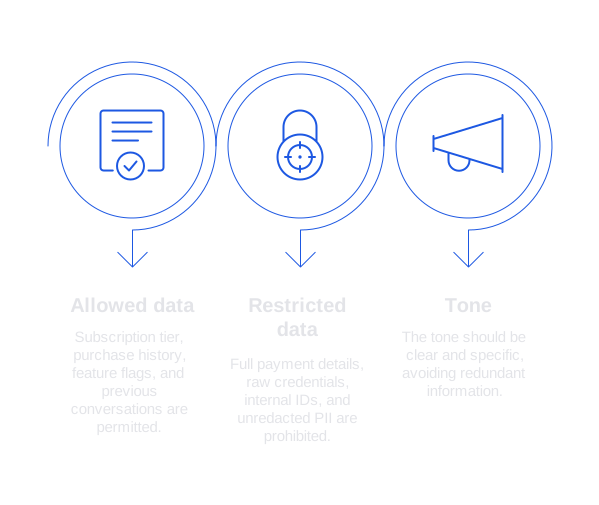
- Allowed data: subscription tier, purchase history, feature flags, previous conversations.
- Restricted data: full payment details, raw credentials, internal IDs, unredacted personally identifiable information (PII).
- Tone: clear and specific. Avoid redundant information.
Use role-based access controls for every data retrieval. Log all access. Redact all nonessential information before passing data to AI models. Use concise, explicit prompts, and deterministic templates for sensitive actions.
Confirm the user’s plan. If Business or above, offer live escalation. Never expose internal ticket notes.
AI customer support for logged-out users relies on intent, not identity
For users who are not logged in, the assistant must rapidly infer intent using cues like geography, device type, referral source, and page context. Personal information should not be assumed. Guidance should be limited to low-risk answers and actionable next steps.
- Typical goals: pre-sales inquiries, basic troubleshooting, understanding pricing, eligibility checks.
- Guardrails: avoid account-level detail guesses, do not disclose order statuses or private links.
- Tone: helpful and neutral, posing one clarifying question at a time.
Clearly offer opportunities to sign in for more tailored support. Secure sensitive workflows behind authentication. Retain session context to minimize repetition after login.
AI customer support for both user states needs state-aware routing and authentication
Design the state machine
- Detect login state at the beginning of each session.
- Load context-appropriate retrieval indexes and tools.
- Verify user consent and regional data privacy requirements.
- Present only authorized actions.
- If unsure, request user authentication before proceeding.
Handle sensitive actions
For high-risk actions such as refunds, cancellations, or data exports, require a second authentication step. Summarize the action before confirmation and log each action with a human-readable rationale.
Store memory responsibly
Use ephemeral (temporary) memory for logged-out sessions, and structured, policy-compliant memory for logged-in sessions. Never embed confidential data within prompts.
AI customer support for logged-in vs logged-out users requires different content strategies
Knowledge and retrieval
- Logged-in: Blend public documentation with account-scoped notes and feature availability flags.
- Logged-out: Restrict to public resources, product pages, and vetted FAQs.
Messaging templates
Logged-in: I see you are on the Pro plan with yearly billing. The Team add-on is active. Here are next steps customized for your setup.
Logged-out: I can provide general setup guidance. For steps specific to your account, please sign in to your workspace.
Use plain language to limit unnecessary exchanges. Steer clear of marketing speak in support interactions. Ensure links are in context, and surface the most relevant next action within the first few sentences.
AI customer support for both user states must measure different outcomes
- Logged-in metrics: cost per resolution, ticket reopen rate, time to next value event.
- Logged-out metrics: first response time, rate of self-service, rate of conversion from visitor to signed-up user.
Fast responses remain crucial. Review ways to improve first response time without sacrificing accuracy. Assess quality with calibrated human review, segmenting results by login state before comparing across teams.
AI customer support for logged-in vs logged-out users depends on product language
Users often repeat terminology found in your product. If your assistant does not reflect this language, it can erode trust. Logged-in users use internal terms from dashboards, while logged-out users tend to use common market terms from marketing materials or internet search.
Develop and maintain a shared product glossary, mapping synonyms to features. Train your assistant to interpret casual queries as precise product actions. Follow best practices for training AI on internal product language and taxonomy. Keep your glossary current, updating it as new terms are introduced in product updates or releases, and depublish obsolete terms in a timely way.
AI customer support for both user states needs rigorous governance and auditing
Handling logged-in flows involves greater risk, demanding audit trails, data redaction, and robust review rubrics. Logged-out flows face risks of unintentional overpromising, so review guardrails for accuracy, particularly regarding product claims and pricing.
- Use structured templates with variables for sensitive replies rather than freeform responses.
- Sample conversation logs weekly, segmented by user state and support intent.
- Automate monitoring for PII, credentials, and compliance with policy terms.
Establish a review process that scales with support volume. Learn more about how to audit AI-powered customer support conversations with clear evaluation criteria, and ensure audit findings guide ongoing improvements to prompts and tools.
AI customer support platforms for logged-in vs logged-out users and where Typewise fits
Several vendors provide AI customer support to both logged-in and logged-out users. Examples include Intercom, Typewise, Zendesk AI, Salesforce Einstein, and Ada. Your selection from these vendors may vary depending on your technological infrastructure (stack), business risk assessment, and the skill level of your customer support team.
- Intercom: excelling in messenger-based support and engagement for logged-out visitors.
- Typewise: specializes in precise agent writing assistance, brand tone calibration, and privacy by design.
- Zendesk AI: comprehensive ticketing integrations for logged-in workflows.
- Salesforce Einstein: ideal for teams operating within Salesforce CRM.
- Ada: highly scalable workflow automation for frequently asked questions and intents.
Typewise integrates seamlessly with CRM, email, and chat platforms. It improves grammatical accuracy, consistency of tone, and phrasing. The tool also helps teams shorten response cycles without compromising clarity. Many teams use Typewise alongside their existing system of record, rather than replacing it outright.
For privacy, apply strict data scopes and regional routing. Typewise follows a privacy-first approach, making it an ideal choice for teams prioritizing data protection, including those in highly regulated industries. Always confirm your compliance obligations with your legal and security experts before implementation.
AI customer support implementation checklist for logged-in and logged-out users
- Define user intents for each state and map these to safe, specific actions.
- Develop two retrieval indexes with a unified public knowledge base.
- Design targeted prompts for each state using concise variables.
- Apply authentication barriers to higher-risk tools and actions.
- Set rate limits, tracing mechanisms, and error handling fallbacks.
- Track and report key metrics by user state, intent, and support channel.
- Review weekly conversation samples, applying findings to prompt improvements.
- Train assistants on product language, updating regularly as products evolve.
- Conduct A/B tests focused on greeting, tone, and next-best actions.
- Document escalation rules and establish clear handoff processes to human agents.
AI customer support examples that show the logged-in and logged-out difference
Refund request
Logged-in: Your last charge was on January 10. I can start a partial refund after a quick verification.
Logged-out: I can explain our refund policy. To process a request, please sign in to your account.
Feature availability
Logged-in: The Audit trail feature is active on your Business plan. Here is how to enable it.
Logged-out: Audit trail is available on Business plans. Pricing details appear on our plans page.
AI customer support rollout timeline for logged-in vs logged-out users
- Week 1: define user intents, draft targeted prompts, select supporting tools.
- Week 2: build tailored retrieval indexes, set up redaction procedures, implement authentication gates.
- Week 3: run in shadow mode, audit responses, refine communication tone.
- Week 4: launch logged-out user flows and monitor response time metrics.
- Week 5: launch logged-in user flows, train on product language, and expand available actions.
AI customer support next steps for logged-in and logged-out experiences
To align both user experiences, begin by refining language, optimizing routing, and establishing robust auditing practices. Ensure that user state is central to every design and process choice. Even small adjustments here can dramatically reduce friction across your support operations.
If you want a practical view for your environment, share examples of support transcripts and process maps. The Typewise team can help you design a safe, state-aware customer support flow tailored to your stack. Connect with Typewise to discuss logged-in and logged-out support design that prioritizes speed, clarity, and privacy.
FAQ
How does AI customer support differ for logged-in vs. logged-out users?
Logged-in users receive support based on sensitive account-specific data, while logged-out users get generic assistance based on inferred intent. Mixing the two approaches erodes trust and violates privacy norms.
Why is it necessary to apply different content strategies for logged-in and logged-out users?
Each user state demands distinct clarity and security levels; failing to do so increases friction and risks data leaks. Tailored strategies ensure accurate support and comply with legal responsibilities.
What role does authentication play in AI customer support?
Authentication is crucial for securely managing high-risk actions and maintaining user trust. Neglecting it leads to unauthorized data access and potential loss of sensitive information.
Why is a state-aware routing system necessary for AI customer support?
State-aware routing ensures the support flow aligns with user status, preserving both data security and context relevance. Ignoring this results in inefficient and potentially harmful support experiences.
How does Typewise fit into AI customer support solutions?
Typewise excels in ensuring privacy by design, enhancing writing precision, and maintaining a consistent brand tone. It can adapt to your existing systems to tighten response times without sacrificing clarity.
How should AI handle sensitive actions such as refunds or data exports?
AI must require a second authentication step for such actions to mitigate risk. Skipping this opens the route to unauthorized actions and potential compliance breaches.
What metrics should be used to evaluate the effectiveness of AI customer support?
Logged-in metrics focus on resolution efficiency, whereas logged-out metrics emphasize conversion and response times. Not segmenting them would dilute accuracy and misguide improvement efforts.
Why should AI customer support avoid using marketing language in interactions?
Support interactions should prioritize clarity and directness, avoiding marketing language that can lead to confusion or unrealistic expectations. Misleading customers undermines trust and erodes credibility.
How can AI customer support minimize unnecessary exchanges?
Use plain, precise language and offer the most relevant action upfront. Overcomplicating interactions not only wastes time but also frustrates users, leading to a poor support experience.