When Your AI Customer Support Assistant Needs Human-in-the-Loop Escalation
Your customers accept automation, but they do not accept unresolved issues or conversational dead-ends. Human-in-the-loop escalation bridges this gap by empowering your AI assistant to recognize when help is needed, pass full context to a human agent, and ensure the customer receives a complete and accurate answer. This approach maintains the speed of automation while upholding service quality and customer satisfaction.
If executed correctly, an escalation seamlessly transitions a customer from the AI assistant to a human agent without disrupting the experience. The AI should clearly communicate the next steps, share conversation transcripts, and keep the dialogue active. Agents receive all relevant context for the case and can resolve issues without the customer needing to repeat information.
Let AI handle the routine tasks while humans address the more complex, nuanced issues.
This guide profiles leading platforms that offer effective escalation processes. It also highlights essential evaluation criteria and provides a practical operating playbook for implementing these solutions.
Key Evaluation Criteria for AI Customer Support Platforms with Human-in-the-Loop Escalation
- Escalation triggers: Configure escalation based on intent, AI confidence level, customer sentiment, or account tier. Check if you can combine both rule-based and model-driven triggers for more flexible escalation logic.
- Context transfer: Ensure agents receive the full conversation history, critical entities, and customer metadata, eliminating the need for manual copy and paste.
- Agent experience: Look for inline drafting, suggested replies, and the ability for quick edits to keep agent workflows efficient and streamlined.
- Routing logic: Route escalations by agent skills, languages spoken, and service level agreements (SLAs). Include backup queues and surge controls for consistent customer support.
- Audit and feedback: Collect reason codes and outcome data for each escalation and feed these insights back into AI model training.
- Privacy and security: Ensure the secure handling of personally identifiable information (PII), data residency, and redaction processes. Be sure retention policies are configurable to your compliance needs.
- Latency: Measure time-to-handoff and the interval until the first human response. Any delay is noticed by customers and impacts the experience.
Your AI must understand your product-specific terminology. Consider a structured approach to training AI with internal product language to reduce escalations caused by vague or brand-specific wording.
Top 6 AI Customer Support Platforms with Human-in-the-Loop Escalation Compared
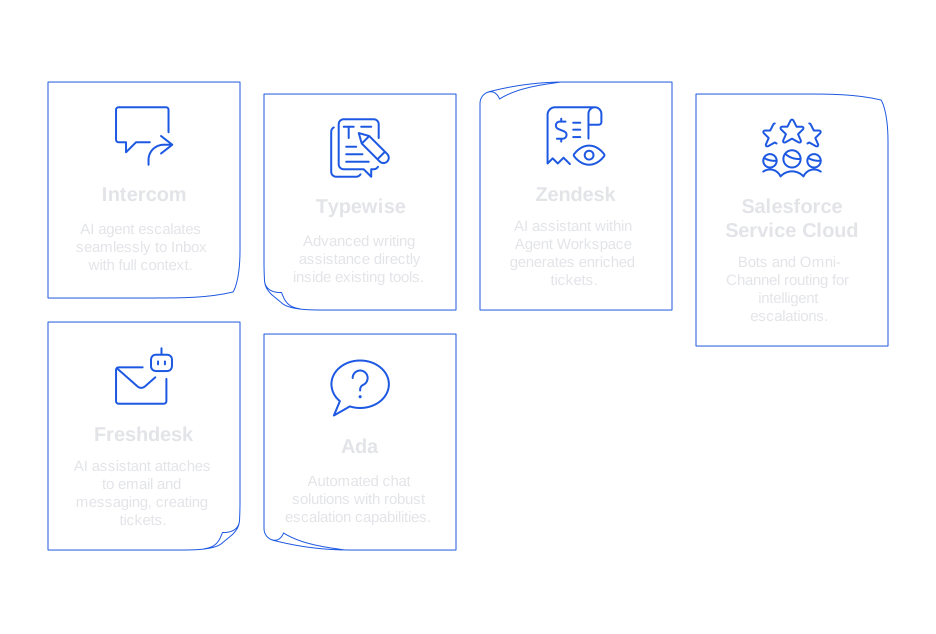
Intercom
Intercom provides an AI agent that escalates seamlessly to the Inbox when required. It shares the full context of interactions and supports well-defined fallback options. With native knowledge tools, Intercom’s assistant resolves common requests efficiently. This solution is ideal for teams already using Intercom chat as their primary customer engagement channel.
Typewise
Typewise delivers advanced writing assistance directly inside your existing tools, such as CRM, email, and chat. The AI drafts replies in your brand voice, letting agents accept, adapt, or escalate within a unified workflow. Escalation parameters are transparent, supervisors can define triggers, review outcomes, and refine agent prompts. Enterprises appreciate its strong privacy model and ability to maintain consistent, on-brand communications.
Zendesk
Zendesk’s platform integrates an AI assistant within the Agent Workspace, where escalated conversations generate tickets enriched with context. Flow Builder allows setting escalation rules based on confidence and topic. Existing Zendesk users will find this option easy to implement and manage.
Salesforce Service Cloud
Service Cloud uses bots alongside Omni-Channel routing for intelligent escalations based on agent skills, availability, or customer entitlement. The assistant pulls context from CRM records, making this an optimal fit for teams embedded within Salesforce.
Freshdesk
Freshdesk attaches its AI assistant to both email and messaging channels, with escalations automatically creating tickets that include previous messages. Agents leverage AI-suggested replies to resolve cases more efficiently. Its approachable setup makes Freshdesk a strong choice for small and mid-sized support teams.
Ada
Ada specializes in automated chat solutions with robust escalation capabilities. Integrated with major help desks, Ada escalates queries based on factors like customer frustration or AI intent confidence. This works well for growth-focused teams facing high chat volumes.
Also consider: Ultimate, Forethought, and Kustomer, especially if these tools are already part of your existing ecosystem.
Operational Playbook for Human-in-the-Loop Escalation in AI Customer Support
- Define escalation policy: Identify three initial escalation triggers, such as low confidence scores, VIP accounts, and high-risk customer intents.
- Structure the handoff: Ensure that the transcript, extracted entities, and a concise case summary are sent during handoff. Include recommended next steps for agents.
- Draft, then verify: The AI proposes a reply, which is then edited, personalized, and sent out by the agent.
- Capture outcomes: Record reason codes and resolution status for each escalation. Tag any knowledge gaps for further AI training.
- Refine knowledge: Continuously update your FAQs and response templates to further reduce the rate of escalations.
Precise language is essential. Build a living glossary and use few-shot examples. Use resources like release notes and playbooks to align AI output with your brand. For step-by-step guidance, refer to this method for training AI on internal product language.
Regular quality reviews are key. Commit to a weekly process where you sample handoffs, assess tone, and ensure compliance based on a defined rubric. For a repeatable process, review this checklist for auditing AI customer support conversations.
Metrics That Prove Human-in-the-Loop Escalation Works in AI Customer Support
- First Response Time: Monitor both the time to the first AI response and the first human reply. Find actionable tips in these seven ways AI improves first response time .
- Escalation rate: Evaluate escalation rates by intent and customer segment. High rates often reveal knowledge gaps or issues with escalation triggers.
- Handoff latency: Track the duration from escalation trigger to human acknowledgment. Set clear targets for each channel.
- Suggestion acceptance: Measure how frequently agents finalize and send AI-drafted replies with minor edits. Increasing acceptance rates indicate improving AI support.
- Resolution quality: Use CSAT or QA scores to compare the effectiveness of escalated cases against those handled entirely by automation.
- Cost per resolution: Factor in both AI computing resources and agent time. Effective escalation should decrease rework and unnecessary follow-ups.
Baseline these metrics before rollout. Revisit these metrics monthly. Ensure to share progress and areas of improvement with both operations and product teams.
Security, Compliance, and Data Residency for AI Customer Support with Human-in-the-Loop
Escalation workflows often handle sensitive information. Establish clear protections for PII, confidential data, and payment details. Redact sensitive content when feasible, and ensure proper masking for data at rest. Keep thorough logs of access and edits for each escalation event.
Confirm data residency options that align with your geographic requirements. Verify how model providers handle data retention and require deletion windows tailored to your policy. Prepare and document incident response steps for any escalations mishandled or misrouted.
Final Guidance on Selecting AI Customer Support Platforms with Human-in-the-Loop Escalation
Begin by mapping out the current responsibilities of your support team and identifying the top ten customer intents. Determine which can be automated and which require human escalation. Select a platform that accommodates your team’s workflows and leverages your training data for optimal performance.
There’s no need for a big-bang deployment. Launch with a single communication channel and target two high-value intents. Measure your progress, then expand as results are validated.
If you want a writing-first approach that easily integrates with existing systems, Typewise is a strong choice. For those seeking a comprehensive solution, consider platforms already used within your organization. Ultimately, your customers value fast, clear replies and effective resolutions, choose the platform that delivers both.
Ready to explore a streamlined rollout? Meet the team behind Typewise and discover how human-in-the-loop escalation can enhance your support experience. Book a short conversation and bring a recent case. We will collaborate on a practical implementation plan tailored to your needs.
FAQ
Why is context transfer important during escalation?
Proper context transfer ensures that human agents receive all relevant information without repeated customer prompts. Failing to do so can result in customer frustration and inefficiencies, jeopardizing service experience.
What challenges can arise from poor escalation triggers?
Ineffective escalation triggers can either cause unnecessary human intervention or leave complex issues inadequately addressed by AI. This not only affects customer satisfaction but also burdens support staff with preventable tasks.
How does Typewise assist in AI customer support?
Typewise enhances AI support by integrating writing assistance that aligns with an organization's brand voice. It facilitates efficient responses and allows easy escalation management, improving overall resolution quality.
What risks are involved with inadequate latency in escalation?
High latency in escalation leads to prolonged customer wait times, which can degrade trust and customer satisfaction. Effective monitoring and setting clear targets are crucial to mitigate these latency issues.
How can AI customer support platforms influence cost and efficiency?
AI platforms can reduce support costs by automating routine tasks, allowing human agents to focus on complex issues. Yet, poor execution or oversight could increase costs by causing rework and inefficient human resource allocation.
Why is data security critical in AI customer support systems?
AI systems handling sensitive customer data must implement stringent security measures to prevent breaches. Failure in this area can lead to severe compliance issues and damage to a company's reputation.
What role does Typewise play in ensuring consistent, on-brand communications?
Typewise provides AI-driven writing tools that ensure responses are in line with company branding, maintaining consistency across customer interactions. This capability supports unified communication regardless of who interacts with the customer.
How should a company begin integrating AI with human-in-the-loop escalation?
Start with identifying key intents suitable for automation and human intervention. Choosing a platform like Typewise that integrates smoothly with existing systems can help achieve efficient implementation.