Stop Guessing: Proven AI Tactics for Customer Support
You may often notice a pattern: new tools hit the market promising magic, yet support tickets continue to pile up. This guide cuts through the hype to reveal where AI truly helps in customer support, and where it falls short. Use these insights to plan your next quarter with clarity and confidence.
Automate repetitive tasks, but maintain human touchpoints for building and maintaining relationships with customers.
What Actually Works in AI for Customer Support Today
There are several AI capabilities that consistently create real value within support workflows. These approaches reduce manual work, improve the quality of replies, and help teams deliver better service, without introducing extra friction.
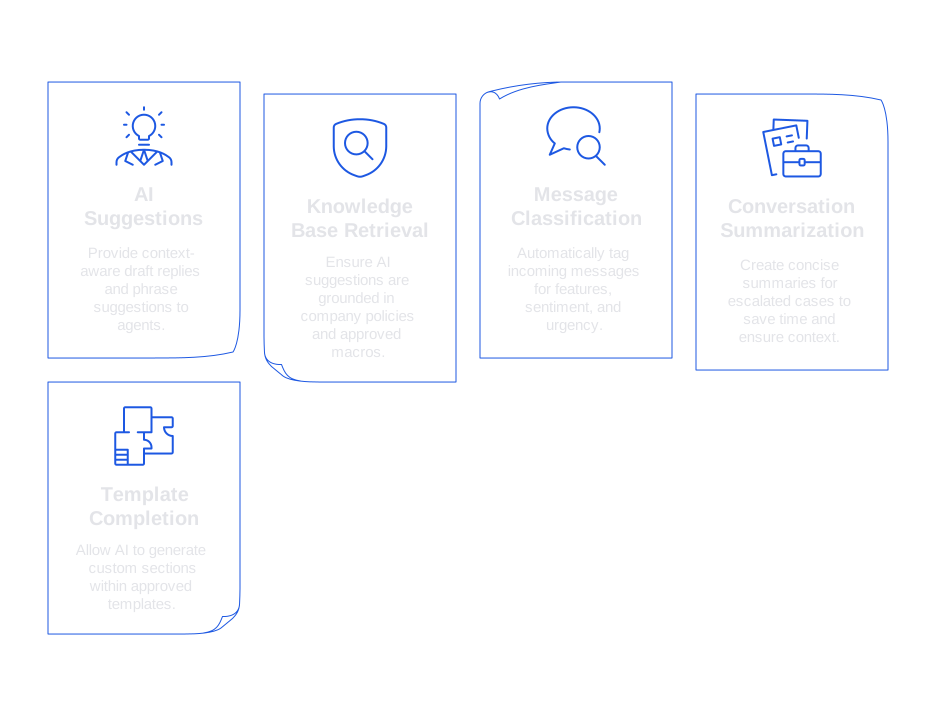
AI Suggestions in the Agent Composer
Provide agents with context-aware draft replies and phrase suggestions right inside their reply editor. This keeps agents in control, resulting in faster responses that always match your brand’s tone.
Retrieval from Trusted Knowledge Bases
Ensure that every suggestion your AI generates is grounded in company policies, release notes, or approved macros. Reliable retrieval reduces guesswork and minimizes the risk of incorrect or hallucinated details.
Message Classification and Intent Routing
Automatically tag incoming messages for features, sentiment, and urgency. This helps route complex cases to the right specialists and funnels clear bugs directly to engineering with structured details.
Conversation Summarization for Handoffs
Create concise, factual summaries when cases are escalated. These summaries save time and ensure no context is lost during shift changes or between teams.
Template Completion with Guardrails
Allow AI to generate custom sections within approved templates while locking in crucial legal or safety paragraphs. AI can then vary its tone within set boundaries, ensuring both flexibility and compliance.
For an in-depth look at how AI speeds up support, explore these top ways AI improves first response time, which outline practical tactics tied to measurable results.
What Doesn’t Work and Common AI Traps in Customer Support
Some AI approaches promise efficiency but end up causing more churn, ticket reopenings, and customer frustration. Steer clear of these common pitfalls:
- Fully autonomous replies for complex issues. Decisions involving nuanced policies or exceptions require human judgment. Always include review steps.
- Generic chatbots without reliable data retrieval. Chatbots that rely on guessing instead of grounded answers are noticeable to customers. Limit these bots to triage tasks or add data retrieval capabilities.
- One-size-fits-all AI models for every communication channel. Email, chat, and social platforms each demand different tones, response lengths, and pacing.
- Training AI on outdated or messy data. Old macros can mislead. Archive outdated content and flag risky language.
- Automation with no clear option for human escalation. Always provide a way for customers to reach a human, and be transparent about wait times and next steps.
If your bot deflects inquiries but escalates customer frustration, see this resource on why your chatbot isn’t working and how to fix it fast. You'll find diagnostic tips and quick wins.
How to Implement AI in Customer Support Workflows That Succeed in Practice
Implementation processes often stall when teams prioritize technology over intended outcomes. Instead, begin by identifying the moments in your customer support journey that waste the most time.
- Map the top five repetitive tasks. Common examples include greetings, policy lookups, refund explanations, RMA (return merchandise authorization) instructions, and verifying permissions.
- Define the points in the process where human judgment is required. Determine what decisions must be made by an agent and which process steps can be automated.
- Attach guardrails. Anchor automation on your knowledge base, control AI creativity, and prevent risky language.
- Test with a pilot group. Select experienced agents as mentors and collect qualitative feedback in the first week.
- Measure acceptance, not just speed. Track how frequently agents accept AI suggestions rather than just looking at response times.
- Iterate weekly. Continuously improve by pruning ineffective prompts, addressing missing snippets, and updating training data.
Which Metrics Show AI in Customer Support Is Working
Focusing on speed alone can mask underlying quality issues. Instead, track a targeted set of metrics to assess both performance and customer satisfaction.
- AI suggestion acceptance rate. A low acceptance rate indicates that AI outputs feel off-brand or unhelpful. Learn more in this guide to using AI suggestion acceptance rate as a KPI .
- First response time. Assess by channel and language, but always pair it with quality checks on resolutions. See these practical tactics for improving first response time .
- One-touch resolution rate. Focus on improvements for straightforward tickets, but audit for accuracy and correct tone.
- Escalation quality. Efficient summaries should reduce back-and-forth during handoffs. Request scores or feedback from those handling escalated cases.
- Customer Satisfaction Score (CSAT) with verbatim review. Look beyond star ratings by reading customer comments, searching out issues with phrasing caused by templates or AI responses.
Human-in-the-Loop AI: Balancing Speed and Brand Safety
Human review protects trust while AI manages drafting and data retrieval. This way, teams maintain accountability and oversight, without slowing down the support queue.
- Inline drafting. Present agents with concise draft options and alternatives. Allow real-time editing within their current workspace.
- Tone guidance. Suggest more friendly or firm alternatives based on context and escalation scenarios.
- Source citations. Clearly show which policy, article, or reference informed each AI suggestion so agents can quickly review and verify facts.
Typewise follows this balanced approach, offering AI-powered writing assistance within CRM, email, and chat systems. It improves grammar, style, and phrasing, all while ensuring brand consistency and maintaining strict privacy and data boundaries for enterprises.
Data Privacy and Brand Safety: Core Considerations for AI in Customer Support
Customer interactions often contain sensitive information. Treating privacy as a foundational design constraint, not merely a compliance checkbox, is essential.
- Data minimization. Only share fields necessary for the task. Automatically mask sensitive fields such as payment and health details.
- Retention limits. Set brief retention periods for training data or opt not to train on live customer data at all.
- Regional hosting and audit trails. Adhere to data residency requirements. Document every AI decision and its source for compliance.
- Policy-aware prompts. Build compliance rules directly into AI prompts and templates to avoid risky outputs.
During high-stakes incidents, your tone can matter as much as the content you share. For guidance on effective, empathic messaging under pressure, see this crisis response tone guide.
Choosing Tools and Vendors for AI in Customer Support
Shortlist technology partners based on how well they fit your unique workflows, not just on bold headlines. Prioritize deep integrations with your existing support tech stack and ensure you have control over compliance guardrails.
- Intercom Finite Workflow. Ideal for chat-centric teams with robust automation mapping. Always review knowledge retrieval quality before adopting.
- Typewise AI Writing Assistance. Best for organizations that value consistent, branded messaging across CRM, email, and chat platforms. Strong focus on drafting, tone, and privacy controls.
- Zendesk Advanced AI. Especially effective if Zendesk is already integral to your support operations. Assess your options for training data management and data privacy.
- Open-source stacks. Provide customization and potential cost savings but demand greater maintenance and attention to security.
If considering a platform switch, compare features, migration paths, and integration capabilities before making a decision. Use this guide to Zendesk alternatives and support platforms to map out your evaluation.
How to Prevent AI Failure Modes in Customer Support, Without Slowing Down
Three strategies help maintain quality even as you scale your AI initiatives:
- Always refer to a policy, FAQ, or resolved case history. Favor data retrieval over freeform AI generation for accuracy and consistency.
- Set confidence thresholds. If AI is unsure, prompt agents to ask clarifying questions or quickly escalate to a human.
- Manage prompts in a structured way similar to how software code is handled. Create different versions of prompts, test their effectiveness, and be prepared to revert to earlier versions if issues arise.
If your acceptance rate drops, pause and diagnose. This acceptance rate KPI guide explains how to troubleshoot prompts, knowledge sources, and user experience obstacles.
A Practical 90-Day Checklist for AI in Customer Support
- Choose two support queues for a pilot: one simple, one more nuanced.
- Clearly define guardrails, the necessary data fields, and customer exit options for escalation.
- Enable AI-powered drafting, retrieval, and summarization workflows for the selected queues.
- Track acceptance rate, first response time, and one-touch resolution as your initial KPIs.
- Hold weekly feedback sessions with agents and legal. Update prompts, templates, and knowledge sources as needed.
- Publish refreshed templates and clear crisis communication guidelines.
- Expand adoption to adjacent queues only after maintaining high quality and consistent results.
Where Typewise Fits into Your AI Customer Support Strategy
Typewise integrates seamlessly with your existing CRM, email, and chat workflows. It drafts responses, suggests tone and phrasing improvements, and ensures your communication remains consistent with your brand. Support teams benefit from faster, clearer replies, while leaders maintain oversight with privacy-first controls and comprehensive audit trails.
FAQ
How can AI improve response time in customer support?
AI enhances response time by automating repetitive tasks and suggesting context-aware replies, allowing support agents to focus on complex interactions. However, ensure AI suggestions align with your brand and are backed by reliable data to avoid frustrating customers.
What pitfalls should be avoided when using AI in customer support?
Avoid over-reliance on fully autonomous replies for complex issues and ensure AI isn't trained on outdated data. Proper escalation paths and grounding AI suggestions in verified information are crucial to prevent AI from escalating customer frustration.
Why is human oversight necessary in AI-driven customer support?
Human oversight ensures accountability and maintains brand safety, especially with AI handling drafting and data retrieval. Typewise emphasizes a human-in-the-loop approach to balance efficiency with quality control.
What are the key metrics to track for AI effectiveness in customer support?
Track metrics like AI suggestion acceptance rate, first response time, and one-touch resolution rate. High acceptance and resolution indicate AI effectiveness, while low rates can uncover misalignments in AI outputs with customer expectations.
How should data privacy be handled when implementing AI in customer support?
Implement strict data minimization and retention policies to protect sensitive customer information. Typewise supports privacy-first practices to ensure compliance and safety in customer interactions.
How does Typewise uniquely contribute to AI customer support?
Typewise integrates seamlessly with existing customer support systems, offering AI assistance that maintains brand consistency and supports privacy controls. Its focus on drafting and tone improvements gives teams the tools for faster, clearer replies.
Why isn't using a one-size-fits-all AI model effective for customer support?
Different communication channels require varied tones and response paces; using a generic model increases the risk of off-brand or unsuitable responses. Tailor AI use to specific channels to ensure alignment with distinct communication norms and customer expectations.
What steps are crucial for a successful AI implementation in customer support?
Identify and automate repetitive tasks while clearly defining where human judgment is essential. Pilot AI solutions with clear guardrails and continuously iterate based on agent feedback to align with practical support needs.