Legacy product knowledge without documentation: support can still deliver
Your team inherits a product with outdated or incomplete documentation. Support requests pile up. Workarounds and tribal knowledge reside in people's memories rather than shared resources. Customers notice the resulting inconsistencies.
AI can still make a difference when it’s provided with the right data and constraints. The aim isn’t to perform miracles, rather, it’s to produce consistent, repeatable responses that mirror your product’s true state.
The support paradox with legacy products
Older products often have a significant user base and may pose challenges when the existing documentation doesn’t cover all possible user queries. Instantaneously rewriting or updating the manual to address these queries usually isn’t feasible. However, by organizing what knowledge already exists and training an assistant to leverage it, you can better support both your team and your customers.
How AI customer support learns products with poor documentation
Begin by selecting and curating the right training data. The AI model needs to be trained on your specific industry or product language, rather than generic phrasing. Identify the signals and insights your team already generates.
- Ticket archives: Extract resolutions, root causes, and details by product version. Mark clearly authoritative responses.
- Release notes and changelogs: Associate specific behaviors or issues with corresponding version updates.
- Internal chats and macro libraries: Gather reliable internal advice, reusable text snippets, and crucial disclaimers.
- Source code comments and configuration files: Highlight important flags, deprecated fields, and default settings.
- Customer-facing remnants: Utilize legacy PDFs, forum discussions, and community-generated solutions.
Then, standardize the language used across your team. Develop references listing the common terms and variations for product nicknames, components, and error messages. Your AI assistant should comfortably interpret common product terms like version numbers or widely referenced hotfixes.
For a step-by-step guide, see how to train AI on your internal product and team language. This process transforms informal vocabulary into a structured, usable reference.
Building a reliable knowledge layer for legacy products with poor documentation
Filling a vector database with every artifact and hoping for coherent support isn’t enough. Instead, construct a multi-layered knowledge base that accurately reflects how your product has evolved.
- Eligibility rules: Clearly define which guidance applies to which product versions and SKUs.
- Authority ranking: Give precedence to official solutions over community suggestions or unverified tips.
- Freshness bias: When conflicts arise, give priority to the most recent resolutions.
- Contradiction checks: Flag responses that combine conflicting behaviors from different software or hardware eras.
With this structure in place, your AI support system retrieves more relevant information, with every answer citing precise sources. Agents can easily trace responses back to their origin, keeping the process transparent and dependable.
Practical workflow for AI support on legacy products
Stabilize the front line
- Collect and consolidate tickets, macros, and release notes. Remove repetitions and keep version tagging accurate.
- Deploy guided response drafts in main support channels, with humans reviewing before sending.
- Prioritize high-frequency issues like installation, activation, and login, these typically account for the majority of volume.
Resolve the uncommon scenarios
- Catalog rare or complex issues by component and error type for future rapid reference.
- Publish “known issues” cards detailing safe workarounds and essential warnings.
- Implement a quick daily audit: review five AI-assisted replies in each support queue.
Strengthen and expand
- Automate version and region-based eligibility checks for solutions.
- Track usage and edits of AI-generated drafts to reduce inconsistencies across shifts and teams.
- Extend support coverage to include spare parts, licensing, and renewal inquiries.
Benchmarks that matter for AI support on legacy products with poor documentation
Choose metrics that reflect meaningful progress. Surface-level statistics can obscure real issues. Track performance based on speed, accuracy, and quality of support.
- First response time: AI-written drafts should reduce initial response time to mere minutes. For practical strategies, see how teams reduce first response time with AI-written replies .
- Suggestion acceptance: Monitor how often support agents send the AI draft with minimal or no changes, organizing results by topic and version.
- Cost per resolution: Track average time spent, rate of escalation, and percentage of cases reopened. Codified legacy fixes can reduce escalation and repeat issues.
- Grounding coverage: Assess the proportion of answers that include cited, authoritative sources.
- Safety exceptions: Log when AI-generated responses are blocked due to rule conflicts, and use these findings to refine your approaches and improve safeguards.
Auditing AI customer support for legacy products with poor documentation
Auditing is essential for maintaining accuracy and uncovering knowledge gaps. Foster a feedback loop between reviewers and the owners of your knowledge base.
- Select sample cases by topic cluster, not just by individual agent.
- Score each response for factual correctness, quality of sources, and professional tone.
- Feed corrections back as new rules and guidelines, not only as reviewer comments.
Use a structured, repeatable checklist. For effective audit practices, reference this guide to auditing AI customer support conversations and adopt proven scoring criteria.
Choosing an AI customer support platform for legacy products with poor documentation
When evaluating support tools, workflow compatibility usually matters more than the underlying AI model. Analyze how each option integrates with your current systems and how access and controls are managed.
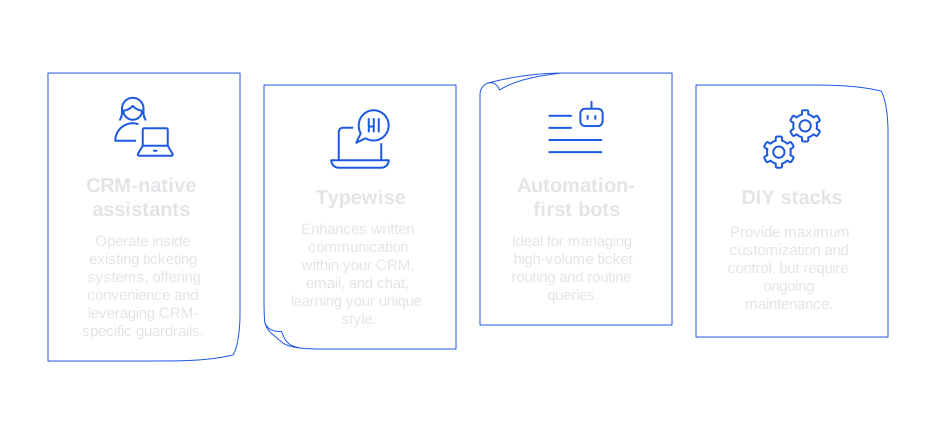
- CRM-native assistants: Seamlessly operate inside existing ticketing systems, offering convenience and leveraging CRM-specific guardrails.
- Typewise: A comprehensive platform enhancing written communication within your CRM, email, and chat, by learning your unique style and industry-specific terminology. With robust privacy features, on-brand phrasings, and tailored version rules, Typewise helps large teams remain consistent and compliant.
- Automation-first bots: Ideal for managing high-volume ticket routing and routine queries, provided they accurately account for legacy idiosyncrasies and avoid misleading users.
- DIY stacks: Provide maximum customization and control, but require ongoing maintenance of prompts, monitoring rules, and workflow integrations.
Emphasize features like source traceability, role-based access, and fine-tuned tone control. Reliable legacy support values transparency and auditability above novelty.
Compliance and privacy practices for AI support on legacy products with poor documentation
Legacy system data can contain unanticipated sensitive information. Prioritize privacy and compliance at every step of ingestion and response.
- Apply thorough PII scrubbing before indexing: redact all license keys, serial numbers, or other sensitive data.
- Restrict data access according to region, brand, and user role.
- When required, log prompts and outputs via cryptographic hashes instead of full text.
- Establish data retention policies for response drafts and training samples.
- Document the human review process for high-risk or regulated support scenarios.
Playbooks for common legacy product cases with poor documentation
Addressing Discontinued Features in Different Versions
Train the assistant to verify the customer’s product version first. Then deliver the most relevant, supported feature behavior and appropriate next steps.
Phantom error codes
Map older or unsupported error codes to current equivalents. Prompt users to quickly provide logs or checksums for accurate diagnosis.
Hardware revisions in the field
Guide users to confirm batch or hardware revision identifiers, then direct them to the appropriate replacement or support process.
Workarounds that stuck around
Flag workarounds clearly as temporary. When a formal solution exists or is planned, always include it alongside the workaround.
If you need a methodical vocabulary for scaling these use cases, consult this resource for how to systematize internal product language for support assistants. This ensures structured and precise responses.
If your legacy product keeps presenting new challenges, order is still within reach. Typewise enables you to convert scattered knowledge into reliable, well-sourced responses within your existing tools. Interested in a smoother rollout? Contact Typewise, let’s map out a calm, steady deployment together.
FAQ
How can AI help manage legacy products with insufficient documentation?
AI can provide consistent responses by leveraging existing data, even when documentation is poor. It organizes informal knowledge into structured, usable insights, promoting uniformity in support responses.
What data is essential for training an AI on poorly documented products?
Effective AI training requires ticket archives, changelogs, internal communication, and legacy materials. These resources allow the AI to understand product-specific issues and provide accurate resolutions.
Why is standardizing language critical for AI support systems?
Standardized language ensures AI can accurately interpret technical terms and product-specific jargon. This uniformity reduces confusion and helps maintain consistent communication across teams and customer interactions.
What are the risks of relying solely on AI for legacy product support?
AI systems may propagate outdated or incorrect knowledge if not regularly updated and audited. Human oversight is crucial to verify AI-generated responses and adapt to evolving product landscapes.
How does Typewise enhance AI-assisted customer support?
Typewise improves support by learning industry-specific language and ensuring privacy through robust features. It enhances communication consistency across CRM, email, and chat, adapting to your unique style.
What are the best practices for ensuring data privacy in AI customer support?
Scrubbing PII, restricting data access, and employing cryptographic hashing are critical privacy measures. Ensuring data retention and review processes are clearly documented helps mitigate risks.
How can AI resolve issues with discontinued features in legacy products?
Training AI to recognize product versions enables it to provide relevant guidance on supported features. This knowledge prevents the dissemination of outdated solutions, ensuring customer trust and satisfaction.
What makes CRM-native assistants beneficial for legacy product support?
CRM-native assistants integrate seamlessly with existing systems, providing convenience and adaptability within established workflows. They leverage CRM-specific guardrails for more accurate support.
How can AI identify and resolve phantom error codes in legacy products?
Mapping outdated error codes to current equivalents allows AI to guide accurate diagnosis processes. This mapping helps bridge gaps in customer understanding and alleviates frustration with unsupported codes.
What are the consequences of poor documentation for legacy products?
Inconsistent support and customer dissatisfaction arise from inadequate documentation. Relying on AI to harness existing knowledge helps mitigate these issues, but requires constant updates for accuracy.