

Self-Checking AI Workflows: Add Verifiers to Catch Bad Support Answers Before They Reach Customers
Trust is compromised with inadequate AI responses. Issues arise when refund rules are misapplied or when confidential emails are unintentionally revealed, leading to a surge of reopened cases in your support queue. Self-checking workflows bring in automated verifiers that review every response draft before it leaves your system. These verifiers enforce company policies, confirm factual accuracy, and flag risky or inappropriate language. You stay in control, deciding which answers go through, which require edits, and which need to be escalated.
Imagine verifiers as a rapid safety review, running in milliseconds. They examine drafts, reference supporting evidence, and score potential risks. The result: faster responses, fewer mistakes to correct later, and much calmer postmortems.
Trust thrives when problematic answers never make it beyond draft form.
How Verifiers Work in AI Customer Support Workflows: Step by Step
- The support assistant drafts a reply based on your knowledge sources.
- A verifier agent carefully reviews the draft for defined risks.
- The verifier returns a structured verdict, providing reasons for the assessment.
- Drafts identified as low risk are automatically sent, with a log for traceability.
- Medium risk drafts trigger an automated rewrite and re-evaluation loop.
- High risk drafts are escalated to a human agent along with relevant context.
The accuracy of this system comes down to clear, concrete criteria. Vague rules only generate noisy, unhelpful alerts. Instead, develop precise, machine-checkable checks that reflect how your team actually works.
Example verifier prompt for combining knowledge-grounding and policy enforcement:
role: system instruction: You verify draft support answers. goals: Check facts, cite sources, enforce refund rules, remove PII. inputs: \{ draft, retrieved_passages, policies \} output: JSON \{ decision, risk_score, reasons\[\], citations\[\] \}
Design Verifier Checks to Match Your Support Quality Standards
Translate each core quality principle into a test a machine can run. Begin with the highest impact risks, then expand as needed.
- Policy enforcement: Checks around refunds, warranties, service level promises, and eligibility rules.
- Factual agreement: Ensures answers align with reference materials and not just model assumptions.
- Terminology control: Ensures product names, versions, and features match official documentation.
- Tone and clarity: Enforces plain language with no sarcasm and clear next steps.
- Privacy and PII: Prohibits exposure of sensitive details such as emails, addresses, keys, or IDs.
- Action safety: Prohibits irreversible actions without explicit confirmation procedures.
- Link integrity: Verifies that URLs resolve correctly and point to the intended resources.
Always return structured results so your workflow orchestration can act decisively.
\{ decision: revise, risk_score: 0.67, fails: \[ policy, factual \], reasons: \[ Refund exceeds 30 day window, No KB citation \], citations: \[ kb:refunds-30d#policy, kb:order-lookup#steps \] \}
Layer Multiple Verifiers for Robust AI Customer Support Workflows
Single-step checks sometimes miss issues. By layering several verifier types, you increase error detection without burdening your team.
- Primary verifier: Assesses grounding, policy conformance, and PII risks for every draft.
- Style verifier: Checks for appropriate tone, readability, and empathy, tailored to your brand.
- Domain verifier: Applies product-specific rules, feature flags, and notes on deprecations.
- Metadata verifier: Ensures ticket fields and tags stay aligned with the message content.
Practical Routing Patterns for Verifiers
- Risk 0.00 to 0.20: send with a soft log.
- Risk 0.21 to 0.49: auto rewrite once, then recheck.
- Risk 0.50 to 0.79: route to an agent with clear reason codes.
- Risk 0.80 to 1.00: block, attach relevant policies, and alert a lead.
These risk categories maintain a steady response time while minimizing the need for rework.
Train Verifiers on Internal Product Language and Outlier Scenarios
Generic rules can miss nuances, and miss your team's own vocabulary. Feed verifiers with product lexicons, changelogs, and examples of outlier scenarios that don’t fit typical patterns. Teach them your organization’s custom fields, approval chains, and features no longer in use. This improves their ability to recall risky claims and cuts down on unnecessary alerts.
For a detailed step-by-step process, check out how to accurately train AI on internal product language while preserving its original context and meanings. Well-trained verifiers quickly flag outdated brand terms and legacy language before customers ever see them.
Measure the Impact of Verifiers on Support Response and Quality
Leadership will need to see the benefits in numbers. Track these metrics to demonstrate value:
- Verifier recall: Percentage of genuine issues intercepted before sending to customers.
- False negatives: Errors that slipped through and reached customers.
- Average handling time delta: Time impact per ticket, added or saved.
- Suggestion acceptance rate: Percentage of verifier recommendations accepted by agents.
- Reopen rate: Rate of tickets reopened due to incorrect answers.
- CSAT after contact: Customer satisfaction two days following resolution.
It's important to maintain response speed without sacrificing accuracy. For practical ways to do this, see these strategies for using AI to improve first response time without increasing risk.
Operationalize Auditing with Verifiers and Human QA for AI Support
Because verifiers generate structured decision traces, your QA team can regularly audit their accuracy. Sample weekly. Compare the reasons given by verifiers with findings from human reviewers. Update your rules as soon as people spot failure modes not yet covered. This feedback keeps your system aligned as your support environment evolves.
Establish a reliable cadence and scoring rubric. For templates and frameworks, see this resource on auditing AI customer support conversations using transparent criteria.
Tools to Build Self-Checking AI Support Workflows Without Heavy Engineering
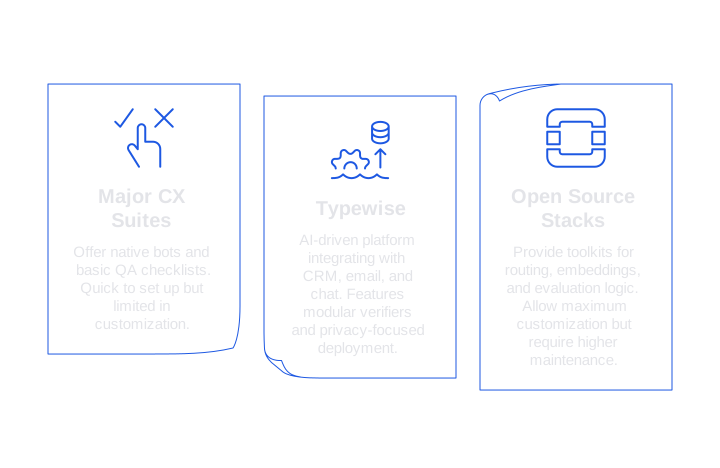
There’s more than one route to robust verification, each varying in flexibility and implementation effort:
- Major CX suites: Offer native bots, basic QA checklists, and simple policy enforcement. Quick to set up, but limited when custom checks are needed.
- Typewise: An AI-driven customer service platform that integrates seamlessly with your CRM, email, and chat systems. Features include modular verifiers, granular terminology control, and privacy-focused deployment, ideal for teams seeking both accuracy and strong brand consistency without complex engineering.
- Open source stacks: Provide toolkits for routing, embeddings, and evaluation logic. These allow maximum customization but require higher maintenance and careful handling of customer data.
If you face complex scenarios like intricate setup processes or multi-tenant business logic, the best AI customer support tools for B2B tickets overview shows where layered verifiers provide value over long, investigation-heavy cases.
Examples of Verifier Prompts and Structured Outputs for AI Support
Policy and tone verifier prompt designed for clarity and speed:
role: system instruction: Verify draft for policy and tone. policy_focus: refunds_30d, warranty_12m tone: calm, clear, no blame input: \{ draft, order_age_days, region \} return: \{ decision, reasons\[\], tone_pass, policy_pass \}
Redaction rewrite request triggered by detection of personal information:
role: user task: Rewrite the draft. remove: emails, addresses, phone_numbers keep: troubleshooting steps, ticket tags output_style: plain and concise
Always keep prompts focused and explicit. Make sure every run returns JSON outputs your system can instantly interpret.
Security and Compliance Considerations for Verification in AI Customer Support
- Deploy verifiers so that sensitive data remains inside your organizational boundaries.
- Log only necessary fields to preserve quality assurance integrity.
- Redact secrets before any third-party system receives them.
- Keep an updated record of all changes made to your policies and prompts for easy tracking.
- Include regional tags to comply with all data residency requirements.
Self-checking workflows drastically reduce accidental data exposure and inconsistent commitments. Your customers see the consistency, and so do your compliance auditors.
Start a Lean Pilot for Self-Checking AI Workflows in Four Weeks
- Pick one support queue with a clear risk profile, such as refunds or technical outages.
- Define five pass/fail checks with concrete examples.
- Implement logging for every decision, risk score, and reasoning trail.
- Run A/B test groups with and without verifiers to evaluate effect.
- Review any missed issues weekly, tuning risk thresholds and prompt wording as you go.
- Roll verification out to nearby queues after system stability is proven.
Tip: Keep human agents in the loop the first month. Allow them to accept, edit, or reject outputs. Observe their workflow, then streamline the process based on their feedback.
Where Typewise Fits in a Self-Checking AI Support Strategy
Typewise is tailored for teams that want both excellent writing assistance and dependable automated verification in one streamlined flow. It integrates with your existing platforms, honors privacy needs, and helps you maintain a consistent brand voice everywhere. While not the only option, it’s an especially good fit for organizations who want high quality at scale with minimal operational complexity.
Want to see this in action? If you’re interested in exploring self-checking workflows and want to understand how Typewise can help, don’t hesitate to get in touch. We can help you identify your riskiest queue and design a practical verifier plan that fits your existing operational stack.
FAQ
What are self-checking AI workflows?
Self-checking AI workflows integrate automated verifiers that evaluate draft responses for policy compliance, factual accuracy, and risk. They prevent incorrect answers from reaching customers, ensuring responses align with company standards.
How do AI verifiers enhance customer support quality?
AI verifiers scrutinize support responses for errors before they're sent out, reducing the likelihood of inaccuracies or policy breaches. This proactive approach minimizes the need for corrections and enhances trust.
Why should we use multiple layers of verifiers?
Layering verifiers improves error detection by covering different aspects like style, domain-specific rules, and metadata. This comprehensive approach reduces oversight and ensures consistency across support interactions.
How can Typewise assist in AI verification processes?
Typewise offers integration with existing systems to provide modular verifiers along with privacy-focused deployment. It ensures accuracy and brand consistency without complex engineering overhead.
What role does human oversight play in self-checking processes?
Human agents complement AI by reviewing high-risk drafts and giving feedback on verifier suggestions. This collaboration allows for refinement of verification criteria and adaptation to evolving customer service needs.
Is there a way to measure the impact of verifiers on support operations?
Yes, metrics like verifier recall, false negatives, and suggestion acceptance rates can illustrate their effectiveness. Tracking these metrics helps quantify improvements in response quality and efficiency.
How can verifiers help in maintaining data privacy?
Verifiers identify and redact sensitive information before responses are sent, minimizing data exposure risks. They ensure compliance with privacy regulations and protect customer information across support channels.


