


Human Override in AI Support: Stay in Control and Build Trust
Customers trust automation when they know human intervention is available when necessary. Human override isn’t a panic button, but a safety net ensuring that the right levels of control and accuracy are maintained. When it’s clear that your team can step in and adjust or correct as needed, trust grows, escalations feel justified, and CSAT remains stable, even in challenging scenarios.
Having a robust human override also safeguards your support agents. It provides a clearly sanctioned path to review, modify, pause, or halt AI processes. When structured well, this practice minimizes rework, manages risk, and ensures feedback loops stay aligned with real-world learning.
Governance for AI Support: Clear Roles, Permissions, and Audits
Your policy should identify who has the authority to override, under what circumstances they should do so, and how the system documents these overrides. Keeping policies straightforward and explicit helps teams act with clarity and confidence.
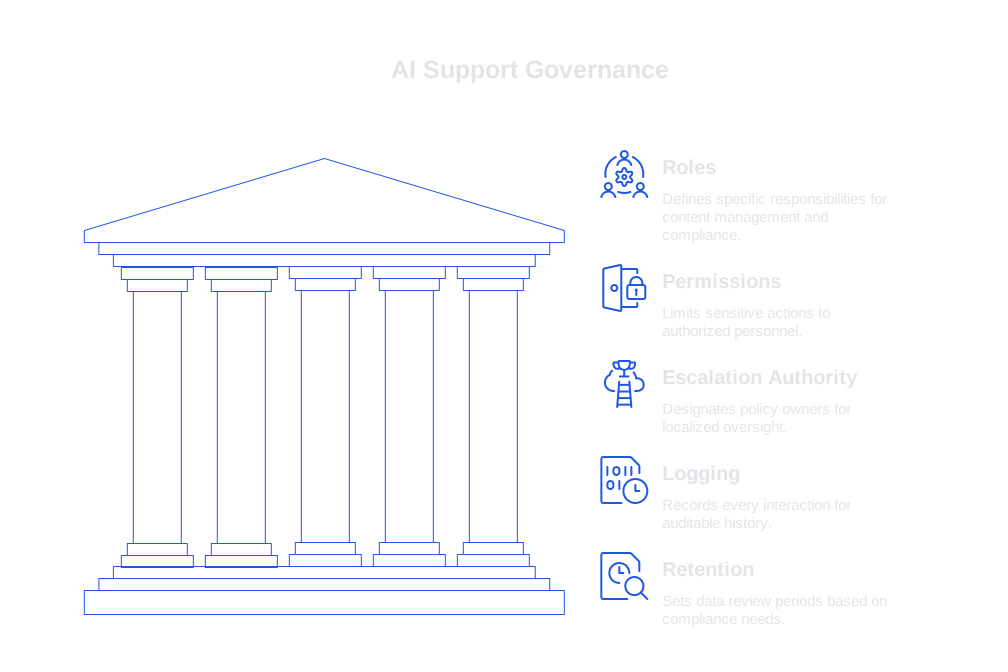
- Roles: Define specific responsibilities such as the author, who inputs the content; the approver, who reviews and signs off; and the auditor, who ensures compliance. Assigning each role distinct permissions supports smoother workflows and accountability.
- Permissions: Limit sensitive actions, such as redacting, resending, or deleting data, to only those explicitly authorized.
- Escalation Authority: Designate policy owners by queue or region to ensure oversight is localized and direct.
- Logging: Record every prompt, version, edit, and relevant timestamp to build an auditable history.
- Retention: Set data review periods that match your compliance and privacy requirements.
Review and update your policy quarterly to adapt as new use cases arise. Evolving, rather than static, rules foster resilience and relevance.
UX Patterns for Human Override That Customers Instinctively Understand
Effective oversight should feel straightforward and transparent. UX patterns should make system status obvious, allow easy corrections, and display a clear trail of evidence.
- Draft then Approve: Let AI generate drafts, but give agents the ability to review and approve with a single click.
- Inline Citations: Link every fact or recommendation to its source, showing exactly what data the AI has relied on.
- Confidence Labels: Surface confidence as plain language, not scores. For example: High confidence on billing, low on contract terms.
- One Click Escalate: Keep the escalation button adjacent to the reply panel, with a reason picker to justify escalation decisions.
- Preview Mode: Allow agents to see their reply in customer view before finalizing and sending.
- Timeout Rescue: If the AI gets stuck, automatically return control to the human agent promptly.
Polish your microcopy for clarity and tone. For instance, Hand off to a specialist sets a friendly, collaborative context, while Abort feels abrupt and negative.
Escalation Policy That Balances Speed and Safety
Establish escalation triggers that are clear, specific, and tied to direct actions and service level agreements (SLAs). Avoid vague instructions, agents should never have to guess when escalation is needed.
- Low confidence on regulated topics: Route issues to senior agents within two minutes.
- Three unhelpful AI responses in a row: Immediately offer live chat or the option to schedule a call.
- Contract, legal, or high-value refund requests: Automatically direct these to the appropriate billing or legal teams.
- VIP or renewal at risk: Notify the assigned account owner as soon as potential issues arise.
- Security-related keywords: Instantly lock the conversation and alert your security lead.
Document these trigger rules in your runbook. Train your team using authentic support transcripts, and run monthly tabletop drills to keep response skills sharp.
Data Governance and Auditing: Simplifying Risk Reviews
Auditors require concise, thorough records that enable efficient reviews. Structure logs to minimize noise but retain full context through smart conversation-level grouping.
- Organize audit trails by conversation thread rather than individual messages for faster, clearer reviews.
- Log model version, prompt, retrieval sources, and all edits for accuracy and transparency.
- Redact personally identifiable information (PII) before storage, using reversible tokens only when absolutely necessary.
- Tag each reply with relevant policy markers, such as refund or medical.
For a detailed step-by-step process, refer to the guide on auditing AI customer support conversations. Their framework will help you set sampling rates and create scalable checklists as your support volume grows.
Self-Checking Workflows That Reduce Override Burden
Filter and improve weak AI responses before they reach agents by adding automated verifiers for key quality signals. These checks help decide whether to publish a draft, request edits, or trigger escalation without overburdening your human team.
- Fact Match: Compare claims with entries in your knowledge base for validation.
- Policy Fit: Automatically reject offers, refunds, or advice that fall outside policy boundaries.
- Safety Check: Detect risky subjects or missing disclaimers in the content.
- Language Fit: Enforce correct product terminology and ban prohibited phrases.
For more details on staging verifiers, see the article on self-checking AI workflows for catching poor support answers. This resource illustrates how to automate checks before escalation is even needed.
Incident Response in AI Support: Rapid, Reliable Recovery
Inevitable incidents, such as hallucinations, failures in handoff, or outages, demand a structured playbook. Treat these as you would any product-related issue with a well-defined escalation plan and communication process.
- Classification: Clearly label each incident (e.g., P1, P2, P3) with concrete examples.
- Containment: Pause or disable problematic prompts and affected flows immediately.
- Customer Notice: Send a simple, direct notification with status and timing updates.
- Backfill: Direct human resources to critical queues during outages or recovery periods.
- Postmortem: Document root causes and define specific follow-up actions to prevent recurrence.
For templates and practical exercises on managing AI-related incidents, see our AI incident response guide for support teams. Consistent practice will significantly improve your response times and outcomes.
Prompt Patterns You Can Use to Support Human Override
Prompts and tool instructions should clarify the chain of control and set explicit boundaries for deferral and source attribution. Clear, actionable language leaves no room for ambiguity or error.
system: You assist customer support. Never guess on legal topics, refunds over $100, or security matters. If information is uncertain or evidence is weak, escalate to a human. Always cite retrieved sources inline.
tool policy: if confidence < 0.6 OR customer repeats issue three times THEN set escalate_reason = unclear or high risk AND initiate handoff_to_agent.
agent assist: Before sending, show a difference check with product-approved terminology. Highlight any banned phrases. Offer three concise rewrites that align with policy.
Keep prompts concise with well-defined cutoffs and next actions. Clarity prevents surprises and errors during handoff.
Selecting AI Support Platforms That Enable Seamless Human Override
Select a platform with intuitive approval flows for rapid content review, granular permissions for precise role management, and transparent logs that enable full oversight. Ensure the platform integrates smoothly with your CRM and communication tools so that everything fits naturally into your existing support processes. Whenever possible, prioritize solutions that let you test with your own real-world data instead of relying solely on staged demos, this shows how the system truly performs under your unique operating conditions.
- Single-click draft approval for easy oversight.
- Detailed event-level logging for actions on prompts and retrievals.
- Redaction at both ingestion and display stages to protect privacy.
- Fallback and rerouting features that account for business hours and geographic regions.
- Customizable verifiers and comprehensive incident recovery controls.
Several vendors offer these core features. Typewise is one example, with a focus on enterprise privacy, robust workflows, and seamless integration with leading CRMs and chat systems. Include it on your shortlist and compare with other frontline support platforms to find the best fit for your governance needs.
Operational Metrics for Tracking Human Override in AI Support
Track metrics that measure safety and service quality, not just volume. Begin with a short list, update weekly, and connect your analysis directly to your review routines.
- Override rate: the percentage of times AI drafts are edited or stopped by agents.
- Escalation accuracy: the proportion of escalations that were truly necessary.
- First response time: monitor AI vs. manual response speeds by queue.
- Containment rate by segment: assess where humans still outperform the AI.
- Revert rate: how often agents need to undo prior AI-generated replies.
- Policy breach count: number of incidents prevented due to timely overrides.
- Training impact: types of errors eliminated after system updates or retraining.
Integrate these metrics with your regular review process. Coupling metrics with targeted audits transforms numbers into insights and actionable improvements.
Unite Governance, UX, and Escalation in a Living System
Building trust is an ongoing, daily discipline. Your governance sets the standards, user experience puts those standards in action, and smart escalation procedures resolve complexity with fairness and integrity. Treat all these functions as interlocking loops, not isolated efforts.
For deeper guidance, explore our resources on auditing AI support, self-checking workflows, and incident response. Start with a pilot in a single queue, set measurable goals, and review weekly. The path to effective, humane oversight will become clearer with every iteration.
If you’re ready to design a tailored override strategy for your organization, connect with our team at Typewise. We can share practical templates and guide you in testing these patterns in your unique environment.
FAQ
What is the purpose of a human override in AI support?
A human override serves as a critical safety net, ensuring control and accuracy when AI falls short. It's not merely a panic switch but a trusted mechanism to correct and optimize automated processes, maintaining customer and agent confidence.
How should companies define roles and permissions in AI governance?
Define clear, specific roles such as authors, approvers, and auditors to streamline workflows and enhance accountability. Limit permissions to mitigate risks; only authorized personnel should perform sensitive actions like data redaction and deletion.
What are some key UX patterns that facilitate an effective human override?
UX patterns should provide transparent oversight, with features like draft approvals, inline citations, and confidence labels. These help agents efficiently correct AI outputs, ensuring reliability and trust in AI processes.
How can escalation policies balance speed and safety?
Escalation triggers should be clear and specific, avoiding ambiguity. Companies should base these triggers on direct actions and SLAs to ensure quick, justified responses without compromising service quality.
Why is data governance essential in AI support systems?
Effective data governance simplifies audit trails and risk reviews, reducing noise while maintaining context. By logging conversations rather than individual messages, issues are resolved faster, with greater clarity and compliance assurance.
How does Typewise ensure effective human override and AI integration?
Typewise emphasizes robust governance and seamless CRM integration, facilitating intuitive control and approval flows. It offers enterprise-level privacy, detailed event logging, and comprehensive incident recovery features, making it a reliable choice for AI support systems.
What operational metrics are crucial for tracking human override in AI support?
Metrics like override rate, escalation accuracy, and containment rate provide insight into the safety and effectiveness of AI operations. Regular metric reviews turn raw data into actionable improvements, ensuring continuous optimization and compliance.
How can companies implement self-checking workflows in AI support?
By integrating automated verifiers for quality signals, organizations can filter weak AI responses before they reach human agents. This reduces override burdens, improving efficiency and ensuring adherence to policy boundaries.


