Authentication in Support Chats Feels Seamless When the Flow Adapts to Risk
You want support that's fast but also safe from data breaches. Your customers expect the same standard. To deliver, authentication in support chats should adjust according to actual risk. Low-risk situations call for minimal checks, while more sensitive requests demand stronger verification. The most effective flows remain unobtrusive until increased risk requires extra steps, then guide the user with clear, concise instructions. This approach maintains trust and keeps the conversation efficient.
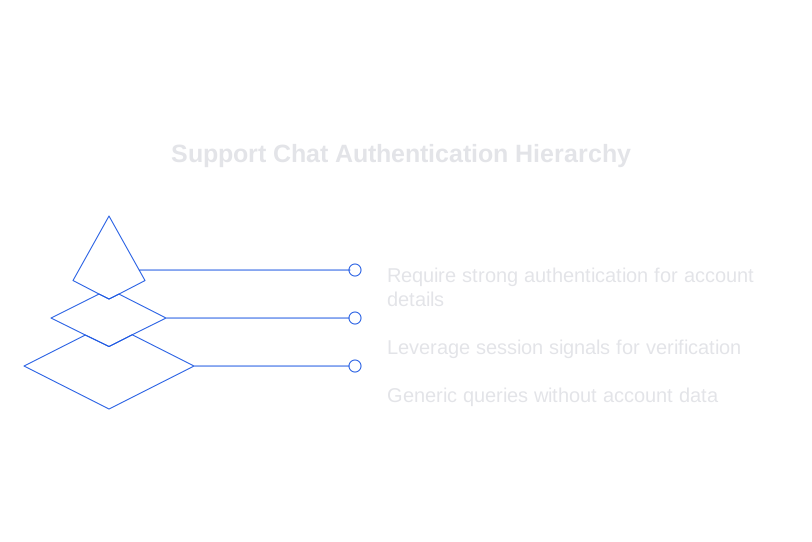
Think of authentication as a layered process, not a single gate. Start by reading session context. Apply the least intrusive verification needed to confirm identity, keeping the path as short as possible for those already verified. Only add more steps if the requested action raises the stakes. Build this process to be fair and consistent for every user.
A Layered Authentication Model for Support Chats Across Risk Tiers
Tier 0: Informational Requests with No Account Data
Do not require authentication for generic queries. Share public status updates, help resources, and basic product information. If the conversation shifts to account-specific details, suggest logging in via an account link.
Tier 1: Account Context with Light Verification
Leverage existing session signals, such as login state, CRM matches, or recent ticket metadata. If verification is needed, confirm a non-sensitive detail using masked information for privacy and clarity.
- Confirm a masked email address, never the full address.
- Reference a recent order ID, but avoid payment data.
- If available, match device fingerprint or IP address region. This involves checking if the connecting device or location aligns with the user's typical patterns.
Tier 2: Step-Up with Possession Factors
If a user requests billing information or needs to update an address, increase verification. Send a one-time code to a verified communication channel. Email one-time passwords (OTP) are suitable for most desktop users. For those using authenticated apps, app push notifications or passkeys are more appropriate. Keep the OTP window short, and restrict the number of retries to prevent guessing attempts.
Tier 3: Sensitive Changes Require Multiple Factors
For owner-only actions, require two verification factors, something the user knows and something they possess. Provide recovery options that avoid exposing private data. Log all attempts, including the reason for triggering higher-level checks, and their outcomes.
Operationalizing Data Privacy in Support Chat Authentication
Always request only the minimum information required to confirm identity. Never copy sensitive data into chat logs. Redact any customer input containing private numbers, and store verification evidence securely outside the chat transcript with strict access controls.
- Never request full passwords.
- Never request full payment numbers.
- Do not ask for national ID numbers through chat.
- Always mask personal details in all prompts and replies.
- Ensure tokens expire quickly and switch channels if anything suspicious occurs.
Use hashed identifiers for analytics. Implement a short retention window for verification logs. Alert security teams to abnormal activity patterns. Train support agents to detect social engineering attempts and provide standardized, safe responses when access must be denied.
AI Assistants in Support Chats: Clear Prompts and Verifiers Are Essential
Do not let AI assistants create their own authentication policies. Set explicit rules mapping actions to required verification factors. Define prohibited requests clearly, and keep these operational rules close to the runtime environment for the assistant, documentation alone is insufficient. This helps reduce both erroneous support tickets and preventable mistakes.
Begin by syncing terminology. You can train AI using your internal product vocabulary to reduce confusion about product names and user roles, significantly lowering the odds of risky guesses during identity verification.
system : You follow the authentication policy before sharing account data. policy : risk.low -> 0 or 1 factor ; risk.medium -> 1 factor ; risk.high -> 2 factors . forbidden : password , full card number , full SSN . allow : email OTP , app push , passkey . redact : Any 16-digit pattern that may represent a credit card number. escalation : after 3 failed attempts , pause help and hand off to a human .
Integrate verifiers to check AI outputs before a customer receives them. These mechanisms can block the release of sensitive data and trigger a step-up in verification if a response contains private details. Learn more about adding verifiers to catch flawed AI support responses and prevent data leaks.
Give AI explicit instructions for each authentication step. Messages should be concise and direct, and should not contain hints that could reveal secure answers.
assistant : I can help with that. To confirm your identity, I will send a one-time code to your verified email. Please enter the 6-digit code when it arrives. If you cannot access that inbox, say “change method.”
Log every policy-related decision for auditing. Record which rule caused each step-up and why. Later, you can audit AI-driven support conversations and demonstrate compliance.
Maintaining Trust Through Cross-Channel Authentication and Handoffs
Verification breaks down easily during handoffs. Use short-lived tokens to preserve authentication status. Never share raw verification information; provide only a signed reference. Limit the application of the token specifically to the current ticket and the user involved, with expiration set to just a few minutes.
When transitioning from bot to live agent, display the verification level, method used, and timestamp. Always mask all identifiers. If the agent requires more proof, restart the process from a clear authentication step, and avoid asking customers to repeat checks they have already completed.
If a customer switches channels, reassess risk. Moving from email to chat usually requires a light check, while shifting from a voice call to chat may justify a more robust step-up. Clearly explain why additional steps are required, the transparency reduces frustration and repeat contacts.
The Vendor Landscape for Enterprise Support Chat Authentication
Building these layered flows usually involves integrating multiple solutions. Many CRM platforms offer basic verification, while identity providers control factors and authentication policies. AI components manage prompts and validation.
- Intercom and Zendesk provide chat, ticket history, and app context integration.
- Typewise specializes in AI writing for support and strict policy adherence, integrating within popular CRMs and chat solutions to help teams maintain a consistent, rule-based tone and structure.
- Salesforce Service Cloud and Kustomer deliver robust CRM integration and customizable workflows.
- Okta and Auth0 offer advanced multi-factor authentication and user directory management.
Select vendors that can evaluate risk signals in real time and allow you to define clear authentication policies. Make sure prompt verifiers are easy to update and that redaction occurs before any data storage, not after.
Key Metrics and KPIs to Measure Authentication Success in Support Chats
Measure both customer satisfaction and security effectiveness. Monitor speed and accuracy across different risk levels and report them accordingly.
- Verification success rate by action type.
- Average time to verify, broken down by verification factor.
- False rejection rates for pre-verified customers.
- Frequency and completion rate of step-up verifications.
- Instances of data exposure prevented by verifiers.
- First response time in authenticated chats.
Set time targets for each authentication method, email OTP should be completed in under two minutes; passkeys should work in a matter of seconds. Analyze where customers abandon the process, experiment with new messaging, and revise prompts regularly for greater efficiency.
Implementation Checklist for Authentication in Support Chats
- Identify high-risk actions throughout your chat workflows.
- Specify the minimal verification factor for each scenario.
- Create a concise, clear authentication policy and accompanying glossary.
- Set up redaction tools and structured logging protocols.
- Add output verifiers for any sensitive chat response.
- Test all handoff scenarios using short-lived tokens.
- Train agents in safe communication and secure recovery methods.
- Conduct regular social engineering drills on chat workflows.
- Review audit logs monthly and update rules as needed.
Simplify change management by implementing small, iterative improvements first. Track results, adapt as needed, and slowly expand your coverage. Keep all rules in a single, easily accessible location. Make sure analytics are tied to authentication policy outcomes, and use those insights to fine-tune risk thresholds for step-up actions.
Message Patterns That Reduce Friction During Authentication in Support Chats
Customers are more accepting of verification processes when the messages conveyed are clear and neutral. Use consistent, straightforward language and brief sentences. Clearly state the purpose of checks without any unnecessary elaborations or exaggerations, and provide a single alternative option if a method fails.
- “To confirm your identity, I will send a code.”
- “I sent the code to your verified email.”
- “I cannot share billing data without verification.”
- “You can try a different method or contact the account owner.”
Tailor prompts to the customer’s current channel, don’t suggest app push notifications to email users, for example. Avoid overly broad questions like “What is your address?” Instead, have customers verify a masked detail.
Closing Thoughts and Next Steps for Authentication in Support Chats
Truly effective support honors customers’ time and privacy. Risk-based authentication is the key to achieving this balance. Clear policies provide guidance for both human agents and AI assistants, while verifiers and audits ensure accountability and trust. The result: responsive support that keeps customer accounts safe.
If you're seeking a practical partner for secure chat support, we can help. Discover how Typewise approaches safe, policy-driven chat with precise AI writing. Let’s create an authentication experience your customers will value, free of frustration.
FAQ
What is risk-based authentication in support chats?
Risk-based authentication tailors the verification process according to the level of risk involved in a support chat interaction. This ensures that sensitive requests trigger stronger security checks while minimizing friction for low-risk situations.
Why shouldn't AI assistants set their own authentication policies?
AI assistants lack the contextual understanding needed for secure policy settings. Clear, predefined rules are essential to avoid erroneous judgments that could compromise customer data security.
How does layering benefit authentication in support chats?
Layering allows for adaptive security measures, starting with minimal checks and escalating only when necessary. This balance maintains efficiency while adequately protecting sensitive information.
What role does Typewise play in support chat authentication?
Typewise specializes in AI writing and strict policy adherence, ensuring support conversations align with set standards. By integrating with popular CRMs, Typewise helps maintain a consistent, secure communication strategy.
Why is session context important in authentication?
Utilizing session context enables accurate risk assessments by analyzing login states and other signals. This precision allows for a more streamlined and secure verification process.
What are the risks of not using proper authentication measures?
Ignoring robust authentication can lead to unauthorized access and data breaches. The consequences include damaged reputations, financial losses, and regulatory penalties.
How can companies measure the success of their authentication processes?
Track metrics like verification success rates, false rejections, and step-up completion rates. These KPIs help identify areas for improvement and ensure that authentication methods effectively protect user data.