
Why AI-Written Customer Replies Sound Robotic in Customer Support, and How Prompt-Level Rules Fix It
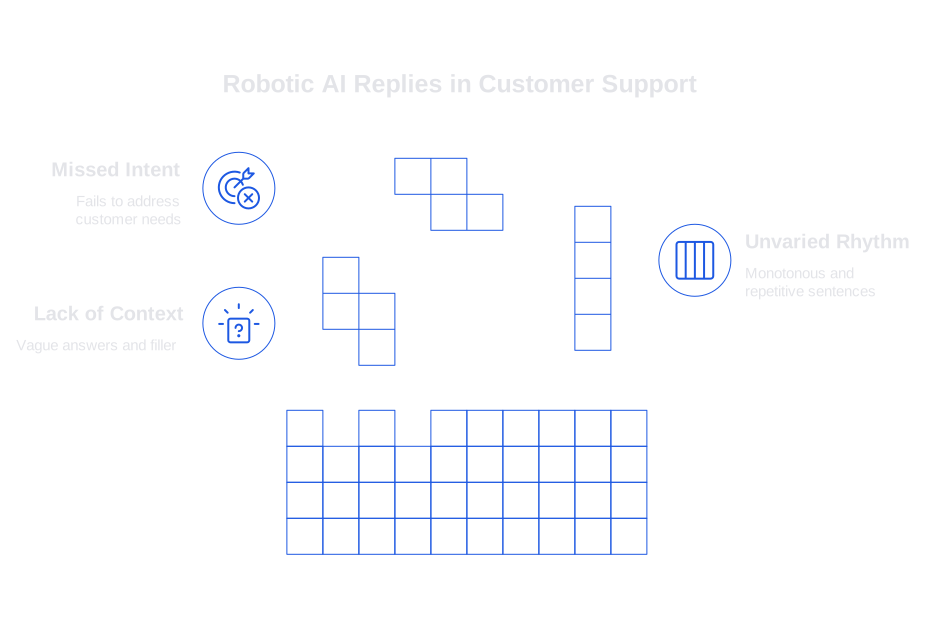
Customers can spot impersonal, robotic writing instantly. These replies rely on repetitive, safe phrases, dodge specifics, and resemble FAQ answers strung into sentences. Such issues arise when prompts overlook three key components: context, rhythm, and intent.
Most AI models follow an average style. Without defined parameters, the guardrails, they default to using generic language. The outcome is distant and unhelpful, especially when a customer seeking a refund receives a generic policy overview instead of direct assistance.
- Lack of context leads to vague answers and unnecessary filler.
- Unvaried rhythm makes every sentence the same length and creates a monotonous mood.
- Missed intent results in polite text that never truly addresses the customer’s actual request.
These problems should be addressed at the prompt level, not by rewriting output after it’s generated. Setting clear rules before generation and refining those rules in production provide a more scalable solution.
The Three Prompt-Level Rules to Solve Robotic Replies, No Manual Rewriting Needed
Approach prompt writing as a systematic process, not just a series of one-off instructions. Use three foundational rules: ground the reply, shape the voice, and verify the information. These strategies work across channels, email, chat, CRM notes, and more.
Rule 1: Ground Every AI Reply in Your Product’s Language and the Customer’s Intent
A robotic tone disappears when an AI model speaks in your brand’s own language and addresses what the customer actually wants. Provide the model with essential nouns, verbs, and constraints, what to say, what to avoid, and how to map user messages to clear tasks.
What to Include
- Your glossary and phrase list, with both preferred and banned terms.
- Clear, current, canonical steps for common customer tasks or workflows.
- Action-oriented intent labels, not just broad categories.
Prompt pattern
Instruction: Identify the customer’s intent from the message. Choose one label: refund, bug, how-to, billing, escalation.
Knowledge: Use the product glossary and step lists in the context. Prefer workspace over account. Avoid portal.
Output: Start with a one-line resolution. Then numbered steps. Use glossary terms exactly.
For further information on how to curate these terms and steps while training AI on your internal product language, refer to our additional resources.
Rule 2: Specify Tone, Cadence, and Structure Directly in the Prompt to Prevent Monotony
Monotone writing is a clear signal of a machine-generated text. In contrast, human writing involves varying sentence length and language nuances. Set expectations for tone and cadence upfront. Define explicit targets for reading level, variation, and structure, ensuring responses stay concise, personable, and always crisp.
Cadence Controls
- Set a target reading level and avoid unnecessary fluff or hedging language.
- Direct the model to vary sentence length within a specified range.
- Limit exclamation points and empathy phrases to maintain authenticity.
- Choose specific opening and closing lines based on the detected intent.
Prompt pattern
Tone: Plain, respectful, and confident. Reading level: Grade 7 to 9. No apologies unless we caused an issue.
Cadence: 1 opening line under 14 words. 2 to 5 steps. Final line includes next action or link.
Style: Use active voice. Vary sentence length between 8 and 16 words. One contraction per paragraph.
Example micro-template
Opening: Thanks for the details. Here is the fastest way forward.
Closing: If this does not fix it, reply with a screenshot and your workspace ID.
Embedding cadence rules at the prompt stage reduces the need for manual edits and helps to shorten first response times. To learn more about operational improvements, see our guide on ways AI improves first response time.
Rule 3: Require Evidence, Cite Sources, and Include Self-Checks in the Prompt
When factual accuracy slips, robotic writing issues compound. Ensure the AI system assigns a confidence score to its responses and has a programmed fallback path for uncertain situations. Prompt-level verification protects against misinformation and hallucinated details.
Verification Controls
- Require citations (such as internal article titles) for any non-obvious claims.
- Set a minimum confidence threshold for sending replies automatically.
- Route low-confidence responses to human agents for review.
- Explicitly prohibit the AI from inventing links, SKUs, or product features.
Prompt pattern
Evidence: For any specific claim, cite the internal article title in brackets. Example: \[Reset SSO Tokens\].
Self-check: If confidence < 0.8, stop and ask a clarifying question. Do not guess.
Safety: Never invent links, SKUs, or release dates. If information is missing, state what’s needed.
External verification steps also strengthen support workflows. Find step-by-step details on integrating these checks in our article on adding verifiers to catch bad support answers.
How to Audit and Iterate Prompts to Keep AI Replies Human in Production
Prompts can drift as your product and policies evolve. Audit them regularly, much like you would with standard macros. Analyze transcripts weekly, grouped by intent, and score them on tone, actionability, and factual accuracy.
What to Measure
- Task completion rate from the first reply.
- Average reading time before follow-up.
- Repetition score across sentences and tickets.
- Distribution of confidence scores and volume of escalations.
For structure and consistency, use our detailed checklist for auditing AI customer support conversations, covering sampling, rubrics, and handoff practices.
Prompt Templates and Examples for Common Support Scenarios That Avoid Robotic Tone
Refund Within Policy
Instruction: Intent is refund. The order is eligible. Tone is calm and direct.
Output: One-line confirmation, then 3 steps. State timeframe in business days. No extra policy text.
Example opening: I have processed the refund. Here is what to expect next.
Bug Report with a Known Workaround
Instruction: Intent is bug. Link to the internal workaround article title in brackets.
Output: Acknowledge impact in one short line. Then 3 numbered steps. Include the bracketed title.
Constraint: Never claim an ETA. Offer a status subscribe option if available.
Outage Status Update
Instruction: Intent is status. Keep sentences under 14 words. Update cadence every 60 minutes until resolved.
Output: Current state, affected regions, workaround if any, next update time.
Safety: No root cause until confirmed by the incident lead.
Designing Prompt Inputs That Reflect Your Brand Voice Without Sounding Scripted
Craft a concise brand voice card specifically for support communication, practical and actionable. Three dos and three don’ts, along with concrete example lines (not slogans), offer guiding clarity.
- Do use short, direct verbs. Avoid unnecessary adverbs.
- Do state the next step and the responsible party.
- Do mirror the customer’s core noun at least once.
- Don’t hedge with “might” or “possibly” unless dictated by policy.
- Don’t over-apologize for user mistakes.
- Don’t repeat the ticket subject exactly as written.
Sample of a voice card prompt
Voice: Plain, warm, and specific. Avoid filler like “please note that.” Prefer direct prompts like: Let’s fix this.
Phrasing: Choose verbs like send, retry, attach. Avoid “assist,” “facilitate,” or “leverage.”
Where These Prompt Rules Fit in Your Support Stack and Workflows
Apply the outlined rules to both your system’s basic instructions (the system prompt) and to each individual, task-specific template (the per-intent template). Store both in your CRM or AI configuration layer, keeping them versioned and connected to your knowledge base and glossary for updates.
Some platforms rewrite after generation, but that can introduce delays and confuse results. By embedding intelligence directly into the prompts, you reduce the need for ongoing edits and maintain quality control within your team’s workflows.
Typewise, for example, works as an embedded AI writing assistant for support teams. It integrates with email, chat, and CRM, applying your voice card, glossary, and cadence rules automatically as it drafts responses. It also supports verifier steps and auditing workflows. This approach reduces the need for manual edits while still retaining your team’s authority over response quality.
How to Roll Out the Three Prompt Rules This Week: A Simple Plan
- Draft a one-page brand voice card and a glossary for your product.
- Create three intent-based templates following the patterns above.
- Add evidence and self-check prompts to each template.
- Deploy to one support queue and measure outcomes for five days.
- Iterate by adjusting one variable at a time, then repeat.
Starter skeleton
System: You write customer replies for our product. Use the voice card below.
Pre-step: Identify intent. If none, ask one clarifying question.
Constraints: Sentence length 8 to 16 words. Steps first. Closing includes next action.
Evidence: Cite internal titles in brackets. Confidence threshold 0.8. Otherwise escalate.
Final Takeaway and Next Steps for Prompt-Level Fixes That Eliminate Robotic Tone
Robotic replies stem not from AI alone but from prompts that are under-specified or incomplete. Ground your text in your brand’s language, define cadence and tone at the prompt level, and always require evidence and checks. Audit regularly to keep results human and effective.
FAQ
Why do AI-generated replies often sound robotic?
AI replies tend to sound robotic because the prompts fail to incorporate context, create rhythm, and align with the customer's intent. This oversight leads to generic, monotonous responses that lack personalization. Implementing prompt-level rules helps prevent this pitfall.
What are the core components to improve AI-written customer support replies?
To enhance AI-generated responses, incorporate context, rhythm, and intent into the prompts. Establish rules that personalize language and structure replies to mirror human interaction. Ignoring these can result in disengaging and ineffective communication.
How does Typewise help in generating less robotic AI replies?
Typewise integrates directly with communication tools to apply your brand's language, cadence rules, and evidence-based checking automatically. This ensures responses are personalized and accurate upfront, reducing the need for post-generation editing.
What risks are involved in not specifying detailed AI prompt instructions?
Without detailed prompt instructions, AI systems default to using vague and generic responses, which can damage customer trust and satisfaction. Overlooking prompt details results in unhelpful and impersonal replies, diminishing the quality of customer support.
How can cadence control affect AI-driven customer support responses?
Cadence control influences the readability and engagement level of AI-generated responses. By varying sentence length and maintaining an appropriate tone, responses become more engaging and human-like, preventing robotic monotony that could alienate customers.
Why is it important to ground AI responses in brand language?
Grounding AI responses in brand language ensures consistency and aligns the interaction with the customer's expectations of the brand. Failing to do so can create dissonance between brand perception and customer service, shaking consumer trust.
What is the significance of setting a confidence threshold in AI support replies?
Setting a confidence threshold ensures that uncertain AI responses are flagged for human review, maintaining accuracy and reliability. Without this, AI systems risk distributing misinformation or making unsupported claims, eroding credibility.