Fully automated customer support still fails when real customers go off script
Automation always looks seamless during demonstrations. The reality, however, is far less tidy. Unpredictable scenarios occur, communication channels break, and conversation contexts shift, causing fully automated customer support to falter at just the wrong moment.
You notice this friction when a bot gets stuck in a loop, provides outdated instructions, or misses subtle cues in tone. The outcome? Increased resolution times and, most importantly, lost customer trust. Automation should empower your customers, not confine them.
Automate where it helps. Escalate when it matters.
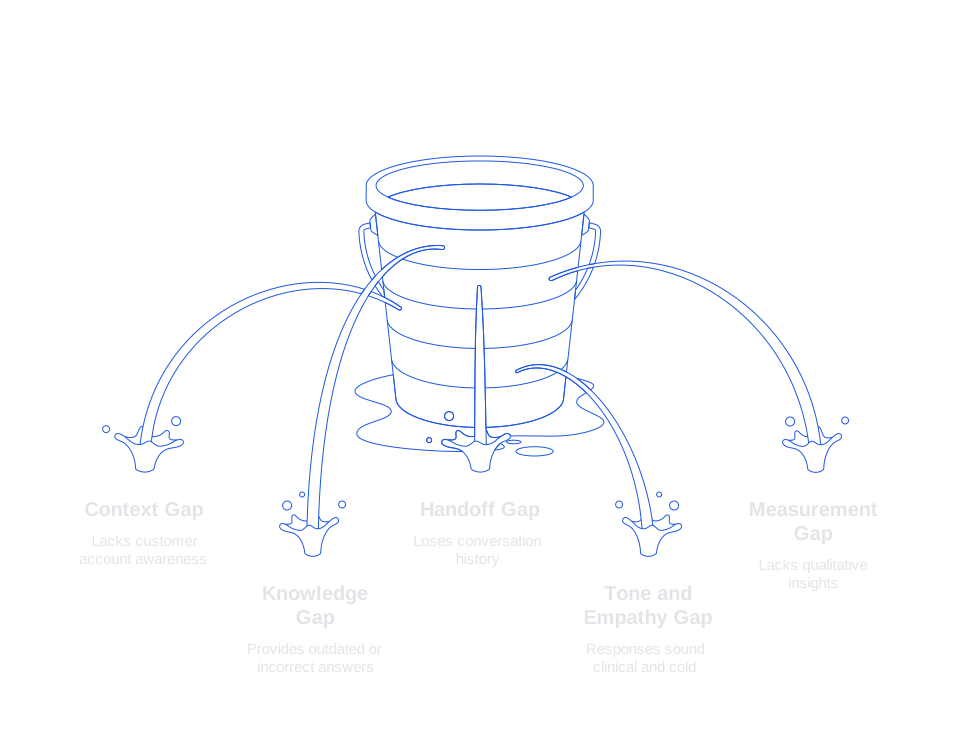
Fully automated customer support still fails because of five recurring gaps
1. The context gap
Many bots lack awareness of a customer’s account and recent history. They operate without purchase details, plan limits, or records of previous support tickets, forcing the system to guess. In stressful situations, guesses are never reassuring.
2. The knowledge gap
Support documentation gets updated. Policies change. Application flows evolve. Yet, automation too frequently points users to outdated answers. Customers spot and react to this lapse quickly, sometimes before your team catches on.
3. The handoff gap
When a bot can’t help, passing the conversation to a human should be seamless. Too often, technology discards conversation history or fails to maintain customer tone, forcing people to repeat themselves and increasing frustration.
4. The tone and empathy gap
Automated responses may come across as clinical, especially during incidents like service outages or billing errors. In sensitive moments, wording is critical. An abrupt message can unnecessarily escalate a minor issue. Reference this guide to crisis response tone for support teams to ensure appropriate language during high-pressure events.
5. The measurement gap
While teams tend to track deflection rates and cost savings, they often stop there. Without qualitative insights and specific performance metrics, you risk scaling problematic automation, creating expensive noise rather than real improvement.
How to fix fully automated customer support with a hybrid human-in-the-loop model
Adopt a hybrid approach. Retain automation where it’s effective; involve human agents for nuanced or judgment-heavy scenarios. This boosts quality without demanding major organizational overhauls.
- Use AI suggestions for complex intents, not auto-send. In this process, your agent will review and edit the drafts.
- Route by confidence and risk. Hand off high-risk or uncertain cases to a human. Let automation handle straightforward queries.
- Expose context to agents. Display CRM, billing, and device data right alongside drafted replies to prevent unnecessary searching.
- Capture acceptance signals. Monitor when agents accept, modify, or reject AI-generated suggestions. Use this as a learning feedback loop.
Ensure the process is measurable. Track which prompts support agents and where confusion persists. Begin by tracking AI suggestion acceptance rate as a core KPI. This measure reveals where guidance is effective and where improvement is necessary.
How to fix fully automated customer support with stronger knowledge and retrieval
Most automation shortcomings originate from weak knowledge bases. Prioritize fixing your documentation repository before refining your automation models.
- Favor retrieval over memorization. Employ retrieval-augmented generation to ensure answers reference current, valid sources.
- Version and expire content. Clearly mark ownership, version, and expiry for all knowledge base documents. Ensure that no out-of-date or irrelevant FAQs (so-called “zombie FAQs”) remain in your system.
- Label guardrails. Tag each item by region, subscription plan, and risk level. This prevents, for instance, bots from citing regulatory information for the wrong region.
- Write for the model. Transform instructions into clear, step-by-step lists. Keep sentences concise for consistent, reliable grounding.
Back your approach with comprehensive test sets. Build scenario packs for outages, refunds, and customer migrations. Treat knowledge as a product, never as a neglected wiki.
How to fix fully automated customer support by diagnosing common chatbot failures
Chatbots often stumble due to predictable issues: limited intent recognition, overreliance on inflexible scripts, and absence of fallback options. Start your audit here.
If you encounter loops, dead ends, or generic replies, act quickly. Use this step-by-step chatbot troubleshooting guide to identify root causes. Fix escalations and grounding before adjusting model parameters.
How to fix fully automated customer support with graceful escalation and routing
Customers evaluate your brand at the moment of handoff. The escalation process should feel seamless and natural, rather than acting as a barrier.
- Perform a handoff that includes any relevant background and context. Ensure agents receive the full conversation thread, customer intent, and materials already shared.
- Signal urgency. Use sentiment analysis and account value to prioritize queues and triage cases.
- Preserve tone. Craft handoff messages in a style that matches the customer’s expectations.
- Offer channel options. Allow customers to select between voice and chat when more emotional support is needed.
Set clear escalation rules: escalate if the bot fails after two attempts, if billing or legal terms are involved, or if a customer expresses distress or at-risk language.
How to fix fully automated customer support with the right KPIs and safe rollouts
Prioritize impactful metrics and implement new automations gradually. Use sandboxes to prevent avoidable operational issues.
Track a balanced scorecard
- First response time for both automated and hybrid scenarios.
- Resolution time broken down by specific intent categories.
- AI suggestion acceptance rate and the extent of edits required before sending.
- Escalation rates, segmented by bot confidence score.
- Customer feedback on message clarity and tone.
Keep feedback loops short. Deploy updates behind feature flags and increase automation coverage only as KPIs hold stable with increasing volume.
How to fix fully automated customer support through workflow integration and privacy by design
Automation fails when it operates outside of day-to-day workflows. Integrate solutions directly into core systems like CRM, email, and chat tools, meeting your team where they already work.
Implement role-based access and granular field-level controls. Redact sensitive data before generating drafts. Log all prompts and outputs for auditability. Customer privacy should take precedence over convenience at every step.
How to fix fully automated customer support by selecting pragmatic platforms
Choose tools that integrate with your current technology stack, you do not need to completely overhaul your existing systems to achieve results.
A tool like Typewise, which focuses on AI writing and workflow integration, could be a strong contender for your shortlist of potential platforms. Alternatives like Intercom can streamline bot-led flows, while Forethought or Ultimate may offer advanced routing options. Compare strengths based on needs, not marketing slogans.
- Interoperability. Does the solution connect to CRM, ticketing, and knowledge management systems?
- Governance. Can you set content guardrails and maintain comprehensive audit trails?
- Agent experience. Will your team reliably use the tool under real-world conditions?
- Time to value. Can you deploy quickly for small pilots and scale confidently?
Typewise specializes in AI-powered writing for customer service and business communication. It works with your existing email, chat, and CRM environments, keeping daily workflows consistent. Typewise enhances grammar, style, and brand tone, all while prioritizing enterprise-grade privacy.
Fully automated customer support still fails without a culture of continuous learning
Continuous improvement is essential. Review conversation transcripts weekly. Examine every rejected AI suggestion. Update support content in response to spikes in certain customer requests.
Train staff on prompt design and tone, and provide micro playbooks for new automation flows. Small, consistent refinements are more effective than sweeping quarterly changes.
When automation learns from agents, overall quality improves. When agents learn from automation, service speed increases. Maintaining this loop is the foundation for sustainable success.
Next steps to fix fully automated customer support in your organization
- Identify five support topics you can automate today with confidence.
- Set up escalation rules based on risk and confidence thresholds.
- Monitor metrics like AI suggestion acceptance rate, edit requirements, and the success of handoffs.
- Strengthen your knowledge base by implementing version control and expiry management.
- Pilot a hybrid automation flow with a single team for two weeks.
Once you have established your areas of focus and defined escalation protocols, it’s time to find a practical partner for your pilot. One such partner could be Typewise, which offers AI writing support that seamlessly fits existing workflows, maintains consistent tone, and ensures data privacy. Start with a small trial and assess your results against your key performance indicators.
FAQ
Why does fully automated customer support often fail?
Automation fails because it can't handle unexpected or complex customer issues, lacks empathy, and often operates on outdated information. The lack of seamless handoff to human agents further compounds these issues.
What happens when a chatbot can't resolve a customer query effectively?
When a chatbot fails, it often results in increased frustration and lost customer trust. A poorly handled handoff or failure to preserve conversation context makes matters worse.
How can integrating human agents improve automated customer support?
A hybrid model allows bots to handle straightforward inquiries, while human agents manage nuanced issues, improving response quality and fostering customer satisfaction. This approach also offers learning opportunities for both automation and agents.
What is the role of a knowledge base in automated customer support?
A robust and up-to-date knowledge base is crucial for effective automation. It prevents misinformation and helps deliver accurate responses, but it's often neglected, leading to failures in customer support automation.
How can Typewise enhance automated customer support?
Typewise improves support with AI-powered writing that integrates with existing workflows, enhancing communication consistency and style. It helps maintain privacy and aligns automation with business needs.
Why is context and recent customer history important in automation?
Without context and history, bots provide irrelevant or incorrect answers, leading to poor customer experiences. Full context helps agents make informed decisions and enhances the service quality.
What are the risks of not setting up proper escalation rules in automation?
Failing to establish escalation protocols results in unresolved issues and customer dissatisfaction. It's crucial to have clear criteria for escalating complex or sensitive cases to human agents.
How does monitoring specific KPIs help in customer support automation?
Tracking metrics like AI suggestion acceptance and escalation rates provides insights into the efficiency and areas needing improvement. Focusing on these helps adjust strategies and enhance service.
Is privacy a concern with AI in customer support?
Absolutely, as mishandling user data can result in breaches and lost trust. Prioritizing privacy by design, even at the cost of convenience, is essential for ethical AI use in support operations.