Stop sounding robotic: 2026‑ready canned responses that work
You want your replies to sound like they’re written by real people, not robots. This 2026 update brings you concise, human-friendly templates and a system to personalize every reply. Copy, paste, and adapt, each template is built using clear language and actionable next steps that feel natural.
Tip: Keep your variables consistent and recognizable, use tags such as {{customer_name}}, {{order_id}}, and {{ticket_id}}. Set timeframes you know you can meet. When linking resources, provide just one relevant article for clarity.
Copy and paste templates for the moments you handle daily
1) Friendly opener for new tickets
Hi {{customer_name}}, thanks for reaching out. I’m {{agent_name}} from {{company}}. I can help with {{issue_topic}}. Could you share {{needed_detail}}? I’ll reply within {{timeframe}}.
2) Chat greeting with routing
Hi {{customer_name}}, you’re chatting with {{agent_name}}. I’m checking your account now. If we get disconnected, I’ll email you at {{email}}.
3) Order status and tracking
Good news, {{customer_name}}. Order {{order_id}} shipped on {{ship_date}}. Track it here: {{tracking_link}}. Delivery is expected by {{eta_date}}.
4) Password reset and security tips
I reset your login for {{account_email}}. Use this link within {{link_expiry}}: {{reset_link}}. Then turn on two‑factor in Settings.
5) Billing question resolved
Thanks for the billing details. I corrected the charge on invoice {{invoice_id}}. You’ll see the update in {{refund_eta}}. A receipt is attached.
6) Refund or return approved
I approved your {{refund_type}} for order {{order_id}}. The refund will post within {{bank_timeline}}. Keep this reference: {{case_id}}.
7) Feature request acknowledged
Thanks for the idea on {{feature}}. I shared it with our product team, case {{ref}}. We review requests monthly. I’ll update you after the next review on {{date}}.
8) Bug confirmed with workaround
I reproduced the issue in {{environment}}. Our team is fixing it under ticket {{bug_id}}. For now, try {{workaround}}. I’ll follow up by {{follow_up_date}}.
9) Outage update during an incident
We’re investigating a service disruption affecting {{scope}}. Status updates are available here: {{status_page}}. Next update by {{next_update_time}}. Sorry for the interruption.
10) Security or data deletion request
I received your data request. To confirm your identity, please provide {{verification_step}}. After verification, deletion is completed within {{sla_days}} business days. We’ll confirm once it’s done.
11) Pricing and plan guidance
I’d be happy to assist you in selecting the best plan based on your {{usage}}. The {{plan_name}} plan seems to be the perfect fit as it includes {{key_features}}. Remember, you can switch plans at any time from your Settings. If you need more clarification, don’t hesitate to ask.
12) Escalation to a specialist
I’m moving this to our {{team_name}} team. They handle {{topic}}. You’ll hear from {{assignee_name}} by {{timeframe}}. I’ll stay copied until it’s solved.
13) Delay apology with clear next step
Sorry for the wait. I’m still working with {{team}}. I will update you by {{date_time}}. If that changes, I’ll let you know immediately.
14) Save attempt for cancellations
It’s unfortunate to hear you’re considering leaving us, {{customer_name}}. If the reason is related to {{problem}}, I can work on a solution for it right away. Could we explore the {{option}} together before we proceed with the cancellation? If you still decide to go ahead after, I’m here to help process it without delay.
15) Confirmed cancellation and feedback
Your subscription ends on {{end_date}}. You will not be billed again. Would you share what made you leave? One line helps us improve.
16) Post‑fix closure loop
We released a fix for {{issue}} in version {{version}}. Please update and test when you can. If it persists, reply to this email and I’ll re‑open the case.
Make templates personal and on‑brand
- Use the customer’s name once. Too much repetition feels scripted.
- Mirror the customer’s language, reflect key phrases to show understanding.
- Stick to one action per sentence. Avoid combining multiple steps at once.
- Give a realistic timeframe, and try to exceed it when you can.
- Invite one clear reply path, such as email or chat, not both at once.
- Sign with a real name and role; avoid just initials.
Keep your voice guidelines with each template. Add any phrases to avoid and your preferred verbs. Remember to specify your brand’s spelling and capitalization rules.
Speed matters; keep the first reply sharp
Your first response sets both the tone and the pace. Use a succinct greeting, get straight to the action, and outline the next step. Well-designed templates and prompt suggestions let you answer quickly, without sounding automated. For advice on replying even faster, review these ways AI can cut first response time.
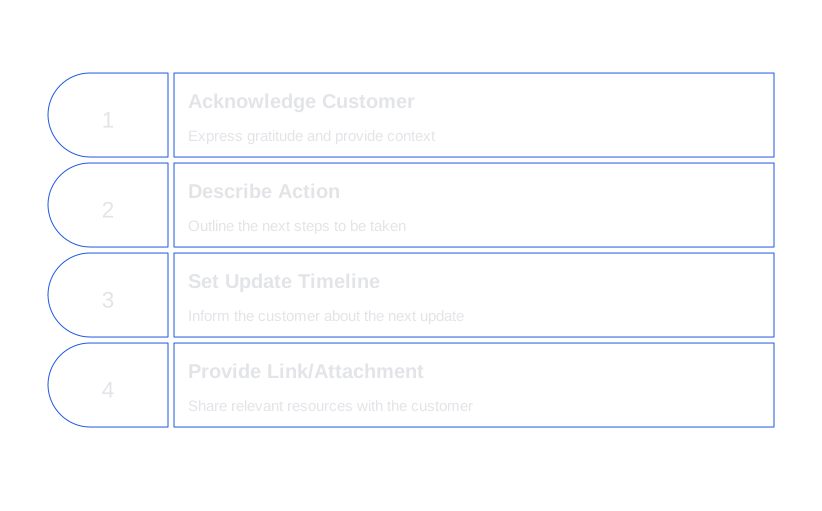
Practical structure for fast, effective replies:
- Thanks and context combined in one line.
- The action you took or will take next.
- When the customer will get another update.
- Include one link or attachment only.
Organize your library so agents actually use it
Even the most effective templates won’t serve their purpose if they’re not easily accessible to your team. Organize replies based on the customer journey, such as pre‑purchase, onboarding, billing, product help, and account changes. Use clear tags like #shipping, #refund, and #security. Make titles descriptive, “Refund approved with bank timeline” is clearer than “Refund 1”.
Review your templates quarterly. Archive outdated versions. Include explanatory notes with each template, clarifying the suitable scenarios for their use and situations where they might not be applicable.
Tools that make canned responses work better in 2026
- Zendesk Macros and Content Cues: Offers robust macro support and shortcuts across all channels. Ideal for handling high volumes of tickets.
- Typewise: Integrates with your CRM, email, and chat. Crafts suggestions in your brand voice and supports privacy needs, making drafts faster and more consistent.
- Intercom Macros: Smooth Messenger integration and helpful event context for instant replies.
- Freshdesk Canned Responses: Provides folders and permission settings for growing teams.
- Help Scout Saved Replies: Simple interface, friendly for small businesses.
- Front Message Templates: Offers shared inbox functions and time-saving shortcuts.
Considering further automation of your customer support tasks? Take a look at this automation guide to explore leading platforms and migration paths that can streamline your customer service response system while helping you integrate templates seamlessly.
Measure, iterate, and prune your templates
- Usage: Track which templates agents use most and consider updating or retiring those rarely used.
- Time to first reply: Monitor how quickly each template lets agents respond. Shorten or clarify as needed.
- CSAT by template: Analyze satisfaction scores to see which templates perform best or need revising.
- Edits before send: Frequent edits suggest the template isn’t clear enough, refine as necessary.
- Localization: Create regional versions rather than relying on a one-size-fits-all template.
Test variations of subject lines or opening sentences with A/B experiments. Make changes measurable and share successful tweaks with the team for continuous improvement.
Advanced ideas for 2026
- Conditional snippets: Easily include extra lines based on the customer’s segment or plan.
- Smart links: Automatically update help URLs to match customer language and product tier.
- Merge images: Attach a single, annotated screenshot for complex instructions.
- Playbooks: Combine two or more templates for longer flows, like chargebacks or escalations.
- Compliance notes: Add legal language for returns, warranties, or data rights as needed.
Turn these templates into your team’s daily habit
Canned responses succeed when your team trusts and uses them. Begin with ten of these templates and put them into use right away. Gather feedback for a week; then update and share version two, along with real examples of successful usage.
If you want customer replies that sound human, stay on-brand, and fit smoothly into your workflow, check out Typewise. See how the platform empowers your team to reply faster, more clearly, and with privacy built in. Start the conversation at typewise.app.
FAQ
How can I ensure my canned responses don't sound robotic?
Avoid overusing placeholders and excessive repetition, as they make interactions feel scripted. Personalize each reply with genuine language and real-time context adjustments to maintain a human touch.
What should I be wary of when using templates?
Beware of templates that become outdated or irrelevant, as they could lead to customer frustration and decreased satisfaction. Regularly review and adapt your responses to match current customer expectations and company guidelines.
Why is it important to organize templates based on the customer journey?
Misaligned templates can cause confusion and reduced efficiency in support responses. Organizing your templates according to the customer journey ensures your team provides relevant, timely, and specific assistance.
How does standardizing tag usage benefit customer support?
Using consistent tags across templates minimizes errors and speeds up response times. An inconsistent tagging system can lead to confusion, resulting in delays and inaccurate communications.
What are the risks of not revising templates regularly?
Neglecting regular template updates can render your responses irrelevant, leading to frustrated customers. Keeping your templates current ensures they provide accurate and valuable information, enhancing the overall support experience.
How can measuring CSAT contribute to better templates?
Analyzing CSAT scores helps identify which templates foster customer satisfaction and which may need refinement. Ignoring CSAT data could lead to missed opportunities for improving response quality and building better customer relationships.
Why is it crucial to personalize templates even slightly?
A lack of personalization leads to an impersonal, robotic interaction that erodes trust. Even minor personal touches, like using the customer's name strategically, enhance engagement and foster a connection.
Can using multiple actions per sentence in a template be problematic?
Yes, combining multiple actions in a single sentence can confuse customers and lead to mistakes. Keeping one clear action per sentence avoids overwhelm and ensures clarity in communication.
Why should businesses avoid relying solely on one-size-fits-all templates?
Relying on generic templates fails to address unique regional or customer-specific needs. Creating localized versions caters to diverse audiences better, enhancing user experience and satisfaction.
What common mistakes might agents make with canned responses?
Agents might skip personalizing templates, leading to disengaged interactions. Moreover, they may misuse templates for unsuitable scenarios, which can undermine the customer's trust in the support system.