

RAG for Customer Support Succeeds When Knowledge Base Templates Act Like APIs
If you want retrieval augmented generation (RAG) to deliver precise answers, your knowledge base must follow a strict template, think of each article as an API response. Articles should expose stable fields, use predictable formats, and communicate clear intent. If structure varies or drifts, retrieval becomes inconsistent, and the quality of your replies drops.
Structure outperforms volume. A smaller, well-structured knowledge base can deliver better results than a larger, disorganized one.
Templates set clear expectations for writers, support agents, and AI models. They minimize ambiguity and speed up content operations, as editors can focus on structure as well as wording. For your RAG pipeline, this means consistently cleaner hits and fewer ambiguous edge cases.
The Anatomy of a RAG‑Ready Customer Support Knowledge Base Template
Every document should share an identical backbone with the same fields across products and regions. Consistency here is key:
- Title: Short, specific, and easily searchable.
- Problem statement: Describe symptoms in the customer’s words.
- Root cause: If known, state it clearly.
- Resolution steps: Numbered, succinct, and tested.
- Prerequisites: Define roles, plans, versions, and necessary access.
- Constraints: List limitations, SLAs, and relevant policy details.
- Examples: Include realistic input and output examples.
- Canonical question: What primary query does this document answer?
- Audience: Specify if the content is for customers, agents, or admins.
- Product area: Use a taxonomy tag instead of free text.
- Version: Record using a semantic version or date range.
- Region and language: For routing and compliance purposes.
- Synonyms and entities: Include SKUs, feature names, and common codenames.
- Error codes: Map symptoms to error codes.
- Owner and review date: Track freshness and accountability.
- Citations: Link to specifications, support tickets, or changelogs.
Define each field thoroughly in your style guide and provide examples next to your template so content creators can easily replicate the intended format.
Field Definitions That Keep RAG Precise in Support Replies
Certain fields play a crucial role in supporting RAG. Give them extra attention:
- Canonical question: Connects customer intent to a stable, explicit target, avoid mixing multiple questions together.
- Problem signature: Incorporate logs, error codes, and system states, these items anchor content embeddings and improve retrieval.
- Entities and synonyms: Gather both official product terms and the phrases customers use. Integrate these into your filters.
- Constraints and policy tags: Clearly flag items like refunds, credits, or required legal language.
- Version and rollout state: Prevent outdated solutions from surfacing.
If your product language is unique, include it in your model training data to reduce misunderstanding and paraphrase drift. For step-by-step guidance, see our practical guide to training AI on internal product language.
Chunking Strategy and Content Patterns for Support Knowledge Bases Used by RAG
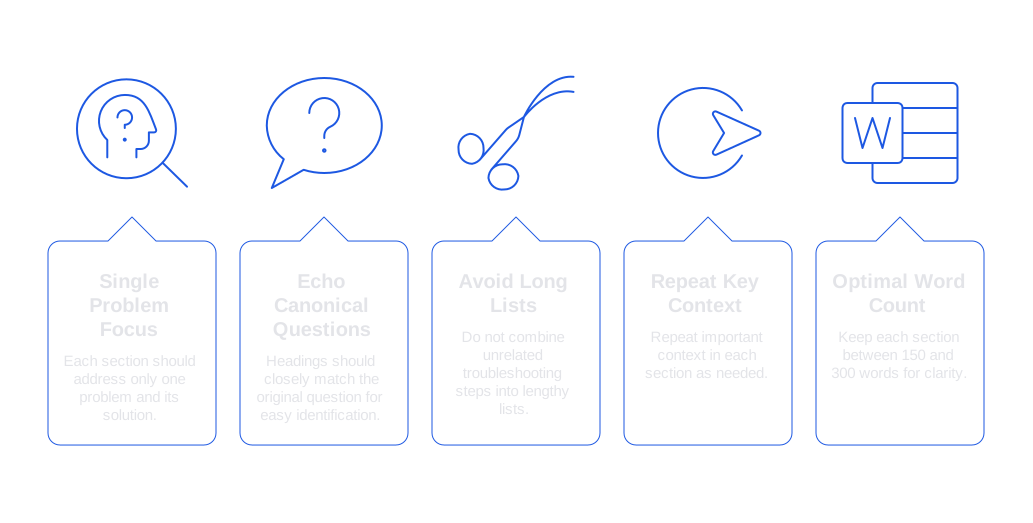
RAG retrieves specific sections, not entire manuals. Organize and format your knowledge base content to make these sections easy to identify and retrieve:
- Each section should focus on just one problem and its resolution.
- Use headings that closely echo the canonical question.
- Avoid combining unrelated troubleshooting steps into long lists.
- Repeat key context in each section where appropriate.
- Keep each section between 150 and 300 words for optimal clarity and retrievability.
Mark sections with machine-friendly, stable labels which are easy to interpret. This approach simplifies matching and searching operations, reducing potential errors and improving document routing.
# Problem: Upgrade fails with code E413 # Resolution: Refresh token and retry # Notes: Applies to Billing v3.2+
End each section with a citation, such as a change record or test case. This provides verification along with the information retrieved.
Metadata and Embeddings for Support Knowledge Bases Powering RAG
Accurate, robust metadata improves embeddings, narrows search, and simplifies evaluation. Build a compact schema for your knowledge base metadata:
\{ doc_id: KB-4831, title: Fix E413 upgrade failure, product_area: Billing, version: v3.2, lang: en, region: US, audience: agent, intent: \[upgrade, payment\], entities: \[SKU-4831, Plan Pro\], error_codes: \[E413\], policy: \[refund_30_days\], pii: \[none\], updated_at: 2026-02-12, owner: Support Ops, source_url: https://kb.example.com/article/4831 \}
Store this metadata with each document’s embedding. Use metadata filters before similarity search to improve results and avoid irrelevant hits. Keep taxonomy and policy tags as simple as possible; overly complex structures tend to degrade faster than your actual content.
Prompt Scaffolds That Align RAG with Support Tone and Policy
Your prompts must respect metadata and prescribe the right support tone. Keep instructions short and strict for greater accuracy:
System: You are a support copilot. Cite sources as \[doc_id\]. Respect policy tags. User: Customer reports upgrade failure on SKU-4831. Context: \{ top_k: 5, filters: \{ product_area: Billing, version: v3.2, region: US \} \} Instruction: Draft a reply under 120 words. Mirror the customer’s language. Ask one clarifying question if needed.
Adapt the support tone to the customer’s state: use a crisis response style for outages, and a retention-focused tone for renewals. Ensure your prompts follow a clear, predefined logic or pattern; this allows for easier auditing of changes at a later stage.
Governance and Auditing for RAG‑Ready Support Knowledge Base Templates
Treat your knowledge base content like code, enforce reviews, automated testing, and rollbacks. Apply version control to both templates and articles. Record who made each change and why, and log retrieval sessions with citations and applied filters.
Establish lightweight audits throughout live conversations: sample actual tickets and AI-generated replies periodically. Check each for policy compliance, citation accuracy, and tonal consistency. Our framework for auditing AI customer support conversations can be easily adapted for this purpose.
Where These Knowledge Base Templates Fit Among Support and RAG Tools for Teams
Your templates operate within a broader support stack. Choose tools that properly handle structure and metadata:
- Confluence, Notion, GitBook: Flexible documentation platforms with decent taxonomy and organization features.
- Typewise: AI writing assistant embedded within CRM, email, and chat tools. It drafts, edits, and maintains tone based on your knowledge base metadata, with a strong focus on privacy for enterprise workflows.
- Zendesk Guide, Intercom Articles, Document360: Robust help center options with advanced analytics and organizational tools.
- Freshdesk, Forethought, Ada: Automation layers that efficiently consume and utilize structured content.
Integrate RAG tools in the environments where your agents operate, rather than confining them to your portal. Equip reply boxes with automated suggestions and cite the source chunk, this is where structured knowledge pays the greatest dividends.
Practical Rollout Checklist for RAG‑Ready Support Knowledge Base Templates
- Select 30 high-volume intents spanning your main channels.
- Draft a single template that includes all required fields.
- Write or refactor five sample articles for each intent.
- Tag each article with clear metadata for product area, version, and region.
- Import synonyms from ticket logs and CRM data fields.
- Break documents into focused sections and include changelog citations.
- Embed, index, and set up search filters before launching search.
- Integrate prompt scaffolds directly into your CRM composer.
- Conduct a closed pilot rollout with at least ten support agents.
- Track errors, missing tags, and outdated versions during testing.
- Automate content freshness checks using owner and review fields.
During rollout, expose the model to your specific product language and abbreviations through comprehensive training data sets. Teaching the model your internal terminology streamlines clarifications. Refer to our internal product language training guide to plan and execute this step effectively.
Metrics That Prove Your RAG Knowledge Base Templates Work
Monitor key performance indicators that directly correlate a well-structured knowledge base to desired outcomes. Evaluate these signals weekly and after every new release:
- Retrieval hit rate: Portion of replies referencing at least one valid citation.
- Top‑1 precision: Frequency the top suggested section is retained by agents.
- Template coverage: Percentage of articles with every required field completed.
- Staleness: Share of documents past their designated review dates.
- Hallucination rate: Percentage of replies without valid citations.
- Suggestion acceptance: Rate at which agents adopt suggested text, see more on the AI suggestion acceptance rate KPI .
- First response time: Expected to drop as search accuracy improves.
Include qualitative feedback. Survey agents after each reply, quick “thumbs-up” ratings on citation trustworthiness work well.
Writing Practices That Keep Support Knowledge Base Templates Healthy for RAG
Clean writing is as important as clean metadata. Remove empty words and filler, prioritize verbs over adjectives, and keep sentences concise. Use the language your customers use instead of internal jargon. Ensure every article includes a practical, realistic example.
Write for both humans and machines, the template is your bridge.
Use style linting tools in your editor. Typewise provides phrasing suggestions within your CRM, keeping tone steady across teams and regions.
FAQ
Why is structuring a knowledge base more effective than increasing its size?
Prioritizing structure over volume enhances retrieval precision and consistency. A well-organized knowledge base outperforms a large, disorganized one, a smaller but structured set leads to cleaner AI-driven responses.
What role do stable fields play in a RAG-ready knowledge base?
Stable fields act like APIs, ensuring predictable and precise information retrieval. They reduce ambiguity in AI interactions, leading to more consistent and accurate support responses.
How can templates improve support operations in RAG systems?
Templates standardize content, minimizing ambiguity and accelerating content updates. They aid AI models in delivering reliable information, crucial for maintaining high-quality customer support.
What are the consequences of not maintaining consistent document structures?
Inconsistent structures lead to unpredictable retrievals, decreasing the quality of AI-generated replies. This inconsistency can degrade user trust and support effectiveness over time.
How does metadata enhance the performance of RAG in customer support?
Metadata sharpens the focus of search and evaluation processes, allowing for more accurate information embedding and retrieval. Without robust metadata, RAG components are likely to deliver suboptimal responses.
Why should support prompts align with metadata in a RAG system?
Aligning prompts with metadata ensures support responses adhere to company policies and correct tones. Misalignment can result in off-brand messaging and misinformation, eroding customer confidence.
What are the potential risks of poorly defined field definitions in a knowledge base?
Vague field definitions can confuse both writers and AI models, resulting in misaligned support responses. This oversight can lead to inefficient troubleshooting and unresolved customer issues.
How can Typewise aid in maintaining a coherent tone across support communications?
Typewise integrates smart phrasing suggestions within your CRM, helping to maintain consistent tone and style. Its focus on internal language ensures that all communication aligns with company standards.
What metrics indicate a successful RAG-driven support knowledge base?
Key metrics include retrieval hit rate, template coverage, and hallucination rate. These metrics directly correlate to how effectively structured content translates into precise and accurate AI responses.


