Your connected knowledge base is the memory that makes support smart
A connected knowledge base unifies content, context, and conversation into a seamless workflow. With these connections in place, your team can respond quickly, maintain consistency, and continuously improve from every interaction. Without such connections within the knowledge base, there can be inconsistencies in answers, chatbot operations may stall, and agents may end up rewriting text redundantly.
Think of your knowledge base as an operational memory. Articles are linked to tickets, product updates, and customer feedback. AI leverages this memory to suggest accurate replies, which agents then refine, while the system records what worked. The next time a similar case appears, the most effective answer surfaces first.
If it is not in the knowledge base, it does not exist. Treat this as your team rule.
Design the knowledge base schema, taxonomy, and content model for support
Start with structure, your schema comes before content. Define reusable fields and content models so both AI and agents can find the right information quickly.
Set the content types your support team needs
- How-to: Step-by-step guides including prerequisites, expected outcomes, and screenshots.
- Troubleshooting: Details on symptoms, root causes, diagnostics, and recommended solutions.
- Known issue: Status, workarounds, affected versions, and responsible owner.
- Policy: Coverage, exceptions, and any legal notes.
- Release note: Specific changes, links to updated content, and change dates.
Model the metadata that drives retrieval
- Audience, language, and region.
- Best-fit channel: chat, email, voice, or public portal.
- Intent tags, synonyms, and related entities.
- Freshness guidelines: review frequency and article expiry.
- Ownership: author, subject matter expert, and approver details.
Ensure articles are modular by breaking longer guides into smaller, linked sections. This allows AI to assemble tailored replies without relying on manual copy-paste.
Connect your knowledge base to every support channel and workflow
By integrating your knowledge base with other tools like CRM, ticketing, chat, and email, you can transform static pages into a functioning system. Link your knowledge content to case context within the agent assistant, and make sure outcomes feed back into the knowledge records.
- CRM and ticketing: Surface relevant articles within case views, and log which suggestions were used by agents.
- Chat and messaging: Allow agents to insert content snippets directly without leaving the thread.
- Email: Compose emails with dynamic templates that reference up-to-date article snippets.
- Phone: Provide step-by-step lists to assist live troubleshooting during calls.
Typewise integrates with CRM, email, and chat, drafting responses from your knowledge base. It adapts tone to your brand and fixes grammar, recording which suggestions are helpful so your library continually improves.
Rapid responses begin with well-connected content. Discover practical ways AI reduces first response time through connected knowledge base suggestions.
Teach AI retrieval and answer patterns with your connected knowledge base
The quality of information retrieval directly impacts the quality of support answers. Index only clean, well-structured articles. Use descriptive titles, clear intent tags, and add synonyms reflecting real customer language. Keep file types simple to allow efficient parsing and retrieval by the AI.
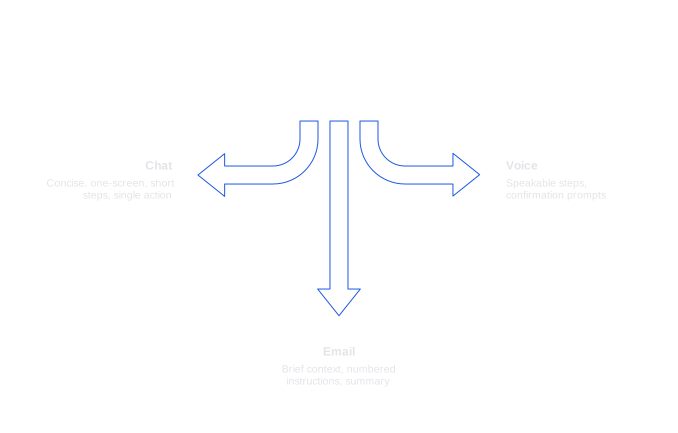
Shape answer templates for each channel
- Chat: Keep it concise, one screen, short steps, and a single clear action.
- Email: Offer brief context, clear numbered instructions, and a summary.
- Voice: Use speakable steps and confirmation prompts.
To ensure operational reliability, include safety measures like referencing article sources in agent drafts, setting parameters to prevent the model from concocting product names, and eliminating stale articles with expired dates.
Having a thin or disconnected knowledge base can lead to chatbot failure. To understand why this happens and how to fix it, refer to this clear guide to fix your chatbot.
Keep knowledge current with governance, ownership, and feedback loops
Outdated content can be costly. Assign owners to every article, set regular review cycles, and display freshness badges so agents can trust the information source.
- Use change logs to specify what was updated and why.
- Route product release notes automatically to content owners.
- Allow agents to provide direct feedback within their drafting panel.
- Promote high-performing snippets to shared templates for team-wide use.
Engage customers in closing the feedback loop. Add quick yes/no ratings to public articles and follow up with a single question. Incorporate the best customer phrasing into reusable text blocks.
Measure the impact of a connected knowledge base with KPIs
Focus on outcomes rather than just activity. Start with a few key metrics and review them weekly.
- First Response Time: Shorter response times indicate the system’s effectiveness. See more practical tips for reducing FRT with AI support .
- Suggestion Acceptance Rate: Tracks how useful AI-generated drafts are. Learn how to measure and act on suggestion acceptance rate .
- Resolution and Reopen Rate: Measure the quality and completeness of answers, not just speed.
- Cost per Resolution: Highlights savings achieved through fewer escalations and faster fixes.
- Self-service Deflection: Shows how many cases are solved directly by public knowledge articles.
Link these metrics to governance. If suggestion acceptance drops, review for outdated tags or missing templates. If self-service isn’t growing, expand article coverage for key intents.
Choose vendors to build a connected knowledge base and AI assistance
When it comes to choosing the tools for building a connected knowledge base and AI assistance, you have many options. Select those that fit your stack, data model, and review process.
- Zendesk + Knowledge: Native to Zendesk, with robust ticket links and workflow triggers.
- Typewise: Integrates directly into CRM, email, and chat. It drafts, refines, and personalizes responses from your knowledge base, ensuring brand tone control and maintaining privacy by design.
- Intercom Articles: Ideal for chat-oriented teams, providing in-app guides and article suggestion.
- Guru: Uses card-based knowledge management and verification workflows.
- Confluence or Notion: Flexible documentation tools that may require additional governance structures and integrations.
Deploy AI assistance where your team works. Let the knowledge base serve as your source of truth, using the AI assistant to assemble, personalize, and format answers while preserving accuracy.
A 90-day plan to launch your connected knowledge base and smart support
Days 0 to 30: Map and model
- Identify your top 100 intents from tickets and chat transcripts.
- Define content types, necessary fields, and tagging rules.
- Migrate five high-volume topics into the new model.
- Integrate the AI assistant into agent tools.
Days 31 to 60: Connect and pilot
- Integrate your knowledge base with CRM, chat, and email systems.
- Enable AI-generated suggestions for a pilot group.
- Create channel-specific templates and establish signoff procedures.
- Set up recurring review cycles and owner notifications.
Days 61 to 90: Scale and measure
- Expand knowledge base coverage to include 80% of inbound intents.
- Monitor suggestion acceptance, FRT, and reopen rates on a weekly basis.
- Promote top-performing snippets to global templates.
- Publish your public-facing library to support self-service.
Privacy and compliance considerations for a connected knowledge base
Safeguarding customer data is crucial as you scale your knowledge operations. Redact personally identifiable information from logs and drafts, and only store essential information. Keep detailed audit trails of edits and approvals, restrict publishing abilities, and enforce role-based access controls for internal articles. Align data retention with legal obligations and verify that your AI assistant does not train on your data without proper consent. Typewise adheres to stringent privacy standards designed for enterprise needs.
Operational habits that keep your connected knowledge base useful
- Draft an article and assign an owner with every new feature release.
- Hold weekly content review sessions with both support and product teams.
- Celebrate time saved and well-crafted phrasing in team meetings.
- Archive outdated content rather than hiding it, and always state the reason for archiving.
Sustained, simple habits keep complex systems effective. When the knowledge base is clear, current, and embedded in daily routines, your team’s trust in it will only grow.
Bring your connected knowledge base into your agents’ daily flow
Smart support is not about introducing a new portal, but about enriching your existing workflows with structured, dynamic content. Connect knowledge to every response, analyze what works, and refine your library continuously. Your customers will notice the difference.
Want to see this in action? Typewise integrates smoothly with your current tools, preserving your data boundaries. Start a conversation at typewise.app.
FAQ
Why is a connected knowledge base essential for effective support?
A connected knowledge base prevents inconsistencies and inefficiencies by consolidating content, context, and conversations. Without it, expect stalled chatbot operations and redundant agent efforts that hurt productivity.
How can AI enhance the utility of a knowledge base?
AI uses the knowledge base as operational memory, suggesting accurate responses that agents refine. This refinement is a continuous learning cycle, optimizing response accuracy over time, rather than relying on static information alone.
What should be considered when designing a knowledge base schema?
Prioritize structure with a defined schema, taxonomy, and content model. Structuring effectively allows quick AI and human retrieval, preventing costly errors from ill-defined or hard-to-find data.
Why is integrating the knowledge base with other tools crucial?
Integration transforms your knowledge base from static to dynamic, aligning content with CRM, chat, and email systems. This minimizes disruptions in workflows, ensuring that accurate information is effortlessly accessible across platforms.
How can Typewise assist in optimizing support workflows?
Typewise integrates with CRM, email, and chat to draft and personalize responses, preserving brand tone and fixing grammatical errors. It accelerates the support process while maintaining privacy and data integrity.
What are the risks of an outdated knowledge base?
Outdated content can cause accuracy issues, leading to potential missteps and lost trust. Regular reviews and ownership assignment ensure reliability, reducing the risk of misinforming clients and prolonging resolution times.
How should metrics be used to manage a knowledge base?
Metrics like First Response Time and Suggestion Acceptance Rate highlight efficiency and effectiveness. They expose areas lacking in coverage or structure, enabling targeted improvements rather than superficial fixes.
What privacy considerations must be addressed with a connected knowledge base?
Ensure personal data is redacted, and limit data retention to legal obligations only. Role-based access controls and a focus on privacy by design protect against breaches and misuse, maintaining customer trust and compliance.