Crisis response tone in customer support decides the outcome of incidents
When things go wrong, your words carry weight. Customers judge your brand by the very first line they read. A steady, clear tone restores trust, sets expectations, and reduces churn. This guide provides actionable guidance on what to say, how to say it, and when to communicate during a crisis.
In your interactions across email, chat, social, and phone, it’s beneficial to follow certain key steps: keep language human, timelines specific, and always share what you know and clarify what your next actions will be.
Crisis response tone principles for customer support teams
- Own it, accept responsibility without legal overreach. State what happened at a high level.
- Be clear, use short sentences, plain verbs, and concrete timelines.
- Show care, acknowledge the impact on the customer, not only the incident itself.
- Set the next step, tell customers when and where the next update arrives.
- Stay consistent, keep tone and facts aligned across all channels.
- Write for scanning, front load the key point, then details, then actions.
Style checklist: use we for showing accountability, you for empathy, and specify exact times like by 14:00 UTC. Avoid hedging terms like hopefully or might when possible, provide a range if certainty isn’t possible.
Constructing effective crisis responses for email, chat, and social platforms
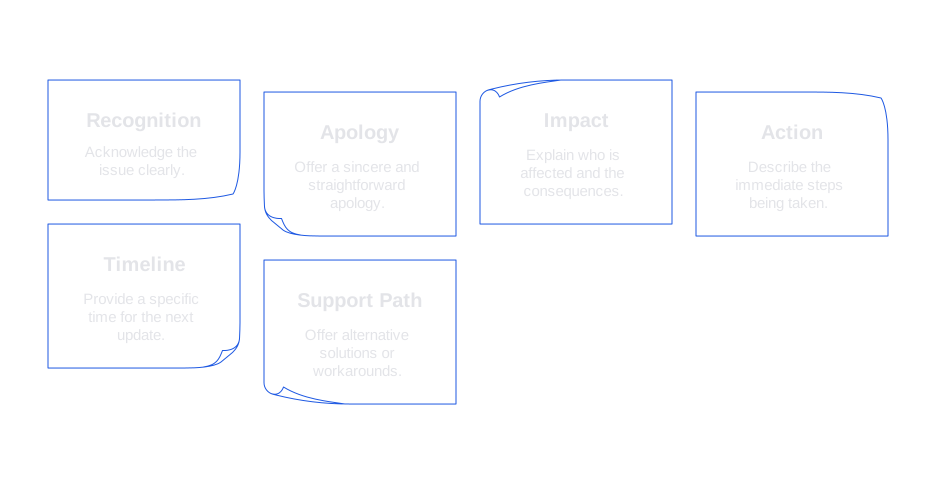
Your first message during any incident sets the tone for all further communication. Use this six-part structure for any response:
- Recognition, name the issue.
- Apology, plain and direct.
- Impact, describe who is affected and how.
- Action, state what your team is doing now.
- Timeline, give the next update time.
- Support path, share a fallback or workaround if available.
We are investigating login failures affecting some customers. We are sorry. Our team is rolling back a recent change. We will provide the next update at 14:00 UTC. If you need access now, please use the mobile app as a workaround.
Speed is critical. If your response queue spikes, leverage AI drafting and triage to reduce delays. For practical tactics, see seven ways AI improves first response time in support.
Crisis response tone templates for common customer support scenarios
Message template for a service outage or degradation
We are seeing payment errors for a portion of checkouts. We are sorry. Our engineers have paused new deployments and are working on a fix. Next update at 10:30 PT. If urgent, you can process payments through the dashboard while we restore the API.
Message template for data display issue or reporting delay
Some analytics charts show incomplete data since 06:00 UTC. We are sorry for the confusion. Source data is intact. We are reprocessing the missing hours. We expect full recovery by 15:00 UTC. Your exports remain accurate.
Message template for a billing error
We charged you twice for the December invoice, for which we sincerely apologize. We will refund the duplicate charge within 24 hours and you will receive a notification when this is done. In case this error has caused any bank fees, we will automatically identify and reimburse them without requiring any action on your part.
Shipping delay
Your order is delayed after a carrier handoff failure. We are sorry for the wait. We upgraded shipping at no cost. New delivery window is Dec 27 to Dec 28. We will update this thread if the carrier scans earlier.
Security concern
We identified unusual login attempts. We are sorry for the concern. We rotated affected tokens and forced a password reset. No payment data was exposed. We will send a full report by 18:00 UTC. You can restore access using the secure link below.
Adapt each template to your brand voice, but maintain the structure and meet the time commitments.
Crisis response tone channel strategy and personalization across your stack
- Status page first, publish a short incident note with clear timestamps.
- In-product banner, place the workaround where the problem appears.
- Targeted email, message only affected segments to reduce unnecessary noise.
- Social replies, acknowledge publicly, move detailed discussions to DMs as needed.
- Phone escalation, call customers with regulatory exposure or high spend.
Personalization signals play a crucial role during incidents. Be sure to consider and make reference to the customer’s plan, region, or workload if these aspects affect or change the impact of the situation. Any customization in your communication should be factual and realistic, making no promises that your team can’t fulfill.
Crisis response tone quality assurance and common mistakes to avoid
High-risk phrases to replace
- Avoid: There is nothing we can do, as it closes the door.
- Use: Here is what we can do next, which keeps the conversation moving forward.
- Avoid: As you know, which can sound condescending.
- Use: To recap, which respects time and focus on clarity.
- Avoid: Users, as it sounds impersonal.
- Use: Customers or people to convey a more human touch.
Close conversations with care
End with clear next steps or confirmation. If the fix is live, summarize the outcome and leave the path open for follow-up. For practical language, see 94 chat closing messages that leave a great impression.
Crisis response tone metrics that show what works
- First response time, measure by channel and segment, and link to incident stages.
- Time to useful reply, the moment when customers receive a workaround or next update time.
- Reopen rate, high values may suggest unclear communication or missing steps.
- CSAT and sentiment, run text analysis on crisis threads specifically.
- Escalation ratio, track how many cases require manual handoff from automation.
- AI suggestion acceptance, monitor how often agents use AI-generated phrasing during incidents.
Teams that consistently measure writing quality improve faster. Learn how to track AI suggestion acceptance rate as a support KPI for more effective support coaching.
Crisis response tone tools and platforms and where Typewise fits
You may already use a help desk with macros and a status page, but several specialized tools can help manage incident response more effectively:
- Zendesk AI and macros, useful for routing and pre-written messages in large queues.
- Typewise, AI writing assistance inside your CRM, email, and chat. It suggests tone-consistent phrasing, checks clarity, and adapts to your brand. Typewise runs privacy-first, which suits regulated teams.
- Intercom, ideal for in-product banners and messenger flows.
- Salesforce Service Cloud, excels at workflows and complex routing rules.
Regardless of your stack, define a crisis style guide and store templates where agents work. Maintain consistency in terminology, timelines, and sign-offs.
Crisis response tone playbook you can start using today
- Prepare, draft three templates per scenario and review them monthly.
- Signal, follow clear subject line patterns like [Incident] Payments failing, next update 14:00 UTC.
- Coordinate, assign one owner per channel to avoid drift.
- Timebox, set default update cadences such as every 60 minutes until resolved.
- Escalate, flag accounts at churn risk for personalized outreach and credits.
- Review, conduct a blameless postmortem on your language choices and outcomes.
During an incident, keep a single source of truth and link every reply to it. For first responses, speed is most effective. Review strategies for faster replies with AI in support teams.
After resolution, close conversations carefully: summarize the fix, confirm the status, and invite further questions. Find proven closing language in this library of chat closing messages for support.
How Typewise can enhance your crisis response tone and integrate with your current tools
Typewise integrates smoothly with your existing CRM, email, and chat platforms. It suggests clear, on-brand language and timelines in real time, enabling agents to accept or edit suggestions with a click. Leaders can ensure the team maintains a consistent tone across all communications.
If you want a practical partner for writing during incidents, reach out. Learn more about how Typewise fits your workflow at typewise.app. We’re happy to share examples and help you get started with a quick pilot.
FAQ
Why is tone important in crisis response?
Tone shapes customer perception and trust during crises. A clear and steady tone prevents miscommunications that could escalate issues, leading to further dissatisfaction and churn.
What are some common mistakes in crisis communication?
Typical errors include using vague language, failing to update customers regularly, and inconsistent messaging across platforms. These missteps erode trust and can worsen a situation.
How can Typewise assist in crafting a crisis response?
Typewise provides AI-driven suggestions to maintain consistent, on-brand language. It integrates with existing tools to streamline communication and help support teams respond quickly and accurately.
What should be included in the initial crisis response message?
An effective first message should describe the issue, extend a sincere apology, outline the impact, state current actions, set a timeline for updates, and offer any workarounds.
When should a company consider leveraging AI in customer support?
AI is invaluable when support queues spike, enabling swift triage and response drafting. It ensures consistency and speed, which are critical during high-stress incidents.
How can a business ensure its crisis communication is effective?
Regularly review and update templates, maintain a unified tone across channels, and rely on metrics to assess response effectiveness. Inefficient communication can lead to increased customer frustration and departure.
What role does personalization play during a crisis?
Personalizing communications based on the customer’s specific circumstances shows respect and attentiveness. Ignoring these factors risks making the communication feel generic and detached.