Stop Rewriting Support Emails: Customer Support Email Templates for SaaS Teams
If your team is stuck sending the same messages day after day, these email templates are your shortcut to instant replies. Each template is crafted with short, clear sentences, a friendly voice, and a single, focused ask. Just personalize the placeholders, send, and keep your workflow moving. These templates work with any CRM, shared inbox, or helpdesk.
Take the exact text, then update it to fit your company’s tone. Replace variables like {{FirstName}}, {{Company}}, and {{PlanName}}. Stick to one main objective per message and always leave the recipient with a clear next action.
How SaaS Teams Can Use These Support Email Templates Effectively
- Save this URL, hit CMD+F and search for a keyword in the list, when you need help for a specific use case.
- Store templates centrally in your helpdesk or CRM to manage versions and ownership.
- Leverage AI tools to refine tone, adjust length, or translate language, always keep your brand's voice intact.
- Measure effectiveness. Explore how AI can speed up response times and share improvements with your team.
- Monitor usage. If support reps skip AI-suggested responses, find out why. You can track the acceptance of AI suggestions as a KPI .
- Update templates every quarter. Retire those with low performance and keep examples relevant and impactful.
50 Copy-and-Paste SaaS Customer Support Email Templates
Onboarding and Welcome Templates
- Subject: Welcome to {{Product}}, {{FirstName}} > Hello {{FirstName}}, we’re excited to have you! Access your dashboard here: {{LoginURL}}. If you need help getting started, just reply.
- Subject: Quick setup for {{Company}} > Hi {{FirstName}}, welcome aboard. Begin with this 3-step guide: {{GuideURL}}. If you'd like, I can walk you through it on a quick 15-minute call.
- Subject: Your data import is ready > We’ve completed your import for {{Company}}! You can review everything here: {{ImportURL}}. Notice anything off? Just send us a sample row.
- Subject: Choose your success goal > What’s your top goal for this month? Let us know one metric, and we’ll customize your setup to help you reach it.
- Subject: Invite your teammates > Share {{InviteURL}} to invite teammates. Most teams add Admin, Builder, and Reviewer roles. Need advice on roles? Let me know!
- Subject: Your first milestone, done > Congrats, {{FirstName}}! You’ve connected {{Integration}}. Next up: create your first workflow with this guide: {{WorkflowURL}}.
- Subject: We set default alerts for you > We’ve added default alerts to your account. You can adjust them here: {{AlertsURL}}. If the thresholds need tweaking, just ask.
- Subject: Need a live walkthrough? > Want a 20-minute demo covering your use case? Pick a slot: {{CalendarURL}}. Please bring one dataset if possible.
Trial and Activation Templates
- Subject: Your trial checklist > To make the most of your trial, just complete these steps: {{Step1}}, {{Step2}}. Need hands-on help? I'm here to guide you.
- Subject: Unblocked your API key > Your API key is now active! Documentation is here: {{DocsURL}}. If you have a request to test, send it over for review.
- Subject: Trial ends soon for {{Company}} > Your trial wraps up on {{Date}}. Want an extension? Reply “yes” for 7 more days.
- Subject: Activation nudge for {{Product}} > Your {{Integration}} setup is almost there! Use this wizard: {{WizardURL}}, it only takes five minutes.
- Subject: Quick win before your demo > Take this step before your demo: {{Step}}. It helps us show your actual data, not a sample. Need assistance?
- Subject: Trial feedback request > What slowed you down this week? Tell us one friction point, and we’ll aim to fix it today.
Billing and Payment Templates
- Subject: Invoice {{InvoiceNumber}} for {{Company}} > You’ll find your invoice attached. Download anytime here: {{BillingPortalURL}}. If you have questions, let me know.
- Subject: Payment failed for {{PlanName}} > Unfortunately, your card ending in {{Last4}} didn’t go through. Update your details here: {{BillingPortalURL}}. We’ll try again tomorrow.
- Subject: Refund processed > We’ve refunded {{Amount}} to your card ending with {{Last4}}. The funds should be visible in 5–10 business days.
- Subject: Overages this month > Your usage is now above your current plan. You’re at {{Usage}}. You can either reduce usage or upgrade, let me know if you want advice.
- Subject: PO received and recorded > Your purchase order {{PONumber}} has been added to your subscription. You’ll see it referenced on your invoices going forward.
- Subject: Tax info update needed > Please upload your tax ID here: {{BillingPortalURL}} to remove VAT, if eligible, from your next invoices.
Bug, Outage, and Apology Templates
- Subject: We’re investigating your report > Thank you for alerting us to this issue. We can replicate the problem and will post updates here: {{StatusURL}}.
- Subject: Incident update for {{Feature}} > There was a partial outage with {{Feature}} from {{StartTime}} to {{EndTime}}. Service is recovering, we’ll follow up with a root cause analysis.
- Subject: Fix shipped for your bug > We’ve released a fix in {{Version}}. Please refresh and try again. If the issue persists, let us know the timestamp.
- Subject: Sincere apology for disruption > We’re very sorry for today’s disruption. We’re raising our standards and putting new safeguards in place.
- Subject: Credit applied to your account > We’ve credited your account with {{Amount}}. This will appear on your next invoice. Thanks for your patience and understanding.
- Subject: Workaround while we fix this > Here’s a safe workaround you can use for now: {{Steps}}. We expect to have a permanent fix this week.
Feature Request and Roadmap Templates
- Subject: Logged your feature request > Your request for {{Feature}} is logged. You’ll get updates as progress is made. Thanks for your feedback!
- Subject: We need a use case example > Could you share a workflow and outcome where you’d use {{Feature}}? Concrete examples help us prioritize better.
- Subject: Early access invitation > We’re beta-testing {{Feature}}. Want early access? Feedback is required. Reply “yes” and I’ll enable it for you.
- Subject: Feature shipped today > {{Feature}} is now live in version {{Version}}. Documentation is at {{DocsURL}}. Let us know how it works for you!
- Subject: Not planned right now > Thanks for the suggestion. {{Feature}} isn’t scheduled for the near term, but we’ll review again next quarter.
Account, Access, and Security Templates
- Subject: Password reset help > I’ve started a password reset for {{Email}}. Use this link: {{ResetURL}}, it expires after 60 minutes.
- Subject: SSO setup details > We need these SSO values: {{Values}}. Please send your metadata file and a test user when you’re ready.
- Subject: Access restored > Access to {{User}} is re-enabled. The account was locked due to multiple failed logins. We suggest enabling 2FA for extra security.
- Subject: Data export ready > Your export is ready at {{ExportURL}} for the next 72 hours. Need an S3 delivery? Just ask.
- Subject: Security questionnaire received > We have your security questionnaire. Our SOC 2 report is attached for your reference. Let me know if you need details beyond what's included.
Renewal, Upgrade, and Expansion Templates
- Subject: Renewal details for {{Company}} > Your renewal date is {{Date}}, current plan: {{PlanName}}. Want to review your usage or discuss options?
- Subject: Seat expansion request > I can add {{SeatCount}} new seats today. Do you need role templates set up as well? It helps onboard new users faster.
- Subject: Upgrade path suggestion > Your team is using {{Usage}} of {{Limit}}. The {{NextPlan}} plan might be a better match. I can outline the switch if you’d like.
- Subject: Renewal invoice attached > Your renewal invoice is attached and references PO {{PONumber}}. Need a split payment schedule? Let me know.
- Subject: Co-term new contract > We can align your new order to renew on {{Date}}, so everything stays on one schedule. Should I prepare a quote?
Cancellation, Churn, and Win-back Templates
- Subject: We received your cancellation > We're sorry to see you leave. Your access will end on {{Date}}. Need a data export?
- Subject: Can we fix this before you leave? > Can you share the main reason for leaving? I’ll aim to resolve it within 24 hours if possible.
- Subject: Pause instead of cancel > Would you like to pause billing until {{Date}}? Your data stays safe. Is a pause a better fit?
- Subject: Welcome back offer > We’d love to have you return. I can help restore your previous setup. Want a guided restart?
Feedback, CSAT, and NPS Templates
- Subject: Quick satisfaction check > Did we resolve your issue? Please reply with a score from 1 to 5. Any comment is appreciated!
- Subject: NPS check-in > How likely are you to recommend {{Product}} to a friend or colleague? Give us a score from 0 to 10, just a sentence or two is helpful.
- Subject: Review request > If you have two minutes, we’d appreciate a review at {{ReviewSite}}. Your feedback helps others make decisions.
Closing, Follow-Up, and Thanks Templates
- Subject: Closing this ticket for now > I’m closing this ticket since we haven’t heard back. If you still need help, simply reply to reopen.
- Subject: Thank you for the kind words > Your message made our day! I’ve shared your feedback with the whole team, thank you for being our partner.
Recommended SaaS Customer Support Platforms and AI Assistants
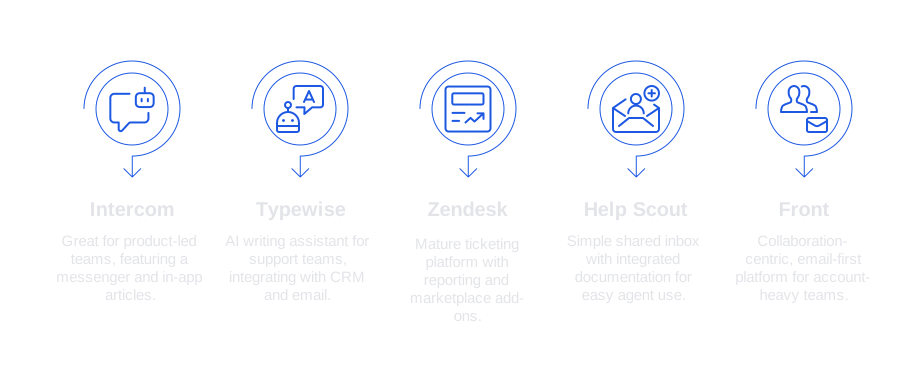
- Intercom – Ideal for product-led teams. Includes a powerful messenger and in-app articles.
- Typewise – AI writing assistant for support and success teams. Integrates with CRM, email, and chat while keeping privacy and your brand tone as priorities.
- Zendesk – A mature ticketing platform with comprehensive reporting and a wide range of marketplace add-ons.
- Help Scout – Simple, shared inbox with integrated documentation. Easy for agents to use.
- Front – Collaboration-centric, email-first. Well-suited for account-heavy teams.
Subject Line Formulas for Effective SaaS Support Emails
- [Action] for {{Company}} by {{Date}}
- Solution for {{Feature}} on {{Environment}}
- {{FirstName}}, your {{Product}} account is almost ready
- Status update on ticket {{TicketID}} for {{Company}}
- Invoice {{InvoiceNumber}}: your next steps
- Trial ends {{Date}}. Need more time?
- New {{Feature}} released, want a walkthrough?
If you’d like your templates to adapt automatically to different tones, languages, or communication channels, try an AI assistant that works inside your current tools. See how Typewise can help your team respond faster, stay on-brand, and improve message accuracy.
FAQ
Why should SaaS teams use email templates for customer support?
Email templates streamline customer interactions, ensuring consistent and quick responses. They reduce the time spent on repetitive tasks, but must be personalized to avoid robotic communication.
How can AI tools, like Typewise, enhance the use of support email templates?
AI tools refine the tone and structure of templates, adapting them to maintain brand voice across languages. Typewise, specifically, ensures efficiency while respecting data privacy.
What are some effective ways to measure email template performance?
Track response rates and customer satisfaction scores. Discard low-performing templates regularly, and rely on AI insights to make data-driven improvements.
What is the risk of over-relying on templates in customer support?
Excessive reliance can strip communication of its personal touch, leading to customer frustration. Balance automation with genuine engagement to maintain customer trust.
How often should SaaS email templates be updated?
Quarterly reviews ensure relevance and effectiveness, accounting for any changes in products or customer expectations. Stagnant templates risk becoming obsolete.
How do you ensure email templates align with a company's brand tone?
Regularly involving communication teams and using AI like Typewise for tone adjustments can help. Ensuring each template undergoes approval processes maintains brand fidelity.