Calming Angry B2B Client Emails with Templates That Defuse, Explain, and Escalate
Anger can spread rapidly by email, but structured responses can help slow it down and restore calm. The templates below enable you to reply with empathy, clear communication, and appropriate firmness. Treat them as foundational tools to personalize, always fill in specific names, facts, and timelines. Aim for responses that are concise, precise, and composed.
If a situation escalates, don’t hesitate to use the escalation templates right away. Keeping communication cycles short and timely can preserve client trust and safeguard your revenue.
How to Use These 50 Email Templates for Angry Clients in B2B Support
- Start by acknowledging the client’s concerns without being defensive. Reflect the impact on them in one sentence.
- State one action you will take immediately. Indicate when the client can expect your next update or step.
- Request only the most essential information or data required to help resolve the issue. Avoid asking clients for extensive or ambiguous tasks.
- For crucial issues with significant implications, consider transitioning to phone calls. Afterwards, summarize any decisions or next steps in an email.
Speed is critical. Explore practical methods to reduce first response time using AI.
50 Email Templates for Angry B2B Clients Categorized by Purpose
Acknowledgment and Empathy Templates for Angry B2B Clients
- Subject: Thanks for reporting [issue] I understand the impact on [Company]. I am investigating now.
- Subject: I hear your frustration I am sorry this affected your timeline. I am your point of contact.
- Subject: We fell short on [SLA] I see we missed the mark. Here is how we will correct it.
- Subject: Quick acknowledgment on [ticket ID] I received your note. I will update you within [timeframe].
- Subject: Apologies for the confusion I am sorry for mixed messages. I now have full context.
- Subject: Impact understood I recognize the cost to your team. I am prioritizing this.
- Subject: Your expectations are fair Your expectations make sense. I will align our plan accordingly.
- Subject: Thanks for your patience I know this dragged. I will deliver a clear plan today.
Clarification Templates to Gather the Right Details from Angry B2B Clients
- Subject: Details that speed a fix Please share the exact error, timestamp, and user ID. Screenshots help.
- Subject: Steps to reproduce Please list steps, environment, version, and data size. I will follow them.
- Subject: Access for troubleshooting May we access staging? Read-only is fine. I will schedule a window.
- Subject: Log file request Please attach logs for [service] from the last 24 hours. Redact as needed.
- Subject: Quick alignment call Can we book 15 minutes today? I will listen first, then propose next steps.
- Subject: Configuration snapshot Please export your config and custom rules. This avoids guesswork.
- Subject: Scope and priority check Which users face this? What is the revenue impact? I will set urgency.
- Subject: Version confirmation Which version are you on? Any recent changes? I will compare against known issues.
Expectation-setting Templates with Timelines for Angry B2B Clients
- Subject: I own [ticket ID] and timeline Next update arrives by [date, time]. I will share the plan then.
- Subject: ETA for workaround We target a workaround by [date]. I will confirm after testing.
- Subject: Maintenance window request We need a window at [time]. It takes 30 minutes. No data risk expected.
- Subject: SLA status update We are in P1 status. Response time is [SLA]. I am monitoring closely.
- Subject: Phased plan for [issue] Phase one is rollback. Phase two ships a patch. I will recap after each.
- Subject: Ownership handoff with continuity [Colleague] covers while I am off. You keep this thread. One playbook.
- Subject: Update cadence I will update you every two hours, even if unchanged. No chasing needed.
- Subject: Change approval Here is the change plan. Please approve the window to proceed.
Solution Templates and Alternatives for Angry B2B Clients
- Subject: Safe rollback plan Rollback restores service quickly. I recommend we proceed today.
- Subject: Patch ready for staging A patch is ready. Please deploy to staging first. I will stay online.
- Subject: Temporary throttle We can throttle requests to stabilize. Analytics impact is minor.
- Subject: Data recovery path I can restore from snapshot [time]. Recovery takes one hour.
- Subject: Workaround using [feature] This workaround unblocks your team now. I will document trade-offs.
- Subject: Replace failing integration The integration fails under load. We can switch endpoints with vendor help.
- Subject: Quick guide for your team I wrote short steps for your team. The guide covers edge cases.
- Subject: Credit option We can credit this month to reflect disruption. Confirm if preferred.
Firm Boundary Templates and Policy Reminders for Angry B2B Clients
- Subject: We cannot share production data I must protect customer data. I can share aggregates only.
- Subject: Outside current agreement This request exceeds our scope. I can quote a change order.
- Subject: Support hours and escalation path Our staffed hours are [hours]. For P1 issues, use this channel.
- Subject: Conduct expectations I want a respectful conversation. I cannot accept insults.
- Subject: Rate limit policy We enforce rate limits for stability. I can raise limits after testing.
- Subject: End of life reminder This feature reached end of life. I can guide a migration.
- Subject: Security on credentials I cannot accept passwords by email. Please use the secure portal.
- Subject: Meeting agenda needed Please share an agenda. I will prepare focused answers.
Escalation and Handover Templates for Angry B2B Clients
- Subject: Escalating to senior engineer I escalated this to [Senior Engineer]. I remain your contact.
- Subject: Management visibility I briefed our head of support. They will track this case.
- Subject: Joint call with vendor I scheduled a joint call with [Vendor]. We will align fixes.
- Subject: War room invite I opened a war room at [link]. Join for real-time updates.
- Subject: Executive review request I requested an executive review for impact. Decisions follow on [date].
- Subject: Escalation playbook kickoff We are in escalation mode. Here are roles and checkpoints.
Follow-up and Relationship Repair Templates for Angry B2B Clients
- Subject: Postmortem and next steps I attached a brief postmortem with causes and actions. Please add edits.
- Subject: Confirmation of resolution Monitoring is green. Users confirm the fix. May I close this case?
- Subject: Preventative check-in Similar patterns appear in logs. I propose a 30 minute health check.
- Subject: Relationship check I value our partnership. How did this feel from your side?
Tools That Help Teams Write and Govern Email Templates for Angry B2B Clients
- Intercom: Macros and routing rules ensure consistent replies. Reporting highlights any gaps or delays.
- Typewise: AI writing assistance embedded in your CRM, email, and chat. It enhances grammar, tone, and phrasing while maintaining privacy.
- Zendesk or Freshdesk: Macros and triggers standardize responses. Use roles and permissions to keep sensitive templates protected.
Metrics That Show These Email Templates for Angry Clients Work in B2B Support
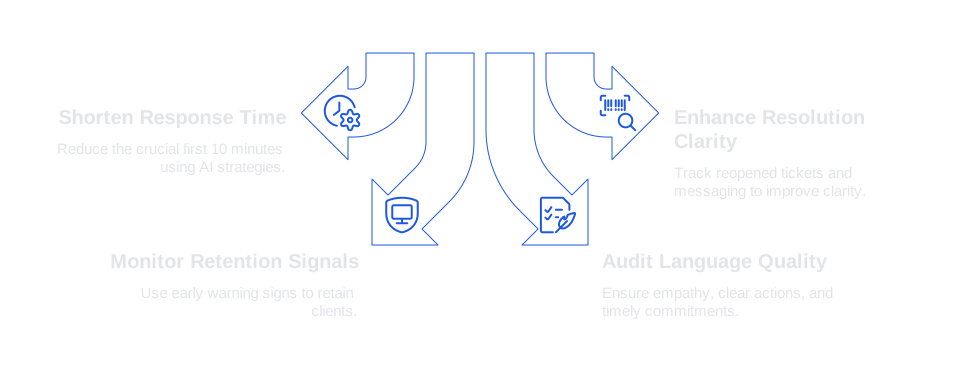
- First Response Time. Aim to shorten the crucial first 10 minutes. Discover strategies to reduce response time using AI .
- Resolution clarity. Track the number of reopened tickets and the back-and-forth messaging per case.
- Retention signals. Use early warning signs to retain clients before they consider leaving .
- Language quality. Regularly audit email samples for empathy, clear actions, and timely commitments.
Final Tips to Keep Angry B2B Client Email Conversations Respectful and Productive
- Write subject lines that indicate the next step or action.
- Commit only to deadlines and timestamps you know you can meet.
- Back up your replies with facts, evidence, or documented details instead of opinions.
- Escalate promptly when the risk or stakes are high.
- After every call, summarize decisions and assign clear owners in a follow-up email.
Looking for a solution that ensures steady, on-brand responses without hindering your team’s efficiency? Try Typewise in your current tools. Discover how it streamlines your workflow at typewise.app.
FAQ
How can email templates reduce anger in B2B client support?
Email templates offer structured responses that defuse tension, maintain professionalism, and expedite resolution. However, personalization is crucial to prevent it from sounding robotic. Consider Typewise's AI assistance to ensure empathy and correct tone.
What is the first step in addressing an angry B2B client?
Begin by acknowledging the client's concerns sincerely and without defensiveness. Reflect on the impact it had on them to establish trust. Relying on generic templates without real empathy can escalate the conflict further.
Is it effective to transition an email exchange to a phone call?
For significant issues with substantial consequences, a phone call can clarify misunderstandings and expedite resolutions. However, follow-up with an email summary to document decisions and assign accountability.
How does Typewise enhance email responses in B2B settings?
Typewise integrates with CRM and email systems to improve grammar, tone, and phrasing, preserving professionalism. It's essential to maintain data privacy while enhancing communication efficiency in high-stakes scenarios.
Why is setting expectations important in B2B communication?
Clear expectations prevent misunderstandings and align both parties around timelines and actions. Failing to establish this can lead to repeated complaints and strained relationships, impacting long-term business viability.
What role does AI play in improving response times?
AI optimizes response times by automating routine tasks and suggesting pertinent responses quickly. But relying exclusively on AI without human oversight can result in inauthentic interactions that erode trust over time.
How can firms ensure email responses remain respectful?
Use subject lines that specify actions and commit to realistic deadlines. Respectful communication is not just about tone; it's about providing factual backing to claims and ensuring follow-ups are rooted in accountability.
What are the consequences of not personalizing templates?
Failing to personalize can make responses feel generic, eroding client trust and sometimes exacerbating their frustration. Templates should be a starting point; adapt them to fit the specific context and client relationship.
Why is it important to summarize calls in follow-up emails?
Summarizing calls in emails reinforces decisions and assigns responsibility, reducing the risk of miscommunication. Ignoring this practice can lead to discrepancies, stalled resolutions, and client dissatisfaction.