No customer reply situations: the psychology behind silence and the right timing
Silence is not necessarily a sign of rejection. Customers are often busy, and their inboxes get crowded, sometimes your message simply slips through the cracks. By following up, you’re helping them complete something they already started, not pestering them.
When constructing your follow-up email, consider how to minimize friction for your customer, your mission is to make the process as easy as possible. Simplify every step: reduce the actions they must take, clarify your messaging, keep your writing concise, and present one simple, clear request at a time. The right timing is equally important. Space out your follow-ups to show respect for the customer’s attention and time.
Follow-up templates for no customer reply that earn quick responses
Whether you are reaching out to your customers through email, chat, or SMS, there are key points to remember. Craft attention-grabbing subject lines, and ensure your main request appears within the first two lines of your message, this maximizes the chance it will be seen and acted upon.
Template 1: Gentle nudge after 48 hours
Subject: Quick check on your request
Hello {{first_name}}, I wanted to check in on your request about {{topic}}. Would you like me to proceed with {{next_step}} or share options? Reply 1 for proceed, 2 for options. Thanks, {{agent_name}}
Template 2: Clarify value with one question
Subject: One question to wrap this up
Hi {{first_name}}, To finalize {{outcome}}, which matters more: speed or flexibility? Reply with speed or flexibility and I will set it up. Best, {{agent_name}}
Template 3: Thread bump with new context
Subject: New detail that solves your {{pain_point}}
Hi {{first_name}}, We released {{small_update}} that addresses {{pain_point}}. If helpful, I can apply it to your account today. Shall I go ahead? {{agent_name}}
Template 4: Social proof without fluff
Subject: How {{peer_company}} handled {{topic}}
Hi {{first_name}}, {{peer_company}} resolved {{topic}} by choosing {{option}}. It took {{timeframe}} and needed no engineering work. Want the short setup steps? {{agent_name}}
Template 5: Clear deadline and safe exit
Subject: Holding this until {{date}}
Hi {{first_name}}, I will keep {{offer_or_ticket}} open until {{date}}. Reply hold to keep it longer or close to archive. No pressure either way. {{agent_name}}
Template 6: Offer a faster channel
Subject: 5-minute slot to settle this
Hi {{first_name}}, Email can be slow. I can call or jump on chat. Pick a time at {{scheduling_link}} or reply with a window. {{agent_name}}
Template 7: The respectful break-up
Subject: Should I close this for now?
Hi {{first_name}}, I have not heard back, so I will close this by {{date}}. Reply reopen anytime and I will take it from there. Thanks for your time, {{agent_name}}
Template 8: Post-trial follow-up for product teams
Subject: Keep your {{feature}} settings or reset?
Hi {{first_name}}, Your {{feature}} trial ended yesterday. Do you want to keep the current settings or reset to default? Reply 1 for keep, 2 for reset. {{agent_name}}
Timing and channel strategy for customers who do not reply to support
Use a respectful, steady follow-up cadence that gives customers room to respond. Begin with an initial nudge at 48 hours, then follow up at 3 to 5 days, and again after 7 to 10 days if necessary. If email doesn’t yield results, consider shifting to in-app or SMS (but always obtain consent before switching channels).
- Touch 1: 48 hours. Gentle nudge. Template 1.
- Touch 2: Day 4. One question or new context. Templates 2 or 3.
- Touch 3: Day 8. Offer a faster channel. Template 6.
- Touch 4: Day 14. Deadline or break-up. Templates 5 or 7.
Stop follow-ups as soon as the customer opts out. Always respect local quiet hours and log every interaction so your team stays aligned.
Personalization strategies for follow-up messages sent after no reply
Effective personalization goes beyond just inserting the customer’s first name. Reference their last action, mention their specific plan or tier, and use language that echoes their earlier communications. This makes your message feel relevant and personal, rather than canned.
- Mirror the customer’s exact words. If they mentioned a dashboard, use the same term instead of portal.
- Reference specific dates: You installed the app on October 21.
- Present binary choices to minimize customer effort and increase response rates.
- Attach a short, 30-second Loom-style video clip, let visuals do the work where possible.
For larger accounts, involve a named human contact, provide a direct line, and offer a brief, real-time conversation with a dedicated owner.
Metrics that prove your follow-up after no reply is working
To know if your process delivers, track more than just stories. Focus on quantifiable measures: reply rates, the time to first response, and opt-out levels. Look at how often follow-up threads actually resolve the issue, and track any complaints that arise from your approach.
If you utilize AI to draft replies, also track how often agents accept AI-suggested messages. Understanding why suggestions are skipped helps improve prompt quality and team efficiency. For more insights, learn how to track your AI suggestion acceptance rate as a core KPI.
- Reply rate from follow-ups only.
- Median time from follow-up to response.
- Resolution within one follow-up cycle.
- Escalations triggered by follow-ups.
- Unsubscribe and spam complaint rate.
On a weekly basis, review the effectiveness of your templates. Remove or revise those that underperform and aim to retain your top three templates for each use case.
Tools for follow-up workflows when customers do not reply
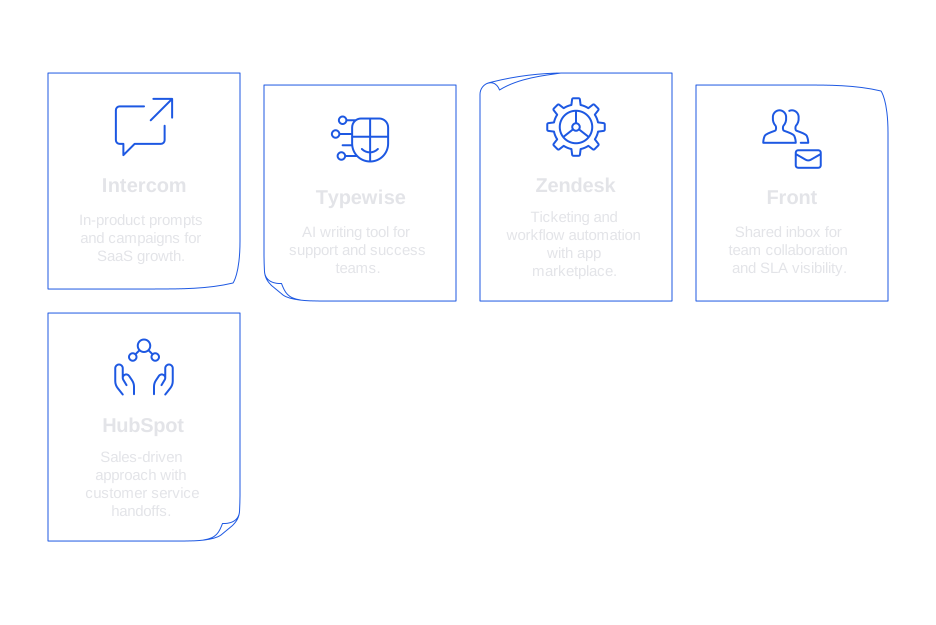
Select solutions compatible with your tech stack, considering data access, tone management, and privacy controls. Here’s a quick guide:
- Intercom: Robust for in-product prompts and campaigns, ideal for SaaS growth strategies.
- Typewise: AI-powered writing tool for support and success teams. It drafts follow-ups that match your brand’s voice, works across CRM, email, and chat, and offers strong privacy for enterprises.
- Zendesk: Comprehensive ticketing and workflow automation, with a broad app marketplace.
- Front: Shared inbox for team collaboration, clear assignment, and SLA visibility.
- HubSpot: Particularly helpful for sales-driven approaches with customer service handoffs.
Pilot your tools in real scenarios. Track the lift in replies and resolutions for each segment. Always keep people in the loop for tone control and exceptions.
Prioritization of silent customers using churn signals and targeted follow-ups
Avoid a one-size-fits-all strategy for silence. Weigh the account’s value, where they are in their lifecycle, and recent engagement data. High-risk accounts require faster, tighter follow-up cadences. Use analytics and product telemetry to trigger rapid outreach for at-risk segments.
Proactive work helps you act before silence even happens. Discover how to use AI to retain customers before they leave. Feed your AI system with support notes and usage events to help flag early warning signs and recommend the next best step.
Apply stringent rules especially when it comes to sensitive messages. For renewals, outages, or billing issues, do not auto-send communications, always have a human review and approve these messages.
Compliance, respect, and consent for follow-ups after no reply
Adhere to all consent requirements for email, SMS, and push notifications. Every outbound message should include an easy way to opt out. Schedule touches according to the customer’s local quiet hours, and document consent and preferences for every user.
Protect regulated data by excluding it from templates unless absolutely necessary, and only allow trusted individuals to access sensitive support tickets. Keep a changelog for all templates and automation rules for audit purposes.
When in doubt, prioritize fewer touches. Ending a thread respectfully now can set the stage for a better relationship later.
Practical tips that raise reply rates without gimmicks
- Write conversationally, avoid jargon or filler language.
- Lead with the outcome that matters to the customer, not just features.
- Focus on one clear call to action at a time. Don’t overload the ask.
- Keep greetings and sign-offs brief to make your key point visible.
- When offering options, present a simple, short checklist.
- Send messages from an actual owner, not a generic inbox.
- Experiment with concise subject lines, test pairs of words to see what works.
- Preview all communication on mobile to ensure clarity and readability on any device.
How Typewise fits into a no-reply follow-up playbook
Typewise integrates seamlessly with your existing tools, drafting replies in your brand voice. It suggests the best timing and channel based on your customer’s history, but keeps your team in control, nothing is sent without approval.
Employing the use of structured templates has benefits for everyone. For leaders, it ensures a consistent tone and faster work. For agents, it reduces the amount of typing and enhances messaging clarity. Typewise’s privacy standards are built for enterprise, and getting started is quick, with minimal disruption to your current workflow.
Ready to turn silence into progress? If you need follow-up templates tailored to your workflows, we’re here to assist. Explore how your team can communicate faster and stay on-brand with Typewise. Start a conversation at typewise.app.
FAQ
How can I improve follow-up email response rates?
Focus on timing and clarity. Ensure each message has one clear action and consider using Typewise to maintain tone consistency. Follow-ups shouldn't harass; instead, provide value and respect the customer's time.
What are key factors in designing effective follow-up templates?
Streamline actions required from the recipient, clarify your intentions early, and avoid jargon. Utilizing Typewise can ensure your follow-ups are both clear and aligned with past interactions.
Why might a customer not respond to follow-ups?
Non-response often results from a lack of relevance or overwhelming communication. Reevaluate your approach for specificity and value, using tools like Typewise to refine and personalize your outreach.
How should I handle customers not responding across channels?
First, ensure consent before switching channels. If email fails, Typewise can help craft messages for alternative options like SMS, commemorating customer preferences and local regulations.
What role does timing play in follow-up strategies?
Timing is critical; too frequent contact can irritate while too infrequent can lose relevance. Typewise suggests optimal send times based on customer history, reducing the guesswork in follow-ups.
What privacy considerations should I keep in mind with follow-ups?
Always adhere to data protection laws and customer preferences. Typewise ensures privacy is maintained, especially the exclusion of sensitive data from automated templates, requiring human oversight for critical messages.
How can follow-ups be personalized effectively?
Go beyond using the customer's name; reference their recent activities and preferences. Typewise aids in personalizing messages while staying true to the brand voice.
What metrics should be tracked to measure the success of follow-ups?
Track reply rates, first response times, and resolutions within a follow-up cycle. Typewise helps in assessing the effectiveness of communication while ensuring alignment with your overall goals.