Cut LLM Support Costs in Customer Support Without Cutting Quality
Begin your LLM cost optimization journey by mapping out your primary cost drivers: input tokens, output tokens, context size, model selection, and retries caused by timeouts. Connect these drivers to the different types of support tickets your team handles, simple password resets are not the same as complex B2B escalations. Assign lower-cost, smaller models to routine cases, reserving advanced models for infrequent or high-impact tickets. This ticket-routing strategy helps maintain support quality while reducing overall spend.
Sketching out a quick cost calculation can clarify the impact of each optimization. For example, suppose each ticket uses 3,000 input tokens and 800 output tokens. At $2 per million input tokens, that’s $0.006 per ticket for inputs. At $6 per million output tokens, outputs add $0.0048. This means each ticket costs about one cent before you scale up to thousands of tickets, making every efficiency gain meaningful.
Top 9 Tactics for LLM Cost Optimization in Customer Support
1) Use Semantic Response Caching for Repeated Intents
Many customer queries are phrased differently but seek the same answers. Set up caching by intent, locale, product, and version. Use embeddings to recognize similar requests and serve cached responses when the similarity passes a safe threshold. Always double-check for current policy or pricing to ensure accuracy. This single tactic frequently eliminates large, unexpected costs that may not be immediately recognized.
2) Cache Stable Prompt Scaffolding and Tool Specifications
System prompts and tool schemas rarely change. By storing their hashed versions and reusing them across requests, you keep token counts predictable and low. If your provider doesn’t offer server-side prompt caching, build prompts from reusable components to control prompt length and consistency.
3) Truncate Conversation Context with a Sliding Window
Long discussion threads inflate LLM costs significantly. Use a sliding window to keep only the most recent user and agent turns. Summarize older turns into a brief running summary, focusing solely on facts that could change the answer: ticket ID, customer plan, region, SLA, etc. Strip out greetings and small talk to keep context lean yet relevant.
4) Use Retrieval Instead of Pasting Full Documents and Policies
Avoid pasting entire policies. Instead, index your documents and retrieve relevant, titled chunks. Present only 3 to 5 top passages to the model. This strategy enhances both efficiency and accuracy, while reducing processing latency.
5) Compress Context with Extractive and Structured Summaries
When conversations are repetitive or redundant, use lossy compression with structured, field-based summaries that models can understand. Example fields include product name, customer tier, device type, steps already tried, hypotheses, and constraints. Favor bullet points and concise fields over long prose for maximum compression and clarity.
6) Control Output Length and Format with Strict Schemas
Unrestricted outputs lead to token waste. Design reply schemas in formats like JSON or concise bullet points, and set firm stop sequences. Define token limits for each section, require concise tone, and ask for numbered steps rather than long paragraphs. Remove redundant signatures and disclaimers. Every token should deliver value.
7) Route by Difficulty to Smaller Models First
Create a simple gate using a compact model to classify intent and risk. Direct straightforward queries to smaller, less expensive models, and escalate challenging or unique tickets to larger models if needed. This layered approach reduces average ticket cost without sacrificing quality.
8) Batch Low-Risk Tasks and Precompute Where Possible
Consolidate tasks such as classification, tagging, and summarization. Run batch jobs overnight for ticket backlogs, and precompute answers to frequent questions after major product releases. This approach prevents budget spikes caused by sudden demand and minimizes per-item overhead.
9) Tame Retries and Timeouts with Firm Guardrails
Retries can quickly double your LLM costs. Set short, variable timeouts and ensure that operations are idempotent. Cache progress throughout workflows, so if you must retry, you can reuse prior context rather than starting over. Clearly log which stage triggered a retry and address root causes proactively.
Understanding the Importance of Context Truncation for LLM Cost Optimization in Support Teams
Reducing prompt context safely is possible when your models are familiar with your internal product vocabulary and naming conventions. By training models to “speak” your product’s language, you avoid needing lengthy examples and improve intent detection accuracy. For more on this, see how to train AI on your internal product language. Teams that invest in this area benefit from shorter, more effective prompts.
- Omit greetings, signatures, and standard ticket text.
- Retain only the final key decision and its rationale.
- Summarize lists as the top three items, ranked by relevance.
- Whenever possible, use IDs or references instead of full object data.
Compression Methods for LLM Prompts and Knowledge in Customer Support
Start by applying lossless compression: strip unnecessary whitespace, abbreviate field names, and replace repeated phrases with variables. Next, move to lossy methods like extractive summaries and tightly worded paraphrases, always verifying that core meaning remains intact. Monitor changes for any drift in accuracy as you optimize prompts.
- Lossless: abbreviate schema keys and reuse template elements.
- Lossy: distill facts, applying concise rules for clarity and brevity.
- Hybrid: keep core facts literal, but compress how reasoning steps are represented.
Ensure the quality of compressed prompts using unit tests. Use known tickets and their expected replies as test cases. If the tone or policy interpretation changes, block the deployment. This safeguards both accuracy and efficiency through frequent updates.
Measurement and Governance for LLM Cost Optimization in Customer Support
You cannot control what you do not measure. Track token usage by intent, model, and channel, and log cost per prompt in your observability stack. Maintain a weekly leaderboard of your most expensive prompts and systematically refactor or retire those with poor cost-performance.
Align expenditures with specific desired outcomes, such as customer satisfaction and resolution speed. Many teams track cost per resolved ticket, see how to calculate and track cost per resolution. Connect efficiency savings with quality gates, auditing for tone, accuracy, and policy alignment. For a detailed process, see how to audit AI customer support conversations. Efficient support means little unless it also meets your standards for service.
Choosing a Platform for LLM Cost Optimization in Customer Support
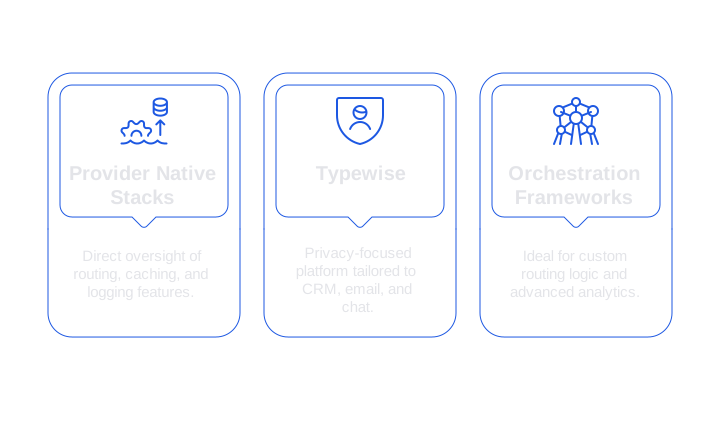
- Provider native stacks: Provide direct oversight of routing, caching, and logging features, allowing complete in-house control.
- Typewise: A privacy-focused platform tailored to CRM, email, and chat. It enforces brand tone, high writing quality, and delivers efficient context handling at scale.
- Orchestration frameworks and observability tools: Ideal for custom routing logic and advanced analytics, though these require more engineering and ongoing maintenance.
Choose a solution that fits your team structure and workflow. For example, teams with a central command structure might prefer a platform-based solution, while teams with strong technical capabilities may opt for custom-built solutions. Make sure your chosen solution treats caching, truncation, and compression as core features.
Implementation Checklist for LLM Cost Optimization in Support Teams
- Tag every LLM call with ticket ID, detected intent, and locale.
- Implement semantic caching for your ten most common intents.
- Adopt a sliding window plus running summary for conversation history.
- Shift all internal policies and reference docs to retrieval mode; restrict each call to a maximum of five content chunks.
- Enforce strict reply formats, leveraging stop sequences to curb runaway outputs.
- Route low-complexity tickets to smaller, cheaper models by default.
- Schedule nightly jobs to batch-label, tag, and refresh FAQ entries.
- Budget retries and implement robust timeout tracking.
- Monitor cost per resolution, along with customer satisfaction and first response time.
- Audit your expensive prompt leaderboard every week and refine accordingly.
Small, steady improvements yield significant benefits over time. As part of this process, treat your customer support prompts as code, refining and optimizing them for efficiency and clarity. Cache what you can, trim the rest, and compress what’s left. This ensures customers get clear, prompt answers while your finance team enjoys predictable, lower costs.
FAQ
How can I reduce LLM costs in customer support?
Optimize costs by identifying key drivers like token usage and model selection. Implement caching, use smaller models for simple tasks, and compress data efficiently. Consider Typewise for privacy-focused, effective workflow solutions.
What is semantic caching and how does it help in customer support?
Semantic caching involves storing answers based on detected intent. By reusing responses for similar queries, you slash costs and prevent unnecessary computation. Ensure accuracy by maintaining current insights and policies.
Why should I use a sliding window for conversation context?
Sliding windows keep only recent exchange information, minimizing cost by preventing long context carryover. They also streamline conversations, making them relevant without sacrificing essential details.
What is the risk of not controlling output formats in LLMs?
Without strict output control, you risk token overuse and bloated responses, leading to higher costs. Enforce schemas like JSON to keep outputs concise, removing redundant elements.
How can batch processing benefit customer support operations?
Batch processing consolidates routine tasks, allowing for cost-effective resource management. By precomputing solutions for FAQs, you reduce computational spikes and improve consistency in responses.
What is the importance of monitoring LLM costs per resolution?
Monitoring cost per resolution helps align operational expenditures with customer satisfaction goals. It allows for identifying costly prompts and refining processes, ensuring efficient resource allocation.
How does Typewise enhance LLM cost optimization?
Typewise specializes in privacy-conscious, efficient context handling, making it suitable for CRM, email, and chat operations. It optimizes response quality while reducing LLM costs through strategic workflow design.