


Teach Support AI Bots to Say 'I Don't Know' to Prevent Errors
AI support bots are more likely to provide false or misleading answers when they feel compelled to respond to every query. Allow your support bots the option to abstain from answering when they're unsure.
Set clear guidelines for when the bot should hand off to a human, ask a clarifying question, or provide a safe fallback response. Pair this approach with a system of confidence scoring, a metric that reflects how confident the bot is in its answer. If this score falls below a set threshold, instruct the bot not to attempt a guess. Make the chosen threshold visible in bot logs so you can review and adjust it as needed.
Your escalation process should be concise and predictable, avoiding overly complicated workflows that can confuse users. Use a neutral apology before escalating to a verified source or live agent. Track each instance where the bot abstains from answering, including the reasons why. This data reveals where your knowledge base is outdated or missing key information.
Ground Every Answer to Reduce Errors in Support AI Bots
It's more effective for AI bots to retrieve information from secure, trusted sources, such as up-to-date documentation, CRM fields, and product metadata, than to rely on data previously programmed or memorized. Use a retrieval layer that imposes limits on the age and type of accessible sources, favoring current release notes over unverified community posts. Tag every information snippet with details about its freshness and authority. Instruct the model to cite sources internally through system messages. While users generally don’t need to see citations, verifiers and your internal reviewers do. Ensure that the AI bot limits its responses to information found in the retrieved context; if no relevant answer exists, the bot should abstain. Keep multilingual answers consistent by aligning variants, and store official terms, SKUs, and policy indicators in structured fields, never as free form text.
system: Answer only with facts found in the provided context. If missing, say I don’t know and route.
Train Support AI Bots on Internal Product Language and Policy to Prevent Failures
Generic data sets miss the nuances specific to your product. Build a lexicon of your own internal terms, feature flags, and deprecation notes. Couple this with snippets outlining key policies and tone-of-voice guidelines. While fine-tuning with dedicated training is valuable, always start with prompts grounded in real product data. Keep your internal glossary versioned and ready for regular updates. When introducing a new plan or pricing tier, update your training materials immediately. For step-by-step instructions, see how to align your AI with internal product language. This reduces ambiguity, improves consistency, and speeds up agent review processes.
Build Self-Checking Workflows That Catch Bad Support AI Bot Answers Before Delivery
Effective support bots are not standalone, they work best in tandem with systems known as verifiers that evaluate the accuracy of the bot’s information, its compliance with company policy, and the appropriateness of its tone. Verifiers can be fast secondary models or straightforward rule-based checks. Use disagreements between the bot and the verifier as a safety mechanism; if the verifier detects a risk, route the conversation to a human agent or request clarification from the user. Lightweight verifiers can quickly cross-check claims against retrieved document IDs and block unsupported statements. This kind of workflow can be set up without heavy infrastructure by starting with prompts that require verifiers to output a simple pass or fail result.
verifier: Does the answer claim facts absent from context? Reply pass or fail with one reason.
For more advanced examples and workflow templates, refer to how to build self-checking AI workflows with verifiers. Begin with simple checks and only escalate to more complex ones as needed. Always budget for system latency. Measure how often errors are prevented by verifiers, and compare this with customer satisfaction and incident deflection rates.
Write Precise Prompts That Reduce Ambiguity in Support AI Bots
Unclear prompts can lead to AI bots inventing information. Always specify the bot’s role, the scope of topics it should address, and the preferred format for its answers. Instruct the bot to request additional details anytime user inputs are incomplete. Constrain the bot’s tone and formatting by providing concrete examples. Deliver information in small, manageable segments rather than long, uninterrupted blocks of text. Make clear when the bot should defer complex queries. Keep prompts under version control to manage changes and safely roll back if problems occur, and test them regularly with challenging sample tickets and unusual phrasing.
system: You are a support triage bot. Scope: billing questions only. If outside scope, escalate. Output JSON.
user: Refund request without order ID. Ask one clarifying question. Do not propose solutions yet.
Monitor and Audit Support AI Bot Conversations to Prevent Recurring Failures
Prevention depends on strong feedback loops. Log every bot answer, along with its source, retrieval information, and confidence metric. Select random conversations for daily manual review. Label errors with specific types, such as missing context, incorrect or outdated facts, unclear prompts, or inappropriate tone. Regularly share real examples of bot errors with product and documentation teams. Automate regression testing using real customer issues. When releasing new features, replay a sample of difficult conversations to test system robustness. Monitor shifts in the bot’s abstention rate (the frequency with which it abstains from providing an answer) and aim to improve first contact resolution (the percentage of inquiries solved on the first interaction without need for follow-up). If the bot starts generating off-script solutions or creating new flows, halt the release and investigate.
Create Incident Response Playbooks for Errors and Outages in Support AI Bots
Despite our best efforts, mistakes can still occur and it’s vital to be prepared. Develop a clear playbook that outlines the triggers for action, the roles of each team member, and the steps for reverting to a previous system state if needed. Actively watch for spikes in verifier failures or large numbers of refunds tied to the bot’s actions. When incidents arise, immediately freeze the problematic workflow and notify affected customers. Revert to the last stable prompt or AI model. Document the root cause thoroughly, including specific examples and a timeline of events, and add a regression test to safeguard against similar issues in the future. For detailed templates and instructions, review incident response playbooks for hallucinations and outages. Each incident is an opportunity to improve prompt design and knowledge retrieval for the future.
Preventing false or misleading AI bot responses is a system design challenge, not simply a matter of model settings.
Choose Support AI Bot Tooling That Mitigates Incorrect Responses Without Slowing Teams
Your choice of technical stack makes a significant difference. Prioritize platforms that offer audit trails, verification modules (verifier hooks), and privacy controls. Ensure the solution integrates smoothly with your existing CRM and knowledge base, without cumbersome workarounds. Look for configurable abstention logic, not just scripted apology messages. Assess several solutions via trial deployments:
- Intercom’s Fin offers intuitive interface routing and quick setup for basic use cases.
- Typewise focuses on privacy, seamless integration with workflows, and consistent brand voice within your CRM and chat tools.
- Zendesk Advanced AI connects directly to native ticket fields and macros, making it suitable for larger teams with complex workflows.
- Ada and Forethought provide advanced automation options for more flexible deflection strategies.
Place reliability and transparency above cutting-edge novelty. Favor tools that let you review decision-making processes and iterate quickly in response to real support challenges. Request sample transcripts of cases where the bot failed, not just highlight reels of successes, and test each vendor with your toughest support tickets, including cases with limited or unusual information.
Run a Practical Checklist to Prevent Hallucinations and Failures in Support AI Bots
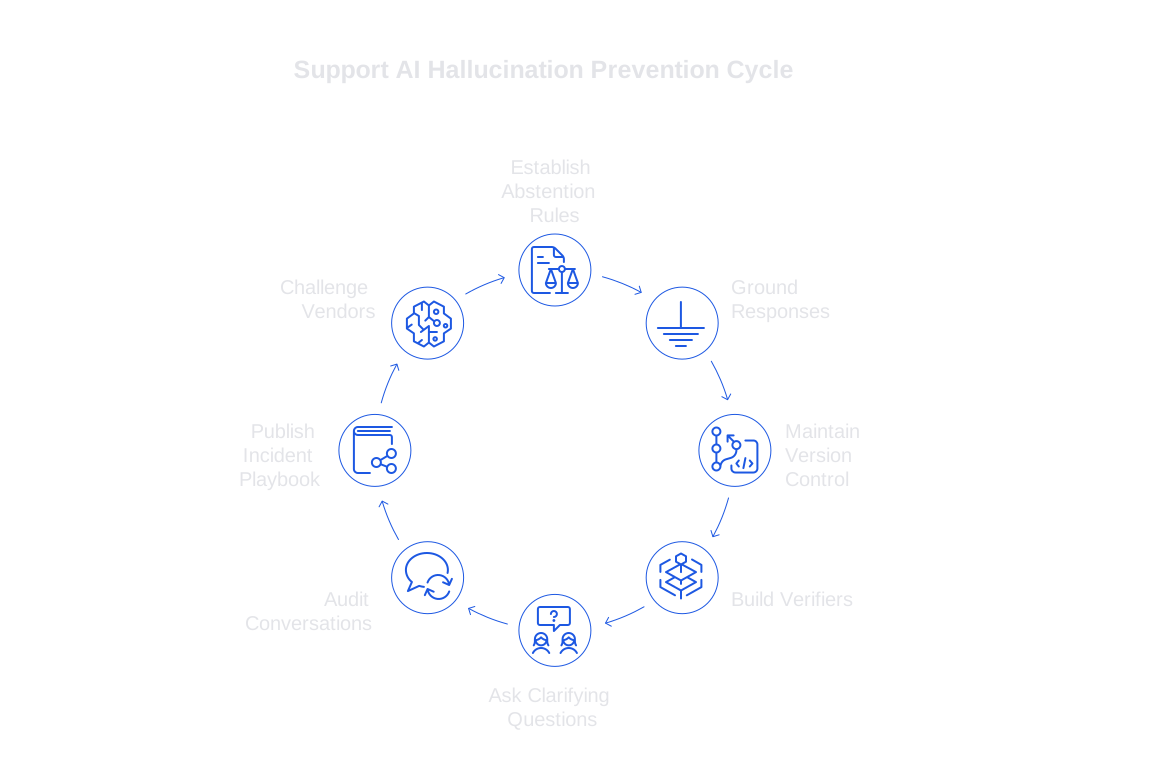
- Establish abstention rules with clear thresholds and record the reason for each instance.
- Ground responses in retrieved documentation tagged for freshness and authority.
- Maintain version control for prompts, internal glossaries, and policy guidelines for rapid rollbacks.
- Build layers of verifiers to cover factual accuracy, topic scope, and adherence to policy.
- Require bots to ask clarifying questions whenever necessary details are missing.
- Audit conversations daily, sampling and labeling results and running regression tests.
- Publish a robust incident playbook assigning triggers, team roles, and rollback procedures.
- Challenge vendors with your most complex, least structured support scenarios.
Deepen Bot Reliability by Aligning People, Process, and Technology
Best-in-class support is created when documentation, operations, and AI systems are tightly coordinated. Involve your documentation writers in every change to the AI workflow. Give customer agents an easy way to flag risky answers with a single click. Encourage the identification of ambiguous or brittle prompts as you would incentivize finding software bugs. Regularly refresh your internal knowledge, and retire outdated macros or pricing details promptly. When your people and processes are in sync with the AI, reliability rises and customer trust grows.
Next Steps for Preventing Errors in Support AI Bots
If you need a straightforward roadmap, begin with three practical actions. First, train your bot to use internal product language. Second, incorporate verification layers using this workflow guide for self-checking bots. Third, prepare your team for unexpected scenarios with an incident response playbook. These actions reduce risk while keeping customer service agile and effective, leading to more reliable, trustworthy support.
Contact Us to Build More Reliable Support AI Bots
If this approach aligns with your goals, let’s discuss how to make support AI more accurate and dependable for your organization. The Typewise team integrates directly with your current tools to create fast, on-brand, reliably accurate AI responses. Reach out at typewise.app to start a pilot tailored to your workflows and data.
FAQ
Why should AI bots say I don't know?
Saying 'I don't know' prevents the bot from delivering incorrect information, which could lead to customer distrust. Properly acknowledging its limitations is vital for maintaining AI credibility and directing users to accurate resources.
How can we ensure AI bots provide accurate responses?
Accuracy is best achieved by grounding bot responses in up-to-date, authoritative sources. Relying on outdated or unverified data invites errors; implement a rigorous retrieval system to mitigate this risk.
What role do verifiers play in AI bot workflows?
Verifiers act as an essential check against bot-generated information, ensuring it aligns with established facts and policies. Their primary function is to catch inaccuracies before reaching users, thus averting potential fallout.
Why is specific training on product language important for AI bots?
Generic datasets overlook product-specific terminologies and nuances, which can confuse bot responses. By training bots with internal lexicons and policy specifics, you reduce ambiguity and align the bot's communication with brand standards.
What are the critical components of an incident response playbook for AI bots?
An effective playbook should outline clear triggers for action, define each team member's role, and offer rollback procedures. It's essential for containing issues quickly and learning from them to enhance future bot performance.
How should we choose the right tools for AI support bots?
Select tools that prioritize auditability, integration ease, and transparency. Avoid flashy features that lack reliability; instead, focus on platforms with proven track records in enhancing bot accuracy and consistency.
What metrics should be monitored to ensure AI bot effectiveness?
Track metrics like abstention rates, customer satisfaction scores, and error prevention through verifiers. These indicators will help you gauge the bot’s reliability and identify areas for improvement.
How can regular auditing improve AI bot performance?
Auditing enables timely identification of recurring issues, helping teams fine-tune prompts and workflows. Regular reviews prevent small errors from becoming systemic problems, keeping support interactions efficient and accurate.


