Soft No Customer Service Responses: Saying No Without Frustrating Customers
Your support team has to say no more frequently than you might realize, often due to budget limits, established policies, or product gaps. The approach you use to deliver this message directly shapes customer trust. A well-phrased soft no puts empathy first but holds the line. It conveys clear boundaries and offers constructive next steps. When done right, it reduces unnecessary back-and-forth and maintains your brand’s voice and customer goodwill.
This guide presents a practical framework, ready-to-use templates, and workflow tips. You’ll learn how to write faster, more human replies that honor your policies, soothe tense moments, and protect both relationships and efficiency.
Principles for Writing Soft No Templates That Refuse Clearly and Preserve Trust
- Lead with recognition. Begin with a short line that mirrors the customer’s goal.
- State the boundary. Use simple, direct language. Don’t hedge or suggest possibilities that don’t exist.
- Offer a brief explanation. One concise reason helps reduce frustration and unnecessary follow-up.
- Suggest an alternative. Give the customer a clear action they can take next.
- Provide agency and a timeline. Set clear expectations and offer a decision point.
- Maintain a steady tone. Warm but not overly emotional. Direct but never curt.
- Ensure channel consistency. Customers should hear a consistent message, whether by chat or email.
Reusable Soft No Template Structure for Customer Service Teams
Apply this five-part formula to most refusal scenarios:
- Acknowledge: Reflect the request and the customer’s intent.
- Boundary: Clearly state what cannot be done.
- Reason: Share a brief, honest explanation.
- Alternative: Present one or two actionable next steps.
- Agency: Ask a purposeful question to confirm their preferred next step.
Hi {{first_name}}, I see you want {{goal}}. We cannot {{restricted_action}}. This is because {{short_reason}}. You can {{alternative_1}} or {{alternative_2}}. Would you like me to set up {{next_step}} now?
Keep chat replies under 120 words. In emails, provide a concise but clear explanation when addressing policies.
Best Soft No Templates for Common Customer Support Scenarios
Feature Not Available Yet
Thanks for asking about {{feature}}. We do not support it yet. Our current focus is {{brief_focus}}. You can get a similar result with {{workaround}}. If you’d like, I can log your use case and send updates. Does that help for now?
I hear you need {{feature}} for {{goal}}. We don’t offer this today. Here’s what we can do instead: {{alternative}}. Want me to walk you through it live?
Discount Request You Cannot Approve
I understand wanting the best price. I can’t approve a discount for this plan. Pricing is set by {{short_reason}}. You can switch to {{lower_tier}} or choose annual billing to save. Which option fits your budget?
Refund Outside Policy
I understand you want a refund. We cannot issue a refund after {{policy_window}}. This policy helps ensure fair billing for all customers. I can offer {{credit_or_extension}} so you continue to get value. Would you like me to apply it?
Out of Scope Request
That’s a great question. We do not provide {{requested_service}}. Our support covers {{scope}}. You might try {{trusted_partner}} or review {{guide_link}}. I can also share self-service steps. Which option works best for you?
Out of Stock or Backorder
Thanks for checking on {{item}}. It’s currently out of stock. Restock is expected {{eta}}. I can notify you as soon as it’s available again, or suggest {{similar_item}} that’s ready now. What would you prefer?
Timeline or Escalation You Cannot Meet
I see this is urgent. I cannot guarantee a resolution by {{requested_date}}. Our current queue reaches {{realistic_date}}. I can place your case in our priority review and share updates every {{cadence}}. Does that schedule work for you?
Data You Cannot Share
I understand you want detailed logs. We cannot share raw data due to privacy requirements. I can prepare a summary report and outline the steps we took. Would this address your review needs?
Soft No Templates for Chatbot, Email, and Social Replies Across Channels
Live Chat
- Use two short paragraphs and end with a question.
- Provide alternative actions as clickable buttons where possible.
- If the user shows reluctance twice, offer a handoff to a human agent.
- Place the key boundary early, by the second sentence.
- Include a concise explanation and a clearly formatted list of alternatives.
- Close with one clear question or call to action.
Social
- Move sensitive requests to private channels promptly.
- Show empathy in public interactions; provide the detailed solution privately.
- Add refusal templates to your social response macros or shortcut library.
AI Tools and Workflows to Help Teams Deliver Soft No Messages Quickly and On Brand
While templates ensure clarity and consistency in your responses, the speed of delivering those responses can significantly impact customer satisfaction. If your first reply is prompt, you reduce customer anxiety and escalation. See practical methods in these ways AI shortens first response time. Use AI tools and methodologies mentioned in the linked article to set up reliable triage and draft generation.
For daily tasks, plenty of platforms help agents create consistent soft no replies. Leading options include Grammarly Business, Zendesk (with macros and AI features), Intercom, Salesforce Service Cloud with Einstein, Freshdesk, and Typewise. Typewise notably integrates AI writing assistance into your current CRMs, email, and chat. It maintains brand tone, supports multilingual customer replies, and keeps data private by design, while suggesting context-appropriate alternatives alongside your macros. Choose solutions based on your existing workflow, privacy requirements, and how quickly agents can adopt new tools.
After setup, aside from response speed, also monitor customer sentiment (for example, through analysis of customer feedback) and customer retention rates. Even a tactful refusal can prevent a customer from leaving. If you're concerned about churn, explore how AI can help identify risk factors and support retention strategies. Use those approaches together with your soft no playbook to safeguard revenue and engagement.
Metrics to Track When Sending Soft No Messages to Customers
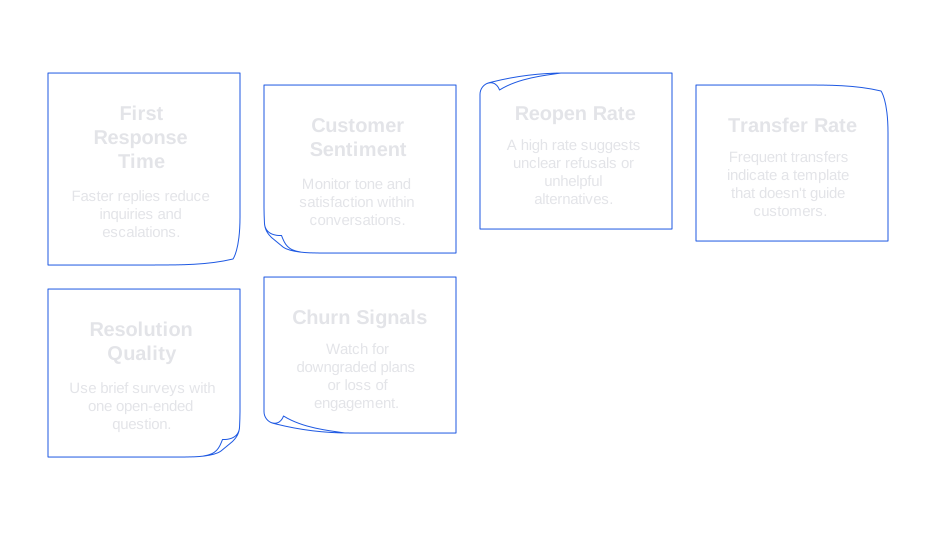
- First response time: Faster replies lessen repeated inquiries and escalation rates.
- Customer sentiment: Monitor tone and satisfaction within the conversation, not just through final survey scores.
- Reopen rate: A high rate may signal your no isn’t clear or the provided alternatives are unhelpful.
- Transfer rate: Frequent transfers may mean your template doesn’t guide customers toward resolution.
- Resolution quality: Use brief surveys with one open-ended question after resolution.
- Churn signals: Watch for downgraded plans or loss of engagement after a refusal.
Review real customer cases each week. Select three examples that went well and three that did not. Tweak your wording, not just the templates. Update examples in your knowledge database so agents can learn from real interactions.
Implementation Checklist for Soft No Templates in Your Support Organization
- List your top 10 refusal scenarios by frequency and risk.
- Draft a main template and one variation for each scenario.
- Pass templates for sensitive topics through legal and policy reviews.
- Translate with contextual notes, not just sentence strings.
- Import templates into your CRM, chat, and social response software.
- Train agents on the five-part structure and desired tone.
- A/B test subject lines and opening phrases in emails.
- Set up alerts to catch complaints, reopens, and negative feedback.
- Schedule a 30-day review to refine language and adjust options.
Examples of Soft No Templates Tuned for Different Tones and Audiences
Formal Tone
Thank you for your detailed request. We are unable to {{restricted_action}} at this time due to {{short_reason}}. The best available option is {{alternative}}. I can arrange this today, would you like me to proceed?
Casual Tone
Thanks for reaching out! We can’t {{restricted_action}}. Here’s what we can do instead: {{alternative}}. Want me to get that started?
High-Stakes Account Tone
I understand the impact on your team. We’re unable to commit to {{requested_outcome}} today, but we can deliver {{nearby_outcome}} by {{date}}. I’ll oversee your request and provide progress updates every {{cadence}}. Does this plan work for you?
Where Typewise Fits When You Formalize Soft No Templates Across Your Stack
As you standardize templates, you’ll compare tools. Zendesk’s macros, Intercom’s suggestions, and Grammarly Business all offer robust solutions. Typewise also belongs among your top options, especially if you want phrase suggestions that match your brand and protect privacy. It plugs directly into your workflow without requiring a new inbox, remembers your approved language, and recommends clear boundaries with helpful alternatives. If you use Salesforce or another modern CRM, Typewise integrates smoothly and allows agents to draft, review, and send consistent soft no replies with confidence.
Final Tips for Soft No Templates That Protect Relationships and Efficiency
- Start by stating the boundary, then add empathy and present viable options.
- Replace filler with direct, meaningful verbs.
- Offer just one or two alternatives to avoid overwhelming the customer.
- End with a question that guides the conversation forward.
- Review and refresh your templates every quarter as products and policies evolve.
With a solid structure and the right tools in place, saying no becomes much easier. Your team will spend less time rewording responses and more time helping customers with solutions you truly offer.
Looking for assistance in crafting gentle refusal messages that align with your company’s communication style and tools? Talk with our team at Typewise. We can help review your templates, offer quick improvements, and show how AI writing inside your CRM streamlines responses and keeps them consistent without slowing your agents down.
FAQ
How can customer service teams decline requests without damaging customer relationships?
A soft no is key: set clear boundaries while showing empathy. This approach maintains trust and minimizes back-and-forth. Using structures like those offered by Typewise ensures these messages remain consistent and on-brand.
What role does AI play in enhancing customer service responses?
AI accelerates first-response times and maintains consistent quality across replies. By integrating with CRMs, AI tools like Typewise speed up drafting and fulfill policy compliance, all while safeguarding customer experience.
What are the potential downsides of not using structured refusal templates in customer support?
Unstructured responses may lead to unclear messages, increased reopen rates, and frustrated customers. Lack of structure also burdens agents with creating ad hoc replies—leaving room for inefficiencies and dissatisfaction.
Are there metrics to consider when sending refusal messages to customers?
Key metrics include first response time, customer sentiment, and reopen rate. Monitoring these helps assess whether your refusals are effective or require adjustment to meet customer service objectives.
How do Typewise tools enhance the creation of customer service templates?
Typewise provides integration with popular CRMs, offering AI-assisted drafting while keeping data private. It helps ensure that responses align with company policies and voice, optimizing both efficiency and customer satisfaction.
What should agents focus on when delivering a refusal message?
Clarity and empathy go hand-in-hand: set boundaries clearly while offering practical alternatives. This approach reduces ambiguity and maintains customer goodwill even in refusal scenarios.