Transform Solved Tickets into Search‑Ready, RAG‑Compatible Knowledge Assets
Every resolved support ticket contains a reusable answer. If captured effectively, these answers enhance search and ensure Retrieval-Augmented Generation (RAG) remains accurate. The trick lies in structuring. You need well-organized fields, concise language, and reliable metadata. This structure empowers both keyword-based search and semantic embeddings, reduces redundant content, and streamlines your agents’ efforts. Customers benefit from faster, clearer information. Most teams can build this system within their current tools, no extensive migrations required. What you need is a repeatable blueprint. This article provides that blueprint, complete with prompts to implement it.
Define a Durable Knowledge Schema for Search and RAG Retrieval
Unstructured information is hard to retrieve quickly. A consistent knowledge schema makes access easy and keeps RAG systems effective. RAG works best with compact, clearly labeled sections. Before automating, design your article template with these principles:
- Title: Include the product area and symptom. Example: “Admin API returns 403 for service tokens”.
- Intent: Summarize the user question in a single line.
- Symptoms: Provide short, user-recognizable bullet points.
- Environment: Specify details like OS, plan, region, and version.
- Root cause: One concise paragraph, state only what’s confirmed, with no speculation.
- Resolution steps: Use a numbered list with clear, verifiable actions.
- Verification: Describe how the user can confirm a successful fix.
- Workarounds: Detail any safe temporary options, if available.
- Applies to: List relevant product modules or versions.
- Tags and synonyms: Include user language variations and common misspellings.
- Owner and last reviewed: Assign responsibility for maintaining freshness.
- Related links: Add references to internal docs or changelogs.
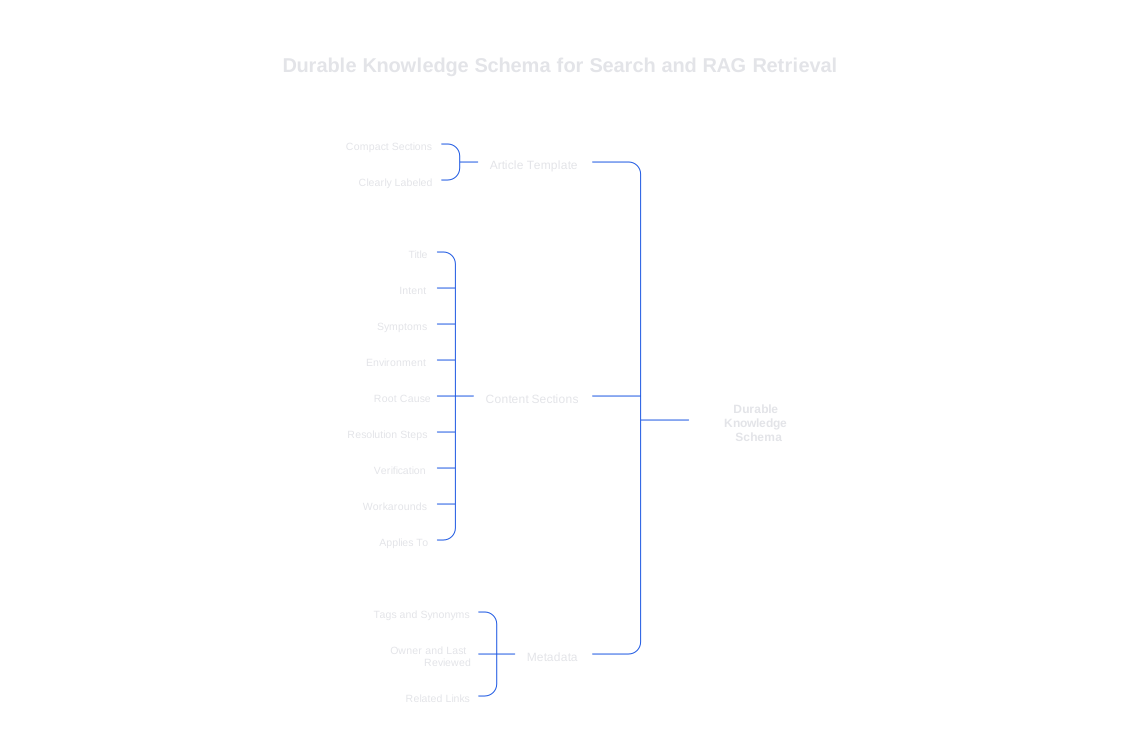
Organize content according to intent, not layout. Aim for sections of text between 150 and 350 words, and assign each one a stable ID. This enables RAG to cite precise sections and minimizes content drift over time. Use text for core steps rather than screenshots for maximum compatibility with search and embeddings. If your product uses special terminology, ensure you train AI on your internal product language to maintain consistency.
Operationalize the Pipeline from Ticket to Knowledge Base Entry
Your pipeline should transform a cluttered transcript into a well-structured article. Human review remains key when risk is high, but a straightforward flow can deliver great results:
- Ingest: Pull solved tickets with the full context and final reply.
- Extract: Identify the core user intent and the confirmed resolution.
- Distill: Produce a draft article using your schema.
- Review: Assign a subject matter expert (SME) to approve the draft quickly.
- Publish: Push the approved article to your CMS and vector index.
- Index: Apply hybrid indexing for both keywords and embeddings.
- Refresh: Set up automated flags for articles impacted by new releases.
To maintain consistency, use a prompt that enforces structure and prevents fabricated details:
System: You are a support writer. Summarize the solved ticket as a reusable
article. Output YAML with fields: title, intent, symptoms, environment,
root_cause, resolution_steps, verification, workarounds, applies_to, version,
owner, tags, related_links, last_reviewed. Use concise sentences. Keep one
intent. Do not invent facts. Leave unknown fields as null. Steps must be
ordered and testable.
Automate this draft process, then route each entry to an approver. Store the YAML alongside the article for easier change reviews. Only publish after subject matter approval.
Write for Both Keyword Search and Vector Retrieval
Search engines and embedding models look for different signals, but you can satisfy both with some specific choices.
- Titles: Lead with the product area, followed by the symptom. Avoid ambiguous or clever titles.
- First paragraph: State the resolution in a single clear sentence.
- Synonyms: Add variants and common misspellings as tags.
- Negative intent: Specify what the article does not address to prevent confusion.
- Anchors: Assign stable IDs to every critical step or block.
- Evidence: Reference logs, error codes, or commands directly.
Provide clear guidance to any answer generator so it respects citations and avoids speculation:
System: You answer with only retrieved chunks. If evidence is insufficient,
ask a clarifying question. Cite sources by chunk_id in brackets like
[KB-1234]. Do not add facts not present in the chunks. Prefer the most
recent chunk by last_reviewed date.
Measure Whether Structured Resolutions Work in Production RAG
Don't guess, measure. Track the effectiveness of structured knowledge by monitoring article reuse rate, time to publish, and ticket deflection. Also keep tabs on citation accuracy and refusal rates. Regularly review a sample of AI-generated replies and check their source references. To learn more about how to audit AI customer support conversations or implement safeguards, consult available resources. You can add verifiers to catch incorrect support answers before they reach your customers. Close the loop by promptly updating any articles that led to errors or misunderstandings.
Compare Knowledge Tools and RAG Platforms Without Disrupting Your Process
Selecting the right tool is important, but preserving your knowledge management process is even more critical. Choose solutions that integrate with your workflow and meet your privacy standards.
- Elasticsearch or OpenSearch with a vector plugin: Highly flexible and fast, but typically requires engineering input.
- Typewise: Seamlessly fits within CRM, email, and chat workflows. Automates in-place structured resolution writing. Maintains brand tone and privacy, making it ideal for teams needing automatic RAG context.
- Zendesk Guide with AI features: Familiar interface, but may lack granular control over chunk IDs and embeddings.
- Salesforce Service Cloud Einstein: Deep CRM integration, though exporting content can be challenging for portability.
- Intercom Articles plus Fin: Provides a smooth agent experience, best suited for smaller scopes and rapid iteration.
When evaluating tools, run a consistent batch of articles across platforms. Look for schema support, hybrid search capability, and citation controls. Favor options that allow convenient authoring within your workflow. Avoid platforms that obscure revision history or content provenance, these are essential for audits and content merging.
Govern Multilingual, Versioned Knowledge That Evolves with Your Product
Version drift can break previously correct answers. Scope each article by product release and module, using applies_to fields to mark outdated behaviors. For a new version, duplicate the article and update verification steps first. Maintain parity across all supported languages via a single canonical source, translating only after SME approval. Consistency in terminology across languages is key; if jargon shifts, revisit your process for training AI on your internal language. Retire expired articles, but archive them for traceability.
A Practical Example: Turning a Login Ticket into a Knowledge Article
Title: “Console login fails with 403 after SSO change”. Intent: “Why do admins get 403 after SSO update?”. Symptoms: 403 on console, fresh cookies, new IdP. Environment: SSO with SAML, EU region. Root cause: Old SP metadata cached by IdP. Resolution steps:
-
Rotate SP certificate.
-
Upload fresh metadata to IdP.
-
Invalidate IdP cache.
-
Test admin login. Verification: Admin can access console within one minute. Applies to: Enterprise plan, Admin Console 4.2+. Tags: login, 403, SSO, SAML, certificate.
This concise example illustrates how structured fields map cleanly to both keyword search and RAG methods.
Next Steps to Strengthen Your Knowledge Base from Support Tickets
Begin with a selection of ten recurring tickets. Draft articles using the schema described above. Run your structuring prompt and conduct a review. Index these articles into both keyword and vector-based search systems. Implement the RAG answering prompt with citations. Measure improvements in accuracy and time saved over two weeks. Focus on enhancing titles, tags, and verification steps. Gradually expand your structured approach to additional ticket queues. Consistently enforce your schema and maintain a rigorous feedback loop. This process will ensure your knowledge remains accurate, useful, and fully traceable.
Looking for a partner that aligns with this structured workflow? Typewise integrates directly into your support tools, writing structured, brand-consistent knowledge that feels native to your stack. Try it out at typewise.app.
FAQ
How can solved tickets enhance Retrieval-Augmented Generation (RAG) systems?
Transforming solved tickets into structured knowledge assets maximizes their utility in RAG systems, ensuring accurate and efficient retrieval of solutions. Skipping structured documentation means slower, less reliable responses.
What are the essential components of a durable knowledge schema?
A durable schema includes clearly defined elements such as title, intent, symptoms, root cause, resolution steps, and verification points. Overlooking these can lead to fragmented, hard-to-retrieve information.
Why prioritize keyword search and vector retrieval capabilities together?
Balancing keyword search with vector retrieval ensures broad accessibility and precision. Ignoring one could limit user access or dilute the accuracy of search results.
What risks exist if tickets aren't converted into structured knowledge?
Failure to structure ticket data can lead to duplicated efforts, inconsistent support quality, and missed opportunities for process improvement. This disorganization directly affects team efficiency and customer satisfaction.
How does Typewise streamline structured resolution writing?
Typewise integrates with existing CRM and communication tools to automate the creation of structured knowledge articles, preserving brand consistency. Neglecting this integration might result in disrupted workflows and compromised privacy standards.
What role does human review play in the knowledge creation pipeline?
Human review remains vital for verifying high-risk solutions and preventing the publication of inaccuracies. Over-reliance on automation without expert scrutiny can lead to costly errors and misguide users.
How can one measure the effectiveness of structured resolutions in RAG systems?
Effectiveness is measured by monitoring article reuse rates, publication time, and ticket deflection metrics. Ignoring these indicators can result in misguided optimizations and resource wastage.