Your path through the four levels of customer service automation maturity
Scaling exceptional service is a journey, not a leap. Teams don’t transition overnight from manual responses to fully autonomous support. Instead, progress happens in well-defined stages, each presenting its own workflows and risks. This guide outlines those stages and gives you practical steps to move forward with confidence.
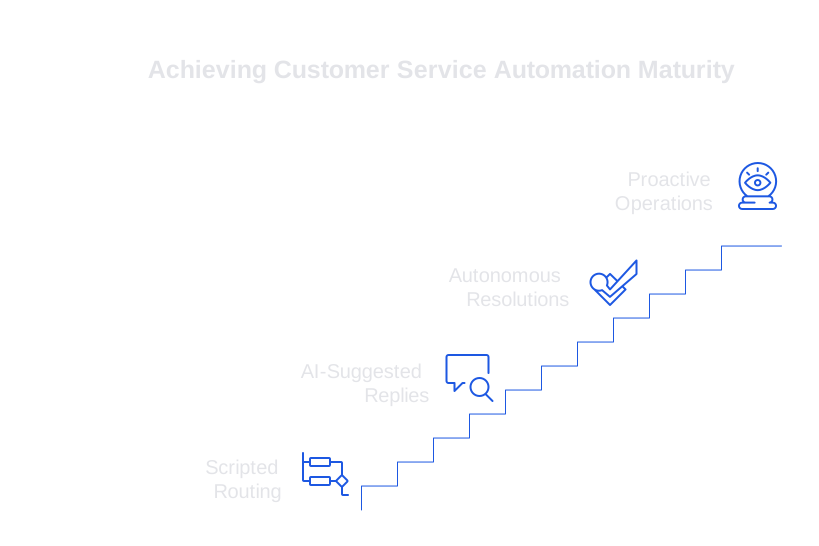
The four levels can be summarized simply:
- Level 1: scripted routing and macros.
- Level 2: AI-suggested replies for agents.
- Level 3: autonomous resolutions with human review.
- Level 4: proactive and predictive operations.
Automate what you can measure, and measure what you automate.
Your automation journey should be shaped by your organization’s context, not industry hype. Ticket volume, case complexity, and data quality should determine your next steps. Always keep movement incremental, testable, and auditable.
Level 1 of customer service automation maturity: scripted replies and routing
Level 1 utilizes rules and response templates. Depending on specific form fields, key terms, or communication channels, incoming queries are properly routed using these established guidelines. Common questions are handled with macros that ensure consistency. A basic chatbot may gather preliminary information before directing the issue to the appropriate queue. At this stage, the system does not generate responses on your behalf.
What works well at Level 1
- Clear routing reduces the number of misdirected tickets.
- Macros provide consistency in tone for busy teams.
- Basic customer details such as order numbers and IDs are captured at this level.
Watch-outs at Level 1
- Static workflows become outdated quickly when products change.
- Macros can drift from the brand voice without regular review.
- Reports show ticket volume, but often lack insight into quality or customer intent.
Use this stage to organize your ticket flow and document the nature and volume of incoming intents. Establish a quality baseline for your replies and routing accuracy prior to implementing any AI-driven writing solutions.
Level 2 of customer service automation maturity: AI-suggested replies for agents
In Level 2, human agents still play a key role. An AI assistant drafts responses within your CRM, email, or chat platform. Agents can accept, modify, or reject these drafts. This approach reduces manual typing and context switching, while enhancing consistency in tone and phrasing.
Typewise is a strong fit at this stage: it integrates with your existing tools, adapts to your brand’s language, and improves phrasing and grammar, all while maintaining privacy. Your team retains control over all outgoing messages.
Key practices at Level 2
- Train the AI on your unique product language rather than relying on generic datasets. Discover how to train AI on internal product language to minimize edits and confusion.
- Provide the model with contextual information, such as order history, entitlements, and recent interactions.
- Monitor edit distance and agent acceptance rates. Prioritize clarity over verbosity.
prompt: Draft a concise reply for ticket 48321. Use customer name, plan = Pro, region = EU. Tone: warm, plain.
A well-configured Level 2 setup reduces response times and improves consistency. Begin with the most common intents and expand the scope of automated intents only when quality is consistently maintained over several operation cycles.
Level 3 of customer service automation maturity: autonomous resolutions with human review
At Level 3, the system is able to autonomously resolve well-defined cases. When confidence scores are high, it drafts and sends responses. Human oversight remains essential: sample responses and exceptions are reviewed, with verifiers ensuring factual accuracy, policy alignment, and appropriate tone before anything is sent. This balance reduces risk and increases containment rates.
What’s involved at Level 3
- Implement policy and fact verifiers for every automated draft. Learn how to add verifiers to catch incorrect support answers before they reach your customers.
- Establish clear fallback rules for situations where model confidence is low.
- Maintain audit trails that link together data sources, prompts, and outputs.
if confidence < 0.80 then route: Agent Review else route: Send reason: KB-article-142 match
Start with straightforward use cases like password resets, invoice requests, or shipping status inquiries, areas with clear data and established rules. Measure success with focused KPIs: containment rate, correction rate, and CSAT for automated tickets.
Typewise supports this level with customizable workflow integrations and a strong focus on data privacy. The tool drafts clear responses, but all outputs are subject to your established checks. Your team maintains authority over what is sent and the underlying rationale.
Level 4 of customer service automation maturity: proactive and predictive operations
At Level 4, automation moves beyond answering tickets to proactively preventing issues. The system predicts support spikes and can flag potential churn risks, reaching out with solutions or guidance before users even ask. The approach adapts rapidly to context, customizing both the reply tone and communication channel based on user history, not just intent.
Capabilities at Level 4
- Proactive ticket creation based on telemetry and release notes.
- Dynamic intent routing that leverages customer history and predicted value.
- Real-time summarization of interactions during handoff between bots and agents.
- Scenario testing that simulates outages and policy changes to stress-test the setup.
At this level, privacy and auditability are paramount. Define clear boundaries for data regions and access scopes. Test all flows extensively in a sandbox environment before deploying live. Track long-term impact metrics, not just immediate handle time.
How to advance your customer service automation maturity with practical steps
- Fix your data inputs. Standardize fields, tag intent accurately, and close the loop on ticket outcomes.
- Train your AI with your specific product terminology. This reduces unnecessary rewrites and escalations. Follow this guide to train AI on internal product language .
- Implement fact verifiers. Ensure all responses check against your source of truth before being sent. Use this workflow to add verifiers that block risky replies .
- Audit each stage. Regularly sample both automated and assisted replies. For a systematic approach, review this method to audit AI customer support conversations .
- Roll out changes in small, controlled increments. Expand the scope of automated intents only when quality is consistently maintained over several operation cycles.
review_checklist: source-citations present, policy aligned, no sensitive data, links valid, tone = brand
Document these steps carefully in your operational playbook. Pair each release with a clear rollback strategy. Share results transparently so teams build trust in the system.
How to choose customer service automation platforms across maturity levels
Choose your technology stack according to your current level. For Level 1, built-in rules within your help desk may suffice. At Level 2, select an AI writing assistant that tightly integrates with your CRM, email, and chat systems. Levels 3 and 4 require robust workflow controls, verification mechanisms, and clear logging capabilities.
Market snapshot without the fluff
- Salesforce Service Cloud Einstein is ideal for organizations deeply integrated with the Salesforce stack.
- Typewise excels in writing quality, privacy protection, and seamless workflow integrations. It works where agents already operate and preserves your brand’s voice.
- Zendesk, complemented by automation apps, is a top choice for teams that favor native macros and advanced routing.
- Intercom and similar platforms work well for teams focused on chat and in-app product support.
Always begin with a targeted pilot using real customer tickets. Evaluate systems based on edit distance, verifier pass rate, and audit transparency. Opt for solutions that reduce manual effort without locking you into a single communication channel.
Metrics that track customer service automation maturity at each level
- Level 1: routing accuracy, macro coverage, first response time.
- Level 2: edit distance, acceptance rate, reply readability.
- Level 3: containment rate, correction rate, policy adherence.
- Level 4: proactive deflection, churn risk capture, forecast error.
Connect each metric to a regular review cadence. Share dashboard results and sample threads openly. If performance metrics drift, halt further rollouts and investigate the cause.
If you’re seeking a practical route from assisted replies to safe, effective autonomy, get in touch. Meet the team behind Typewise and see how it fits your workflows by visiting typewise.app.
FAQ
What is the first step in customer service automation?
The first step is implementing scripted routing and macros. This organizes ticket flow but requires constant updates to avoid obsolescence.
How does AI assist agents at Level 2?
AI provides draft replies which agents can edit, ensuring consistency and efficiency. Typewise excels here by adapting to brand language and maintaining privacy.
Is full automation possible without human intervention?
No, even at higher levels of maturity, human review is essential to ensure accuracy and compliance. Over-reliance on automation without oversight leads to increased risks.
How can predictive operations benefit customer service?
Predictive operations allow the system to anticipate issues and address them proactively. This reduces the support load but requires precise data handling and privacy safeguards.
What challenges exist when progressing through automation levels?
Each level introduces unique challenges, such as maintaining data quality and balancing automation with human oversight. Failure to address these may lead to inaccurate responses and customer dissatisfaction.
Why is auditability important in service automation?
Auditability ensures that every automated action is traceable, reducing errors and improving accountability. Lack of audit trails could compromise data integrity and customer trust.
What are the risks of not training AI with specific product language?
Using generic datasets can lead to incorrect replies and increased correction work. Tailoring AI to your product language minimizes these risks and enhances efficiency, as Typewise demonstrates.
How should companies select automation platforms?
Companies should choose platforms that integrate with existing systems, like Typewise, and align with their maturity level. Prioritize flexibility over feature overload to avoid vendor lock-in.