Stop Hiring Per-Language Agents: Design Scalable Multilingual Customer Support Systems
Your global users expect clear support in their own language, but hiring one agent per language doesn’t scale. It slows response times, fragments your knowledge base, and increases the challenge of quality control. A systems-first approach can solve these issues. By integrating detection, translation, terminology management, response generation, and review into a single workflow, you ensure consistency and efficiency. Human intervention remains available for complex or ambiguous cases. The outcome is universal, high-quality support in any language, without multiplying your headcount.
Translate meaning, not just words. Preserve your brand’s intent, tone, and terminology.
The goal is straightforward: keep expertise centralized and only localize the final step, your responses. This way, your core knowledge remains unified and accurate, while language-specific adaptations happen as needed. Control your tone and terminology once, and apply them consistently across all languages.
Building a Multilingual Support Stack Without Hiring Individual Language Agents
A robust and scalable support stack should guide each customer message from intake to resolution. Begin with language detection, then proceed to translation and information retrieval. Next, generate a response, verify its quality, and log outcomes. Every step in this process should be measurable and consistently improved.
Language Detection and Routing in Multilingual Support
Use automated language detection to direct every message to the appropriate
workflow. For example, lang = detect(message); route = choose_pipeline(lang).
Set a low-confidence threshold that triggers human review, especially for short
or slang-heavy messages. This minimizes errors in routing and increases
accuracy.
Terminology and Style Memory for Consistency
Glossaries and tone guides help minimize inconsistencies. Map your brands’ key
product nouns and verbs to established target terms, for example:
glossary = \{ workspace : Console, credits : Tokens \}. Pair these with style
notes so that elements like exclamation marks, honorifics, and level of
formality are adapted to fit local expectations.
Response Generation and Summarization
Retrieve facts from your help center and CRM. Choose whether to draft directly in the customer’s language or draft in English and then translate. Summarize long message threads before translation to save on costs and reduce response time. Cache frequently-used responses to cover recurring queries more efficiently.
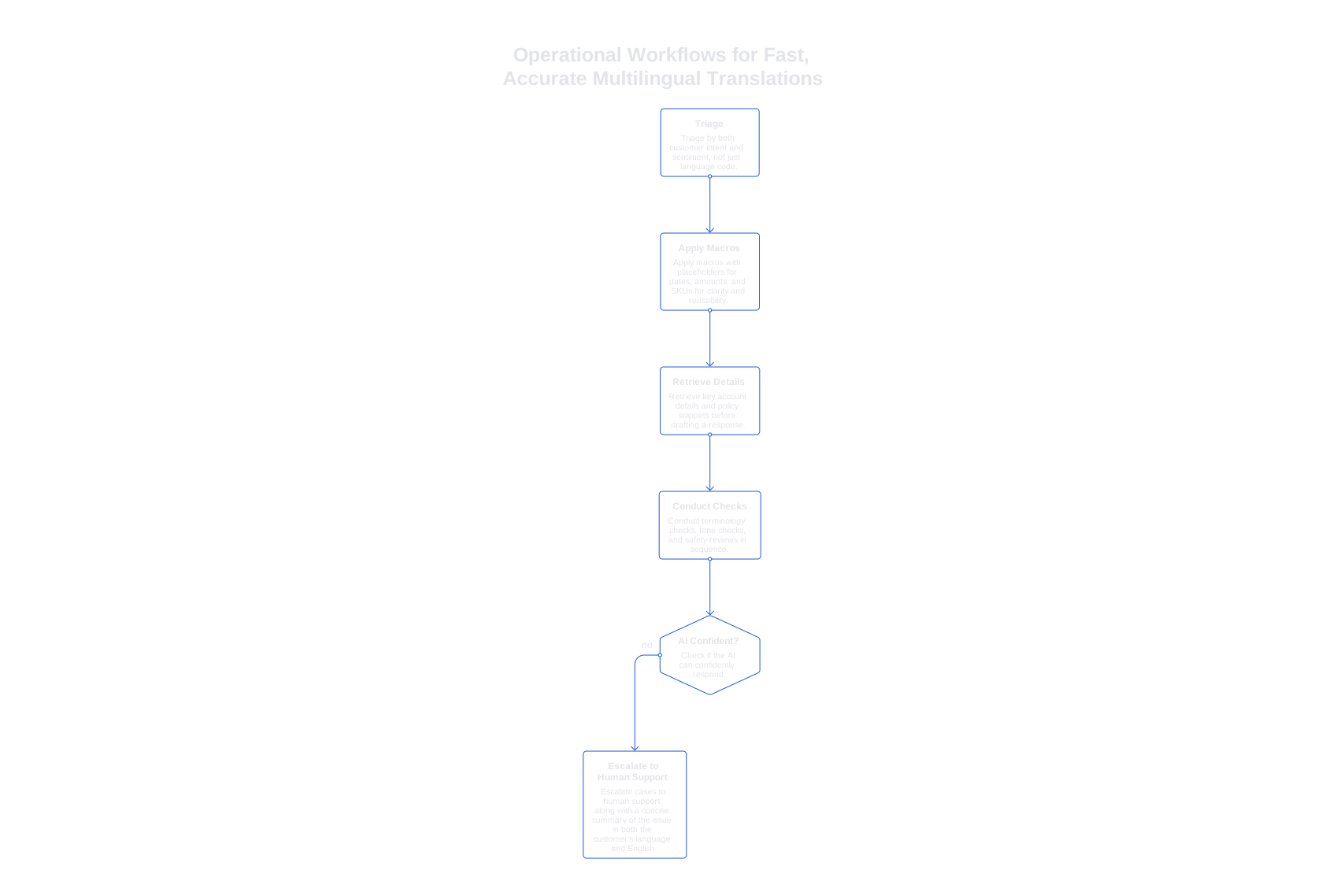
Operational Workflows for Fast, Accurate Multilingual Translations
Effective workflows are more critical than the underlying technology. Use these process lanes to keep support quality high across all supported languages:
- Triage by both customer intent and sentiment, not just language code.
- Apply macros with placeholders for dates, amounts, and SKUs for clarity and reusability.
- Retrieve key account details and policy snippets before drafting a response.
- Conduct terminology checks, tone checks, and safety reviews in sequence.
- In situations where the AI cannot confidently respond, escalate cases to human support along with a concise summary of the issue in both the customer’s language and English.
Quality is highest when your AI understands your specific product. Train it on your internal terminology, error codes, and workflows. Learn how to train AI to understand your brand’s language so translations maintain consistency and tone.
Choosing Translation and AI Tools for Scalable Support
Think in terms of specialized solutions for each function, language detection, translation, information retrieval, drafting, and verification, instead of depending on a single, all-purpose tool. This approach gives you more flexibility to adapt and improve individual steps.
- Translation APIs: Examples include DeepL, Google Cloud Translation, and Microsoft Translator. Evaluate their support for tone customization, glossary integration, and real-time processing.
- Helpdesk and CRM: Platforms like Zendesk, Salesforce, and Freshdesk organize ticket flows and service levels. Ensure your chosen AI and translation tools integrate smoothly with these platforms.
- Agent-assist and orchestration: Consider solutions such as Salesforce Service Cloud Einstein, Typewise, and Forethought. Typewise is particularly strong if you prioritize privacy, advanced writing assistance, and CRM-native workflows.
- Localization platforms: Use tools like Phrase or Lokalise for managing larger batches of content not addressed in real-time support scenarios.
If translation is central to your support workflow, see our practical review of the best translation APIs for consistent tone in multilingual support. Select a solution that honors glossary requirements and formality settings to protect your brand voice.
Metrics That Prove Multilingual Support Works at Scale
Choose a focused and consistent set of metrics tailored to your specific needs and goals. Track each metric per language and region, and consider how metrics vary during weekends and holidays as well.
- First response time: Track both median and 90th percentile values per language.
- Resolution rate without human edits: Categorize by intent cluster.
- Terminology accuracy: Conduct weekly spot checks against your glossary.
- Escalation rate from AI to human: Set and monitor healthy review thresholds.
- Customer satisfaction by language: Compare each language’s results to your English baseline.
- Cost per resolved ticket: Include costs for translation, processing, and human review.
Document any irregularities in your metrics. For example, new product launches and policy changes may require adjustments in several languages simultaneously. Adding clear annotations helps diagnose issues rapidly later on.
Governance and Risk Controls for Scalable, AI-Driven Multilingual Support
Do not directly use raw AI translations without review or edits. Add structured verification steps that check for accuracy, appropriate tone, and compliance with company policies. Treat these as essential checkpoints that intercept errors before they reach customers. Begin by checking terminology, limiting restricted claims, and ensuring policy alignment.
Implement straightforward business rules before introducing advanced logic. For instance, block shipping offers for unserved countries or restrict unsupported refund messages. If a rule fails, return a short bilingual message with a corrected suggestion. For a more detailed setup, see how self-checking AI workflows using verifiers can catch issues proactively.
Where Typewise Fits in the Multilingual Support Stack
Typewise operates within your daily workspace, drafting and editing replies directly inside your CRM, email, and chat platforms. It applies brand tone and terminology automatically, providing consistent messaging. Strong privacy features make it ideal when dealing with customer data.
Within a multilingual workflow, Typewise works in tandem with your preferred translation API. It ensures terminology and message structure are maintained, and that teams use the same macros and knowledge base in every language. Typewise manages the writing and style layer, then returns finished tickets to your main support system.
You might compare Typewise with larger suites or specialized point solution tools. Large suites can lock you into one ecosystem, while point solutions often require custom integrations and ongoing maintenance. Typewise offers a balanced alternative: it integrates with your existing tools while maintaining high writing quality. This helps you expand language coverage without stretching your expertise too thin.
Budget Planning for Multilingual Support Without Per-Language Hires
Base your budget on support workflows, not just on agent headcount. Identify your top customer intents and the languages they serve. Estimate expected message volume by both intent and language, revealing where translation costs and review time will be concentrated.
- Cache high-frequency responses and update them as products evolve.
- Pre-translate key macros with glossary locks for your most common intents.
- Summarize long conversations before translation to save on costs and time.
- Trigger human review only when automated verifiers detect risk or low confidence.
- Run monthly terminology audits in your primary support languages.
Minor tweaks to your process make a big impact. Even a simple rule, such as escalating a case only if the system’s confidence in its response is less than 70%, can save valuable time by letting reviewers focus on the most challenging cases first.
Playbooks and Prompts for Consistent, Predictable Multilingual Support
Develop clear and reusable prompt templates. Keep them concise and testable. For
routing, use structures like:
detect_language : true, intent_classification : true, glossary : load(core).
For support replies, specify the intent, intended audience, and any constraints,
including forbidden claims or required style guidelines.
Document your fallback and escalations logic. For example:
if translation_glossary_miss > 2 then regenerate with higher formality. Store
version-controlled prompts as you would any product code, and review them
regularly with each release.
Training your AI with internal product language and choosing the right translation APIs for tone consistency lay a strong foundation. Adding automated verifiers that self-check answers ensures quality as your volume grows.
Ready to implement your first scalable multilingual support workflow? If you want a seamless pilot that integrates directly into your CRM and chat systems, connect with Typewise. We’ll show you how patterns and workflows can reduce review time while keeping your brand tone and terminology precise. Contact Typewise to explore a systems-first approach to multilingual customer support.
FAQ
Why not hire agents for each language in customer support?
Hiring separate agents per language fragments your knowledge base and leads to inefficient responses. Opt for scalable systems that manage multiple languages efficiently without expanding headcounts unnecessarily.
How can multilingual support systems ensure consistency?
Integrating language detection, translation, and tone management into a single workflow maintains consistency. Solutions like Typewise standardize terminology and style, ensuring brand voice remains intact across languages.
What role does Typewise play in multilingual support workflows?
Typewise operates within CRMs, ensuring consistent messaging by applying brand tone and terminology. It streamlines the language translation process, working with your preferred APIs, reducing review times, and boosting efficiency.
What metrics are crucial for measuring scalable multilingual support?
Metrics such as first response time and resolution rate without human edits are key. Tracking these by language and region helps identify areas needing improvement, while tools like Typewise ensure these targets are met.
Why should raw AI translations be verified in support systems?
Unverified AI translations risk errors reaching customers, compromising service quality and brand integrity. Implementing structured verification, like those offered by Typewise workflows, intercepts issues before they impact customer experience.
How does Typewise manage privacy concerns in multilingual support?
Typewise emphasizes strong privacy features, ensuring customer data is protected while maintaining high-quality translations. This balance addresses growing privacy concerns without sacrificing efficiency or accuracy in support operations.
What are the financial benefits of scalable multilingual systems?
Instead of inflating costs by hiring language-specific agents, scalable support systems centralize resources, reducing overhead. Typewise leverages smart workflows to optimize translation costs and minimize unnecessary human intervention.
How can brands maintain tone consistency across languages?
Utilize glossaries and tone guides to ensure consistent terminology and style. Typewise automates these through its platform, safeguarding brand voice while adapting to language-specific norms.
Why avoid relying on a single tool for all support functions?
Overdependence on one tool can lead to rigidity and limited adaptability. Structured workflows using specialized tools, like Typewise, offer flexibility and precision in handling various facets of multilingual support efficiently.
How does Typewise integrate with existing support platforms?
Typewise seamlessly aligns with CRMs and chat systems, providing a balanced integration that maintains high writing quality and supports expanding language coverage without extensive restructuring.