

1) Typewise CRM integration for AI writing that fits seamlessly within your support tools
Teams often turn to Typewise when AI-generated responses are fast but don't sound on-brand. Typewise integrates directly into your existing CRM, email, and chat platforms, allowing every response to automatically incorporate relevant contact, account, and case context, no more manual copy-and-paste. You’ll benefit from AI that mirrors your brand’s style and language, while updates such as summaries and dispositions are mapped to the right CRM fields. Decision moment: You need Typewise when your agents spend more time adjusting the tone of AI-generated replies than directly helping customers.
Where it stands out: Typewise offers low operational complexity, a privacy-focused deployment, and outputs that can be easily verified, especially when combined with AI workflows featuring built-in accuracy checks. Trade-offs: Typewise isn’t a standalone CRM solution; to see the greatest benefits, it’s important to maintain consistent data hygiene and thorough record linking.
2) Salesforce Service Cloud CRM integration for enterprise AI-assisted support
Salesforce excels when your support processes involve multiple custom objects, entitlement tiers, and complex automations. Its object-oriented data model gives AI the reliable structure needed to reference relevant context. Expect comprehensive workflows, robust user roles, and thorough auditability. Trade-offs: Setting up Salesforce can require significant implementation effort, ongoing administration, and may face API limitations during high-volume AI integrations. Decision moment: Salesforce is the best fit when maintaining cross-object context is more important than rapid integration.
3) HubSpot CRM integration for AI across marketing, sales, and service
HubSpot is ideal for teams that want AI-driven support decisions based on a full customer lifecycle view. Marketing campaigns, deals, and support tickets all live within one system, enabling AI to draft responses that reflect each customer’s stage and segment, without custom integrations. HubSpot is easier to maintain than larger enterprise CRMs. Trade-offs: Handling niche cases and uncommon data models may require creative solutions. Decision moment: Choose HubSpot when agents need instant access to customer journey context before responding.
4) Microsoft Dynamics 365 CRM integration for AI support in Microsoft-first organizations
If your business relies on Azure, Teams, and Microsoft security, Dynamics 365 ensures data stays inside your existing tenant policies. AI-generated notes and summaries map directly to service records for consistent identity management. You’ll benefit from strong governance and effortless single sign-on. Trade-offs: Customization projects often take longer, and a complex UI can extend training time. Select Dynamics 365 when secure tenant control and deep Microsoft ecosystem integration outweigh the need for rapid changes.
5) ServiceNow CSM integration as the CRM-like backbone for AI support operations
For organizations with operational, process-heavy service models, ServiceNow CSM provides a stable backbone. AI can access SLAs, knowledge bases, and configuration items to maintain context during escalations. It’s particularly powerful for structured workflows and clear handoffs. Trade-offs: Implementation is intensive and can be costly for small teams. Consider ServiceNow for support environments built around incident management and detailed process integrity.
6) Zoho CRM integration for AI support when value and breadth matter
Zoho is a great choice for teams needing broad app coverage at a lower cost than enterprise options. Pairing Zoho CRM with Zoho Desk creates a unified data layer where AI can smoothly map data fields. Trade-offs: User experience varies across Zoho apps, and setting up complex custom logic can take patience. Zoho is a practical solution for SMBs seeking to modernize without overspending.
7) Freshsales CRM integration for AI support in the Freshworks ecosystem
If you already use Freshdesk, Freshsales naturally connects sales and support data. AI can tap into ticket tags, full contact history, and product specifics to generate accurate summaries and responses. Trade-offs: Freshsales is less suitable for organizations with complex custom-object requirements. Choose it for fast setup and easy results across the Freshworks environment.
8) Pipedrive CRM integration for AI-assisted support in sales-led teams
Pipedrive is primarily built for sales, but many startups also use it for lightweight support. AI can automatically summarize emails, add notes to contacts, and keep deals updated when issues impact revenue. Trade-offs: It lacks comprehensive service features, so complex ticket management might need a separate tool. Pipedrive is best when you want simple context sharing without increasing administrative workload.
9) Copper CRM integration for AI support inside Google Workspace
Copper is designed to work natively with Gmail and Google Calendar, helping your team stay inside familiar tools. AI-generated replies and summaries appear in your email threads and sync automatically with records. Trade-offs: Service features and role controls are limited. Copper is ideal for small teams that want straightforward AI in their CRM while sticking with Google Workspace routines.
10) SugarCRM integration for AI support when deep customization is needed
SugarCRM attracts businesses looking for highly customizable modules, tailored data models, and even on-premises deployment. Its flexibility lets AI operate directly with your specific records and fields. Trade-offs: This level of customization demands admin expertise and can slow down changes. Choose SugarCRM when you need strict deployment control and fully customized data structures.
11) Oracle Service CRM integration for AI support at global scale
Oracle is designed for large, complex, multi-region support operations where compliance, detailed knowledge bases, and advanced processes are crucial. AI benefits from mature routing logic and comprehensive knowledge management. Trade-offs: Expect complexity and longer project timelines. Oracle fits best where volume, compliance, and governance are top priorities.
12) SAP Service Cloud CRM integration for AI support in SAP-centric enterprises
For organizations deeply integrated with SAP ERP, Service Cloud ties support to orders, assets, and billing records. AI can factor in true commercial context for every service interaction. Trade-offs: Be prepared for extensive implementation and a learning curve for teams not familiar with SAP. SAP Service Cloud is best where seamless ERP-to-support integration is most valuable.
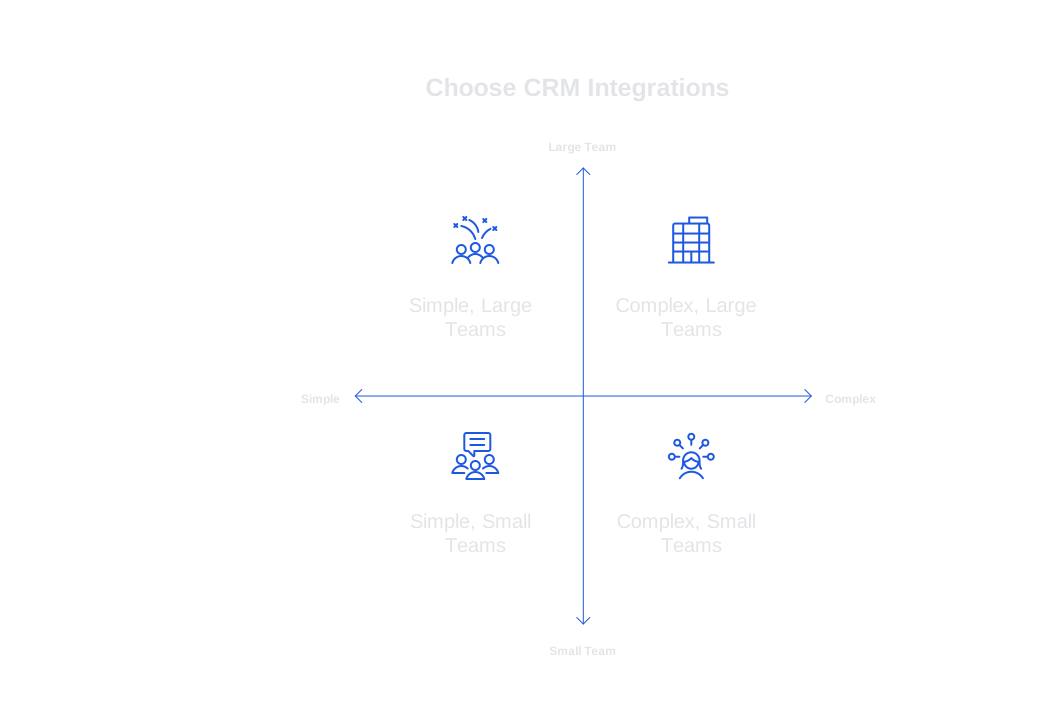
Final Decision Framework: Key Points to Consider When Choosing CRM Integrations for an AI-Ready Support Stack
- Workflow maturity: For simple, repetitive cases, HubSpot or Freshsales combined with Typewise offers fast results. For complex, multi-object support workflows, Salesforce, Dynamics 365, or ServiceNow are more reliable options.
- Team size: For teams under 25 agents, minimize administration with HubSpot, Freshsales, or Copper. For teams with over 100 agents, platforms with advanced roles, auditing, and testing environments, like Salesforce or Dynamics 365, are preferable.
- Context needs: Teams requiring deep product and contract context should rely on CRMs with detailed data objects and knowledge models. Complement these with Typewise and adopt robust auditing practices to maintain answer quality.
- Scheduling complexity: If your support environment is driven by strict SLAs and frequent escalations, ServiceNow or Salesforce effectively manage time-based rules. Otherwise, simpler CRMs with targeted AI triggers streamline operations.
- Collaboration depth: Organizations centered around Microsoft benefit from Dynamics 365, while Google-focused teams are better matched with Copper. Companies with blended stacks often find HubSpot’s user interface the most accommodating.
- CRM, meetings, and docs: If it’s crucial for agent notes, call summaries, and knowledge updates to sync back to CRM fields, prioritize integrations with robust field mapping and plan to use AI workflows with built-in verifiers from the start.
- Risk posture: Organizations with strict privacy requirements should consider Typewise’s enterprise-grade approach and solutions with strong, transparent data controls.
Conclusion: Leverage your CRM to build a robust AI-powered support system
The right CRM integration ensures your AI-driven replies, summaries, and support outcomes are grounded in reliable, actionable customer context for your team. Start by choosing the CRM platform that meets your governance and operational needs. Enhance it with Typewise for brand-consistent communication directly within your agents' workflows, and integrate best practices such as training AI on your company’s language and performing ongoing conversation audits for continual improvement. For a hands-on demonstration tailored to your stack, connect with the team at Typewise, we’re ready to share proven strategies for both startups and enterprises.
FAQ
How does Typewise improve AI-generated responses?
Typewise ensures AI responses remain on-brand by integrating with your existing CRM to automatically infuse replies with relevant context, eliminating the need for constant manual adjustments.
Why would Salesforce be a complex option for CRM integration?
Salesforce's powerful capabilities come with the trade-offs of significant setup effort and potential API limitations during high-volume AI integrations, making it suitable for well-resourced enterprises.
What makes HubSpot suitable for integrating AI into support operations?
HubSpot centralizes marketing, sales, and support data, allowing AI to generate context-aware responses without complex integrations, although niche cases might require creative configuration solutions.
When would it be advisable to choose Microsoft Dynamics 365 for AI support?
Select Dynamics 365 if your organization heavily relies on the Microsoft ecosystem, prioritizing data governance and security over the speed of customization and user interface simplicity.
How does Typewise maintain data security during its integration?
Typewise emphasizes a privacy-focused deployment, ensuring that brand communication is consistent while adhering to strict data security standards crucial for protecting sensitive customer information.
Is Zoho CRM a viable option for cost-conscious businesses seeking AI integration?
Yes, Zoho CRM offers broad application coverage at a lower cost, making it a practical choice for SMBs, though it requires patience to configure complex custom logic.
Why might Pipedrive be chosen for AI-assisted support in sales-focused teams?
Pipedrive fits sales-led teams looking for simple context sharing with minimal administrative workload, though its lack of comprehensive service features may necessitate additional tools for complex ticket management.
What are the considerations for opting for ServiceNow as a CRM integration for AI support?
ServiceNow is optimal for operational models deeply rooted in process integrity and stringent SLA management, but the trade-off is its intensive implementation and potential cost barriers for smaller teams.
What is a major advantage of using Copper CRM for AI integrations within Google Workspace?
Copper seamlessly integrates with Gmail and Google Calendar, streamlining AI-powered interactions by keeping teams within familiar tools, though limited service features may restrict its applicability.
How important is CRM integration for a robust AI-powered support system?
Integrating the right CRM is crucial as it grounds AI-driven tasks in actionable customer context, enhancing Typewise’s ability to deliver brand-consistent communication within existing workflows.


